
Vandaag of morgen in huis

Kwaliteit gegarandeerd

Welkomstaanbiedingen ontgrendelen: GRATIS bezorging | Tot 80% korting | Gratis 30 dagen JoyPlus-proefperiode
Download de app
A wireless mouse keeps your desk more organised and is useful with a laptop, PC or MacBook. Yet many models look very similar. A low price tells you little about click noise, comfort or connectivity. Terms such as “ergonomic”, “silent click” and “long battery life” are only meaningful when you check the underlying specifications.
As a Joybuy Product Recommendation Officer, I filter the most important features based on verifiable product information. This helps you avoid paying for functions you do not need or buying a mouse that does not suit the way you use it.
A wireless mouse can work via a 2.4GHz USB receiver, Bluetooth or both. A mouse with a USB receiver is generally easy to connect, but you do need a spare USB-A port. A slim laptop with USB-C ports only may require an adapter.
A Bluetooth mouse does not use a separate receiver, but your computer must support Bluetooth. Also check whether the mouse can remember multiple devices. This is useful if you switch between a laptop, desktop computer and tablet.
A silent mouse reduces click noise, but the scroll wheel and pressing other buttons may still be audible. According to Logitech, the M330 Silent Plus is up to 90% quieter than traditional mice; this is a claim from Logitech’s product information, not a universal guarantee for every working environment.
Also consider the number of buttons. A simple mouse with two or three buttons is often sufficient for office work. Programmable buttons can be useful for software, productivity or gaming, but they can also make operation more complicated.
DPI stands for dots per inch and determines how far the cursor moves for the same hand movement. For documents and browsing the internet, around 1,000 to 1,600 DPI is often practical. A higher adjustable DPI can be useful with large screens or games, but only if the sensor, software and your own preferences are suited to it.
So do not look only at a large DPI figure. Also check whether the speed can be adjusted and whether the mouse is suitable for your surface.
Check the following before buying:
A mouse with both RF Wireless and Bluetooth offers greater flexibility. According to the product information, the HP 635 can connect up to three devices via the USB nano receiver or two devices via Bluetooth. The HP 430 also supports RF Wireless and Bluetooth, with a stated resolution of 1,200 DPI.
A mouse powered by AA or AAA batteries often works straight away, and you can replace the battery when it runs out. With a rechargeable model, you do not need to buy disposable batteries, but you do need to charge the mouse in good time.
Pay attention to the difference between:
The Logitech MX Vertical states that it has a rechargeable battery with up to four months’ use. The HP 635 states up to twelve months with a replaceable battery. These figures come from the respective product descriptions and may vary in practice.
A compact mouse is handy for students and commuters, but may provide less support during prolonged use. A larger shape or rubberised sides may feel more comfortable, depending on the size of your hand and your grip.
An ergonomic mouse is not automatically comfortable for everyone. A vertical mouse also takes some getting used to. So check the following:
During prolonged computer use, it also helps to change your posture regularly and take breaks. A product claim about reducing strain should be read as information from the manufacturer, not as a medical guarantee.

Why it suits this profile: The 2.4GHz connection via USB receiver and 1,600 DPI are designed for everyday use with a laptop or PC. The product information states that it offers silent clicks and is compatible with Windows and Mac.
The specifications state both the connection type and sensor resolution, so you do not have to rely solely on a general marketing term.
1,600 DPI, optical tracking and a USB receiver included for easy setup.

Why it suits this profile: The vertical design, adjustable 4,000 DPI and choice of Bluetooth or a USB receiver are well suited to intensive office and home working.
The design and hand position are clearly described. This allows you to assess in advance whether a vertical mouse suits your grip.
Bluetooth and 2.4GHz, adjustable DPI, a rechargeable battery and support for multiple devices.
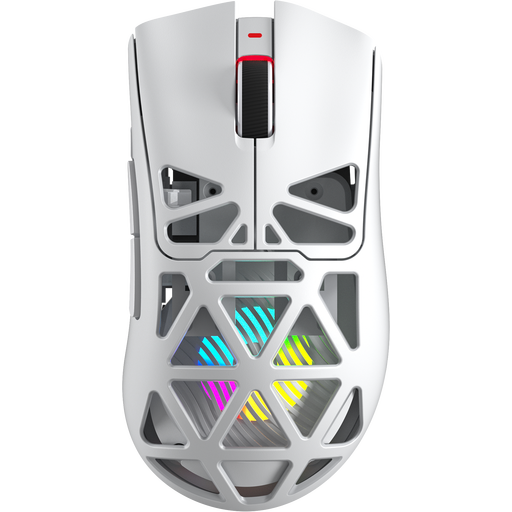
Why it suits this profile: This model is designed for gaming and lists Bluetooth 5.0, 2.4G and USB-C, a PixArt PAW3311 sensor, 12,000 DPI and seven programmable buttons.
The product details specify the connectivity options, sensor type, DPI and number of buttons. However, check that your PC or Mac supports the connection you want to use.
400 mAh battery, 67-gram product weight according to the product information, and seven programmable buttons.
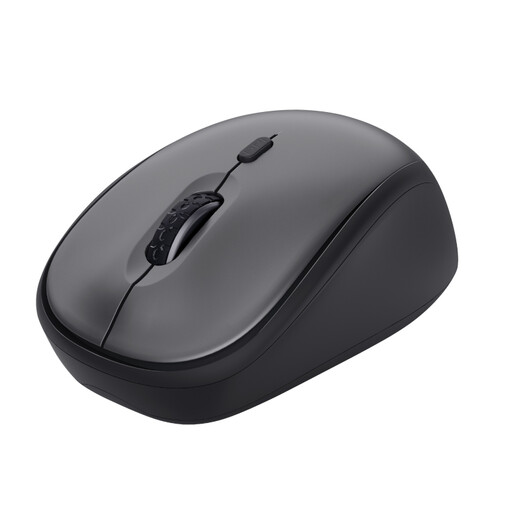
Why it suits this profile: The compact design, silent buttons and 800–1,600 DPI make this model suitable for working from home, libraries or shared offices.
The product description clearly states that the mouse works via a USB micro receiver rather than Bluetooth. This tells you exactly what you need in advance.
Silent buttons, a range of up to 8 metres, one AA battery and a receiver that can be stored inside the mouse.
We have compiled a complete, up-to-date list of products that fully meet these strict selection criteria and the applicable European safety regulations.
Not every mouse works with every device. A model with a USB receiver usually requires a USB-A port. Bluetooth models only work when Bluetooth is available and compatible on the device. Also check support for Windows, macOS, ChromeOS or iPadOS.
This depends on the model, battery type and how you use it. In the product information for selected models, the stated figures range from a few months to a maximum of 24 months. An automatic sleep mode and an on/off switch can help limit power consumption. Treat stated battery life as an indication, not a fixed period of use.
It can be, but when choosing a gaming mouse, pay particular attention to latency, sensor information, DPI settings, polling rate, weight and connection type. A basic office mouse with 1,000 or 1,600 DPI is suitable for everyday work, but may not offer the adjustment options you need for fast-paced games. Also check whether the battery can be charged while the mouse is in use and whether the software is compatible with your operating system.
