
Vandaag of morgen in huis

Kwaliteit gegarandeerd

Welkomstaanbiedingen ontgrendelen: GRATIS bezorging | Tot 80% korting | Gratis 30 dagen JoyPlus-proefperiode
Download de app
A wireless mouse keeps your desk tidy and is comfortable to use with a laptop or PC. Yet many models look much the same. A low price may come with limited compatibility, while a high DPI figure doesn’t automatically mean a mouse is right for your work or gaming.
The three most common pitfalls:
A Bluetooth mouse connects directly to a laptop, tablet or PC with Bluetooth. It’s handy if you don’t want to carry a dongle. For example, the HP 240 Black Bluetooth Mouse uses Bluetooth 5.1, doesn’t need a separate receiver according to the product description, and works with Windows 10, Windows 11, macOS and ChromeOS.
A mouse with a USB receiver typically uses 2.4 GHz. This is useful for desktop PCs and computers without Bluetooth, but check that you have a free USB-A port. A model with both connection types offers greater flexibility. According to its product specifications, the Trust Ozaa+ can connect to up to three devices: one via the USB receiver and two via Bluetooth.
Also bear in mind the difference between wireless use and charging. Some mice run on an AA battery, while others have a built-in rechargeable battery and a USB cable. So check the information on battery type, charging time and battery life.
DPI stands for dots per inch and indicates how far the cursor moves in response to a particular hand movement. For word processing, email and browsing, a fixed setting of around 1,200 to 1,600 DPI is often practical. Adjustable DPI can be useful for image editing or gaming.
An optical sensor is common in a wireless computer mouse. As well as DPI, check other details such as polling rate, the number of programmable buttons and the supported software. According to its product information, a gaming mouse such as the Logitech G309 Lightspeed has a HERO sensor, six buttons and adjustable DPI. These are specifications you can check, but they’re not the only things that determine whether the model suits your play style.
An ambidextrous mouse is suitable for left- and right-handed use. A right-handed model may have a thumb rest or a specific curved shape. Check the length, width and height before ordering, especially if you have small hands or use the mouse every day.
A quiet mouse can be a good choice for a shared workspace, library or home office. Check whether “silent” or “quiet” is actually listed in the product specifications. The Trust Ozaa+ is listed as having silent buttons. The Logitech Lift is also described as having quiet clicks, but it’s a vertical model designed specifically for right-handed use.
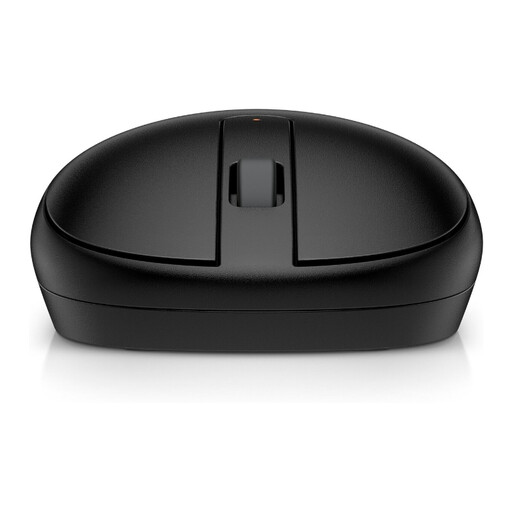
Why it suits this profile: A straightforward wireless mouse for everyday laptop and PC use, with no separate dongle. Its ambidextrous shape suits both left- and right-handed users.
It connects via Bluetooth 5.1, and the product specifications clearly list a 1600 DPI optical sensor and three buttons.
Bluetooth connectivity without a dongle, 1600 DPI, an ambidextrous shape and support for Windows, macOS and ChromeOS.

Why it suits this profile: Designed for home workers and office staff who switch between a laptop, desktop and tablet, and often work with large spreadsheets.
The USB receiver and two Bluetooth channels mean you don’t need a separate mouse for each device. The product information also lists silent buttons.
Connects to up to three devices, adjustable DPI up to 3200, a rechargeable battery and an extra wheel for horizontal scrolling.
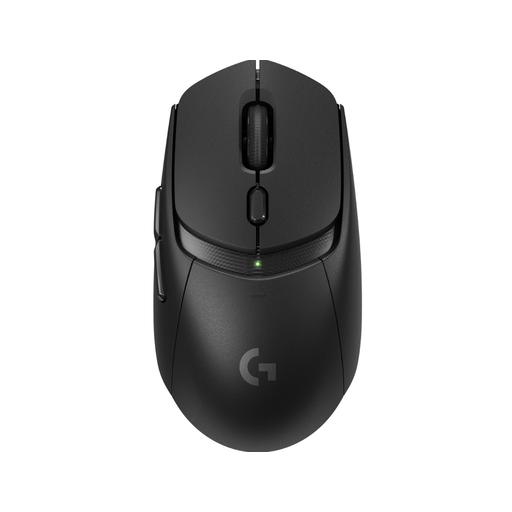
Why it suits this profile: A gaming mouse for users who value low latency, programmable buttons and a lightweight design.
You don’t have to rely on DPI alone: the product specifications also list Lightspeed radio, Bluetooth, six programmable buttons and an optical sensor.
According to the product specifications, the model weighs 86 grams with an AA battery, supports adjustable DPI and comes with a USB receiver.
Before buying, check the statutory warranty and the seller’s terms and conditions. The product information provided lists a minimum statutory warranty of two years for several models. This is separate from any additional manufacturer’s warranty.
Clean the sensor opening, buttons and scroll wheel with a soft, dry cloth. Don’t use liquid on the casing. If your mouse takes an AA battery, it’s a good idea to remove it if you won’t be using the device for an extended period. Store a separate USB receiver in its designated compartment, if there is one.
We’ve put together a complete, up-to-date list of products that meet these strict selection criteria and the relevant European safety requirements.
Not every connection works with every device. A Bluetooth model requires Bluetooth support, while a mouse with a USB receiver usually needs a free USB-A port. Also check which operating systems are supported, such as Windows, macOS or ChromeOS.
It varies by model, battery type and usage. The HP 240 Pike Silver lists one AA battery and a stated battery life of up to 15 months. The HP 285 Silent lists 18 months. These are manufacturer’s product specifications; actual battery life may vary depending on usage and settings.
It can be, but there’s more to consider than just wireless connectivity. For gaming, polling rate, connection type, sensor, weight, adjustable DPI and programmable buttons are all relevant. A gaming mouse with a USB receiver and a low-latency connection is generally better suited to fast-paced games than a basic office model.
