
Vandaag of morgen in huis

Kwaliteit gegarandeerd

Welkomstaanbiedingen ontgrendelen: GRATIS bezorging | Tot 80% korting | Gratis 30 dagen JoyPlus-proefperiode
Download de app
A wireless mouse gives you a tidy desk and more freedom of movement. However, not every wireless model is suited to the way you work. A small mouse can be convenient when you’re on the move, but become uncomfortable during long working days. A high DPI value may sound impressive, but it does not automatically indicate practical accuracy. And Bluetooth is not always the most convenient connection if your computer already uses several wireless devices.
In this buying guide, you’ll find out what to look for in a wireless Bluetooth mouse, optical mouse, silent mouse, ergonomic mouse or gaming mouse. The selection below is based on verifiable product specifications and intended use.
DPI determines how quickly the cursor moves across the screen for a particular hand movement. A high value can be useful for large screens or gaming, but for office work, a range of around 800 to 2,000 DPI is often perfectly adequate. More important is having adjustable DPI, so you can set the speed to suit your screen, software and preferences.
A wireless mouse works via Bluetooth, a 2.4GHz radio connection with a USB receiver, or both. So check the following:
A Bluetooth mouse is useful for a laptop without any free USB ports. A model with a USB receiver may be simpler: plug it in and use it, without navigating Bluetooth menus.
A vertical mouse or ergonomic mouse can make your hand position feel different, but the effect varies from user to user. According to information provided by some brands, a particular shape may reduce pressure or muscle activity; this is a brand claim, not an established health outcome. Pay particular attention to the shape, dimensions, hand orientation and whether you can regularly change your posture.
You pair a wireless Bluetooth mouse directly with a compatible device. This is practical for laptops, tablets and modern desktops. An RF mouse generally uses a USB dongle on 2.4GHz. The connection is often quick to set up, but the receiver does take up a USB port.
A multi-device mouse can be paired with two or more devices. This is useful if you switch between a work laptop, personal computer and tablet. According to its product specifications, the Logitech M720 Triathlon supports up to three devices and uses Bluetooth and a USB receiver.
An optical mouse uses a light sensor to detect movement. Ideally, use the mouse on a flat, matt surface or a mouse mat. Some laser models work on a wider range of surfaces. According to the product information, the Logitech MX Master 4 for Business has a laser sensor with 8,000 DPI and, according to Logitech, is suitable for use on glass. Always check whether your desk surface is actually supported by the manufacturer.
Look for the description right-handed mouse or left-handed mouse. A right-handed vertical mouse is not automatically suitable for left-handed use. Also consider:
A silent mouse reduces clicking noise, but also pay attention to the sound made by the scroll wheel. Manufacturers may promote silent technology based on their own measurements, so compare the specific product description with user experience.
A battery-powered mouse can work for months or years on a single AA battery, depending on the model and how it is used. The Trust Yvi+ states a battery life of up to twelve months. The Logitech M720 Triathlon states up to 24 months on a single AA battery. A rechargeable mouse avoids disposable batteries, but it does need to be charged regularly via USB. Check whether you can continue working while it is charging and what type of cable is included.
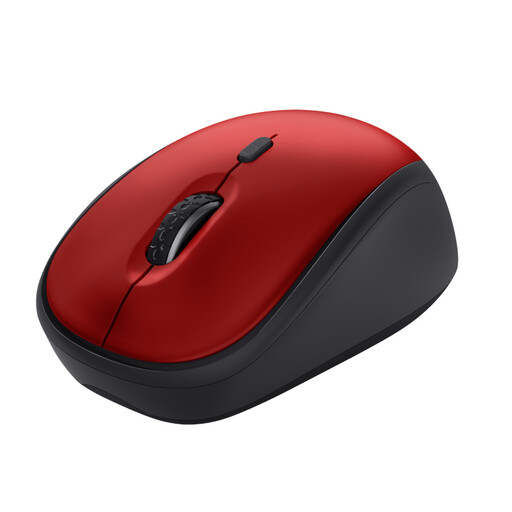
Why it suits this profile: A compact mouse for office work, working from home and laptop use. The USB receiver makes installation straightforward.
The DPI can be adjusted from 800 to 1,600, so you are not limited to a single cursor speed. The mouse uses an optical sensor and works via 2.4GHz RF.
Three buttons, a weight of 84 grams, silent clicking and a stated battery life of up to twelve months.
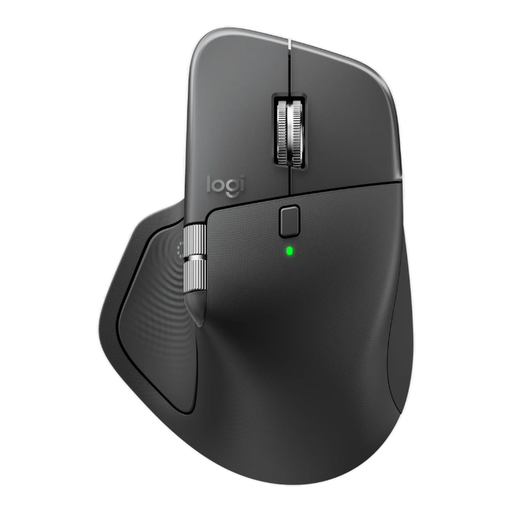
Why it suits this profile: Designed for right-handed office professionals who scroll frequently, use multiple screens and want a rechargeable mouse.
You get more than just a high DPI figure: the mouse has eight buttons, horizontal scrolling, Bluetooth and a Logi Bolt receiver.
Rechargeable battery, adjustable 8,000 DPI, support for up to three devices and silent clicking according to the product specifications.

Why it suits this profile: A wired gaming mouse for right-handed players who do not want to recharge batteries and use lots of buttons.
Choosing a wired mouse prevents the battery from running flat during use. The optical sensor, USB connection and 1,000Hz polling rate are clearly specified.
Up to 25,600 DPI, programmable buttons, horizontal scrolling and a weight of 89 grams.
Check these points before placing your order:
A vertical mouse often requires a short adjustment period. A compact laptop mouse may provide less support during prolonged use. So do not choose based solely on appearance or brand; consider the combination of dimensions, connection and intended use.
We have put together a complete, up-to-date list of products that fully meet these strict selection criteria and the applicable European safety regulations.
Not always. A Bluetooth model requires Bluetooth support on the laptop. An RF model needs a free USB port for the receiver. Also check the supported operating system, such as Windows, macOS, ChromeOS, Android or iPadOS.
This varies by model, connection and usage. According to their product specifications, some mice work for several months to two years on a single battery. A rechargeable mouse does not have a fixed lifespan per charge: usage time depends on the model and the settings selected. So look at both the stated battery life and the charging time.
Yes, but pay attention to the connection, polling rate, weight and shape. A wired gaming mouse eliminates the need to stop and recharge. A wireless gaming model with 2.4GHz, Bluetooth and USB-C offers more flexibility, but check that the software and programmable features work with your operating system.
