A poorly performing wireless mouse can be a source of frustration. Imagine a cursor that stutters during a crucial presentation, a battery dying at the worst possible moment, or an uncomfortable grip causing strain after just a few hours of work. The market is vast, and the specifications can be confusing. This guide will help you make an informed decision by outlining the key features of a wireless mouse and comparing several models based on their specifications.
What to Consider Before You Buy
To avoid buyer's remorse, it's helpful to base your choice on a few objective criteria. The following factors are crucial for functionality and ease of use.
1. Connectivity: Bluetooth or 2.4GHz?
How the mouse connects to your computer is a fundamental choice.
- 2.4GHz USB Dongle: This type of mouse comes with a small USB receiver you plug into your computer. Setup is typically simple (plug-and-play), and the connection is often stable. The downside is that it occupies a USB port.
- Bluetooth Mouse: This connects directly to your laptop's, tablet's, or computer's built-in Bluetooth receiver. This saves a USB port and makes switching easy. A multi-device mouse often uses Bluetooth to switch seamlessly between a laptop and a tablet, for example.
2. Ergonomics and Design
An ergonomic mouse is designed to support the natural posture of your hand and wrist. This can reduce the risk of strain during prolonged use. Pay attention to the shape, size, and whether the mouse is suitable for left- or right-handed use. Models with a thumb rest offer extra comfort.
3. Power Source: Rechargeable or Batteries?
- Replaceable Batteries: Many mice run on AA or AAA batteries. These often last for months or even years, but you'll need to have new batteries on hand when they run out.
- Rechargeable Mouse: A rechargeable mouse has a built-in battery that you can charge via a USB cable (often USB-C). Some models can even be used while charging. This is a more sustainable choice and prevents you from being caught without power.
Depending on your use case, specific features can make all the difference.
- Silent Mouse: A silent mouse has buttons that produce significantly less clicking noise. This is ideal for use in quiet environments like a library or an open-plan office.
- Programmable Buttons: A professional mouse often has extra buttons that you can configure for specific tasks or shortcuts, which can boost productivity.
- DPI (Dots Per Inch): This indicates the sensor's sensitivity. A higher DPI means the cursor moves faster across the screen. Adjustable DPI is useful for tailoring the sensitivity to your task or screen resolution.
Our Top Product Recommendations
Below is a selection of wireless mice, each with unique features tailored to different user profiles. This selection is based on product specifications.
1. RAPOO MT760Mini: For the Multi-Device User
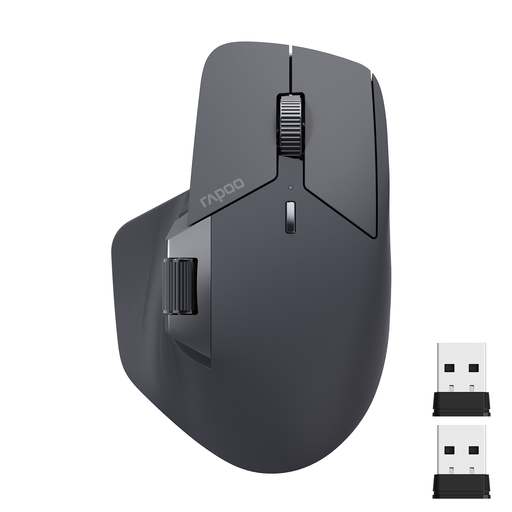
- Why this product: The MT760Mini is designed for users who work with multiple devices simultaneously. The ability to connect to and quickly switch between up to four devices makes it an efficient tool for multitasking.
- Advantages:
- Multi-mode connectivity: Supports both Bluetooth 5.0 and 2.4GHz via a USB dongle.
- Multi-device mouse: Can be connected to up to 4 devices at once.
- Programmable: Features 11 programmable buttons for setting up shortcuts.
- Rechargeable: Built-in 800mAh battery, rechargeable via USB-C. According to the manufacturer, the battery lasts up to 90 days.
- Adjustable DPI: Sensitivity is adjustable in seven steps, from 800 to 4000 DPI.
- Who it's for: Professionals and power users who want to switch seamlessly between their work computer, personal laptop, tablet, and even a smartphone.
2. Logitech M330 SILENT PLUS: For Focus and Silence
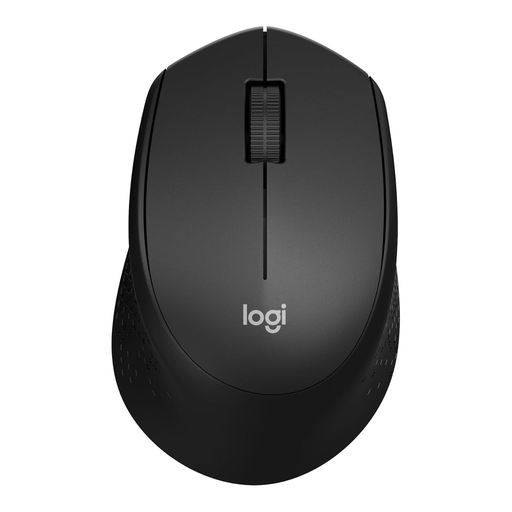
- Why this product: The M330 SILENT PLUS focuses on one specific feature: silence. According to Logitech, this mouse offers over 90% noise reduction compared to a standard mouse, without sacrificing the click feel.
- Advantages:
- Silent mouse: Minimises distractions for the user and their surroundings.
- Long battery life: Runs on a single AA battery that lasts up to 24 months, according to the manufacturer, thanks in part to an automatic sleep mode.
- Easy setup: Plug-and-play via the included 2.4GHz nano receiver.
- Reliable connection: Provides a stable wireless connection up to 10 metres.
- Who it's for: Students, office workers in open-plan spaces, and home users who prefer a quiet work environment.
3. Logitech MX Master 4 for Business: For the Demanding Professional
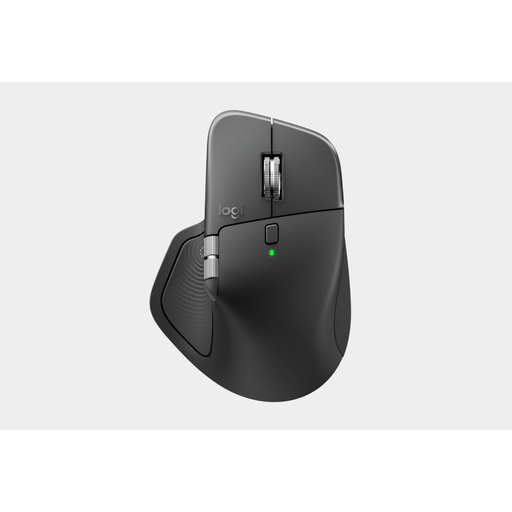
- Why this product: The MX Master 4 is a professional mouse built for precision, comfort, and productivity. The combination of a high-quality sensor, advanced scrolling technology, and an ergonomic shape makes it an instrument for intensive daily use.
- Advantages:
- Superior sensor: The 8K DPI Darkfield sensor tracks accurately on virtually any surface, including glass.
- Ergonomic design: The shape is sculpted for right-handed users and provides full hand and thumb support.
- Advanced scrolling: The MagSpeed scroll wheel can switch between step-by-step and hyper-fast scrolling.
- Quiet clicks: Quiet Click technology significantly reduces click noise.
- Dual connectivity: Connects via Bluetooth or the included Logi Bolt USB receiver.
- Rechargeable: Fast charging via USB-C.
- Who it's for: Designers, developers, analysts, and other professionals who demand the highest standards of precision, comfort, and functionality from their mouse.
Still Haven't Found What You're Looking For?
While a wireless mouse offers a great deal of freedom, there are situations where a wired connection is preferable. Consider competitive gaming where every millisecond counts, or if you simply never want to worry about a dead battery. For these scenarios, or if you need a replacement charging cable for your mouse, you can browse our range of mouse cables.
Frequently Asked Questions
1. What is the difference between a Bluetooth mouse and a 2.4GHz mouse? A Bluetooth mouse connects directly to your device's built-in Bluetooth, which keeps a USB port free. A 2.4GHz mouse uses a dedicated USB dongle for the connection, which often results in a slightly more stable and direct connection but occupies a port.
2. How long does the battery of a rechargeable mouse last? This varies greatly by model and usage. The RAPOO MT760Mini has a manufacturer-stated battery life of up to 90 days. The Logitech MX Master 4 can also last for weeks or months on a full charge. The exact duration depends on how intensively you use the mouse.
3. Can I use a wireless mouse for gaming? Yes, you can. Many modern wireless mice have low latency that is sufficient for most gamers. However, for competitive esports, professionals often still opt for a wired mouse or a specialised wireless gaming mouse with extremely low latency to eliminate any possibility of lag.
Written by the Joybuy Product Recommendation Officer


