Joybuy Insights

Choosing the Right Wireless Mouse: 3 Pitfalls to Avoid

Buying a new wireless mouse seems simple until you get tangled in a web of marketing jargon and specifications. Many users end up with a mouse that becomes irritating after a few months, constantly runs out of battery, or simply doesn't feel comfortable in their hand. Before you invest in a new mouse, it's crucial to recognise the common pitfalls that can unnecessarily drive up the cost.

The Pitfalls of a Wireless Mouse

Manufacturers often use clever marketing to make products seem more appealing than they are in practice. Pay close attention to the following three points:

  1. The Battery Life Myth: Claims like "lasts up to 12 months" are often based on minimal usage. If you use your mouse intensively every day, that duration can decrease dramatically. A rechargeable mouse seems convenient, but if you can't use it while it's charging, you're still left with a useless device.
  2. The Superfluous DPI Race: An extremely high DPI (Dots Per Inch) is often presented as a premium feature. However, for standard office work or browsing, a DPI above 1600 is often too sensitive and impractical. You're paying for a specification you don't need, which can actually make the cursor uncontrollable.
  3. Vague "Ergonomic" Promises: The term "ergonomic" is not a protected term. A mouse sold as an ergonomic mouse might be completely unsuitable for your hand and grip style. The wrong fit can lead to discomfort and strain, regardless of the label.

What to Look For: The Specs That Really Matter

To avoid buyer's remorse, it's better to focus on the specifications that directly impact your daily use.

Connectivity: Bluetooth Mouse vs. RF Dongle

How your mouse connects is a crucial choice.

  • RF (Radio Frequency) via USB Dongle: This is the classic wireless connection. You plug a small USB receiver into your computer, and the mouse works instantly. This connection is typically very stable and has minimal latency, making it a popular choice for a gaming mouse or a fixed workstation. The downside is that it takes up a USB port, and you can lose the dongle.
  • Bluetooth Mouse: This connects directly to the built-in Bluetooth of your laptop, tablet, or PC, without needing a dongle. This is ideal for mobile use and keeps your USB ports free. A multi-device mouse often uses Bluetooth to easily switch between devices like your laptop and tablet.

DPI Sensitivity: How Much Do You Need?

DPI, or Dots Per Inch, determines how sensitive your mouse is. A higher DPI means the cursor moves faster across the screen.

  • For Office and Daily Use: An adjustable DPI between 800 and 1600 is more than sufficient. A standard office mouse usually falls into this category.
  • For Gaming and Graphic Design: A higher, adjustable DPI (e.g., up to 4800 or more) provides the precision needed for quick reactions or detailed work.

Form and Features: Ergonomics, Silent Clicks, and Power

Think about how and where you will use the mouse.

  • Ergonomics: Choose a shape that fits your hand (right-handed, left-handed, or ambidextrous) and grip.
  • Silent Mouse: Do you work in an open office, a library, or late at night? A silent mouse with dampened clicks prevents noise disturbance for yourself and others.
  • Power: A rechargeable mouse saves money on batteries in the long run. Models that run on AA or AAA batteries offer the advantage of being able to quickly swap them out without waiting for a recharge.
  • Wireless Keyboard and Mouse Set: If you're looking to replace both devices, a set often offers good value and the convenience of a single USB receiver for a clutter-free desk.

Recommended Picks for Different Users

Based on objective specifications, we have selected several popular choices that suit different needs.
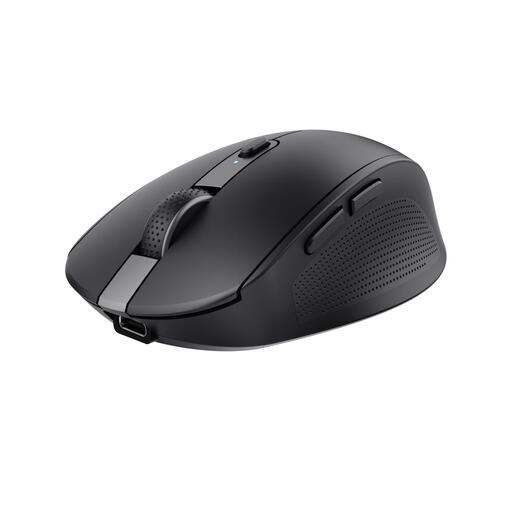
MATCH FOR: THE EFFICIENT MULTITASKER
Trust Ozaa Mouse Office Right-Hand RF Wireless + Bluetooth Optical 3200DPI

Trust Ozaa Mouse Office Right-Hand RF Wireless + Bluetooth Optical 3200DPI

Why This Fits Their Persona: Perfect for those who switch between a laptop, tablet, and PC. The multi-device functionality via both Bluetooth and an RF dongle offers maximum flexibility for a dynamic workday.

How It Avoids the Trap

The built-in rechargeable battery eliminates unexpected costs and the hassle of disposable batteries. The silent buttons prevent distractions in a busy environment.

Key Advantage & Pros

Connects with up to 3 devices simultaneously. Made from 60% recycled plastic, making it a more sustainable choice.
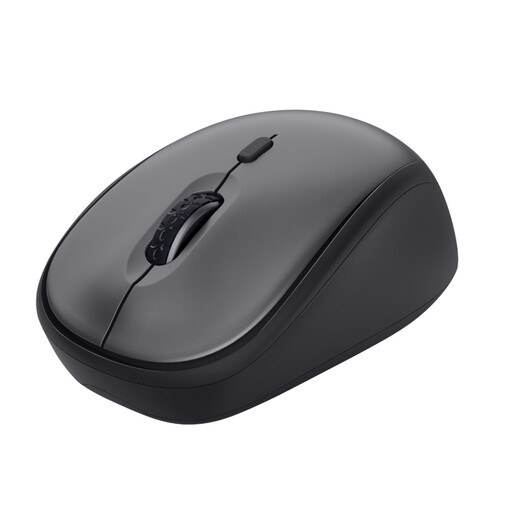
MATCH FOR: THE BUDGET-CONSCIOUS ALL-ROUNDER
Trust Yvi+ Silent Wireless Mouse

Trust Yvi+ Silent Wireless Mouse

Why This Fits Their Persona: A no-nonsense mouse for students or home users looking for a reliable and affordable device. Its compact form factor makes it easy to take with you.

How It Avoids the Trap

This mouse focuses on what really matters: a silent click and a reliable connection. You don't pay extra for an extremely high DPI that you don't need for daily tasks.

Key Advantage & Pros

Very quiet buttons for a peaceful work environment. The ambidextrous design is suitable for both left- and right-handed users.
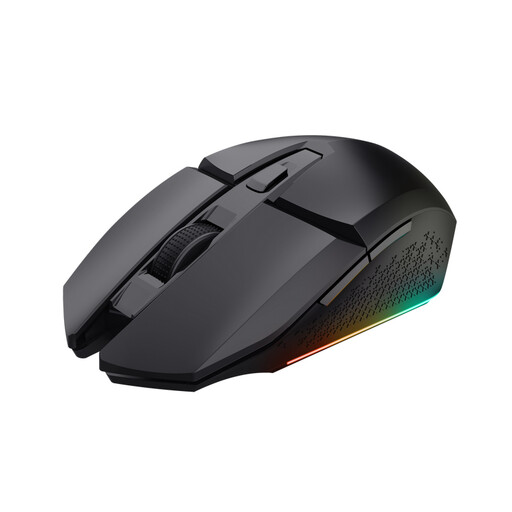
MATCH FOR: THE COMPETITIVE GAMER
Trust GXT 110 Felox Mouse Gaming Ambidextrous RF Wireless Optical 4800 DPI

Trust GXT 110 Felox Mouse Gaming Ambidextrous RF Wireless Optical 4800 DPI

Why This Fits Their Persona: Designed for gamers who demand speed and precision. The high DPI and stable RF connection provide the responsiveness needed in competitive games.

How It Avoids the Trap

For a gamer, a high DPI isn't a pitfall, it's a necessity. This mouse delivers the performance without the extremely high price tag of some niche brands. The rechargeable battery prevents it from dying mid-game.

Key Advantage & Pros

High, adjustable DPI up to 4800 for precision. The stable RF connection minimises latency (lag). Includes LED lighting to complete your gaming setup.

Looking for more options?

Didn't find what you were looking for? We have a wider range of products that meet these selection criteria and comply with local regulations.

Frequently Asked Questions About Wireless Mice

How long does the battery of a wireless mouse really last?

The actual battery life depends heavily on your usage. A rechargeable mouse often lasts several weeks to a month with intensive use. Models with replaceable AA or AAA batteries can last from several months to a year, depending on the model and battery quality. The advertised battery life is almost always based on light office use.

Is a Bluetooth mouse or an RF mouse (with a dongle) better?

Neither is inherently "better"; it depends on your situation.

  • RF (with a dongle) is generally more stable and faster, making it a good choice for gaming or a stationary desktop computer.
  • Bluetooth is more convenient for laptops and tablets because you don't sacrifice a USB port and can't lose a dongle. It's the standard for a multi-device mouse.

Do I need an expensive gaming mouse for office work?

No, absolutely not. A gaming mouse has features like an extremely high DPI and programmable buttons that are superfluous for standard office work. A good office mouse with a comfortable shape, a DPI between 800-1600, and possibly silent clicks is a much more practical and cost-effective choice. Well-known brands like a Logitech mouse or a Trust mouse offer excellent options for both categories.
