
Vandaag of morgen in huis

Kwaliteit gegarandeerd

Welkomstaanbiedingen ontgrendelen: GRATIS bezorging | Tot 80% korting | Gratis 30 dagen JoyPlus-proefperiode
Download de app
A desk cluttered with cables is a common source of frustration. They get tangled, restrict your movement, and make your workspace unnecessarily messy. A good wireless mouse solves this instantly, offering the flexibility you need, whether you're working from home, studying, or constantly switching between your laptop and a desktop computer.
As a Joybuy Product Recommendation Officer, I'm here to help you navigate the vast array of options. In this article, I'll provide practical tips and present a selection of popular models to help you make an informed choice that suits your needs.
Before making a choice, it's important to consider a few key features. These will determine how comfortably and efficiently you'll work with your new mouse.
If you spend many hours a day at a computer, comfort is not a luxury. An ergonomic mouse is designed to support the natural posture of your hand and wrist. Pay attention to the shape and size of the mouse. A model that fits your hand well can reduce strain and promote a more comfortable working posture in the long run.
A wireless mouse connects in two main ways:
Many modern mice offer both options. A multi-device mouse can even switch between your laptop, desktop, and tablet at the touch of a button, which is perfect for multitasking.
No one wants their mouse to die in the middle of an important task. Check the battery specifications. A rechargeable mouse, often recharged via a USB-C cable, is convenient and more environmentally friendly. Other models run on AA or AAA batteries that can sometimes last for a year or more.
Additionally, there are extra features that enhance usability. A silent mouse with muted clicks is a godsend in an open office, a library, or when you don't want to disturb your housemates.
Based on functionality, ease of use, and specifications, we've highlighted some compelling options for you.
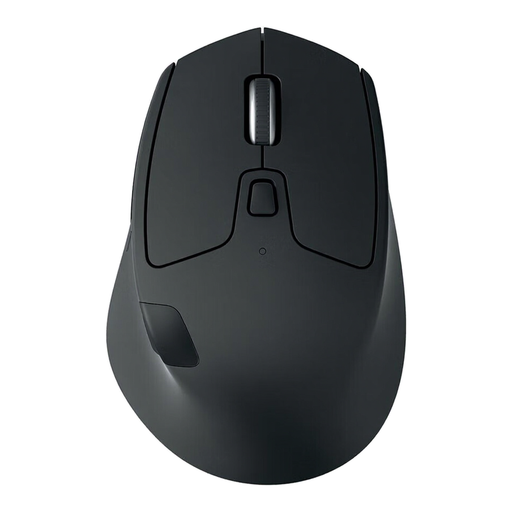
Why It Stands Out The Logitech M720 Triathlon is designed for those who need to switch seamlessly. With its Easy-Switch technology, you can pair the mouse with three different computers and switch between them at the touch of a button.
Key Features
Who Is It For? For professionals and students who work with multiple devices daily and need an efficient, reliable mouse without the hassle of constant re-pairing.
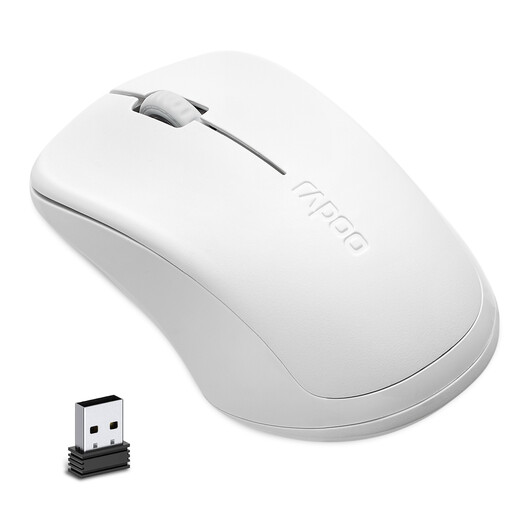
Why It Stands Out The RAPOO 1680 is a silent mouse that focuses on the essentials: reliable performance without distracting click sounds. According to the manufacturer, the click noise is reduced by 90%, ensuring a quiet work environment.
Key Features
Who Is It For? For users looking for a simple, affordable, and above all, quiet mouse for daily tasks at the office, school, or home.

Why It Stands Out The Logitech mouse from the MX Master series is renowned for its advanced features. The MX Master 4 for Business takes this to the next level with an 8K DPI sensor that works even on glass, and an electromagnetic MagSpeed scroll wheel for ultimate precision.
Key Features
Who Is It For? For creative professionals, developers, and power users who demand the highest standards of precision, comfort, and productivity.
The perfect mouse is a personal choice. Perhaps you're looking for a different model, a specific colour, or a mouse with unique features. A wide range of options is available to meet various needs.
Browse our full range and find the perfect match for your desk. Discover more options in our USB Wireless Mouse category.
A Bluetooth mouse connects directly to your device's Bluetooth functionality, so no USB port is required. A mouse with a USB receiver (dongle) uses a dedicated, included receiver that you plug into a USB port for a direct and often very stable connection. Many mice, like the Logitech M720, support both.
Battery life varies greatly by model and usage. A rechargeable mouse can last from several weeks to several months on a single charge, depending on the model. Mice that run on replaceable batteries can have a lifespan of a year or even longer. Always check the product specifications for the most accurate information.
For people who spend many hours a day at the computer, an ergonomic mouse can make a noticeable difference in comfort. By promoting a more natural posture for the hand and wrist, it can help reduce strain. Whether it's worth the investment depends on your personal needs and the duration of your computer use.
