
Vandaag of morgen in huis

Kwaliteit gegarandeerd

Welkomstaanbiedingen ontgrendelen: GRATIS bezorging | Tot 80% korting | Gratis 30 dagen JoyPlus-proefperiode
Download de app
Choosing a new wireless mouse can be overwhelming. The market is saturated with models all vying for your attention, from a simple laptop mouse to an advanced gaming mouse. How do you find the mouse that truly fits your needs without getting lost in technical specifications?
As a Joybuy Product Recommendation Officer, I'm here to guide you. In this article, we'll cut through the marketing noise and focus on what really matters: the features that make your daily computer use easier. We will discuss the key considerations and highlight some popular choices for different users.
Before you make a choice, it's helpful to consider how you'll be using the mouse. Here are three points to help you make your decision.
A wireless mouse connects in two main ways:
Some models offer both options, providing maximum flexibility.
You probably use your PC mouse for hours every day, so comfort is not a luxury. An ergonomic mouse is designed to support your hand, wrist, and arm in a natural posture. This can help reduce strain.
Pay attention to the shape and size. Do you have large or small hands? Are you left- or right-handed? For those who want to go a step further, a trackball mouse is an interesting option. With a trackball, you move the cursor with your thumb instead of your arm, which minimises strain on the wrist and shoulder.
Not all specifications are equally important for everyone.
silent mouse has buttons that make almost no sound when clicked. It's a small feature that can make a big difference for you and those around you.rechargeable mouse with a built-in battery can be more convenient and cost-effective in the long run. You can easily charge it via a USB cable.Based on specifications and use cases, we have selected a few models that stand out in their category.
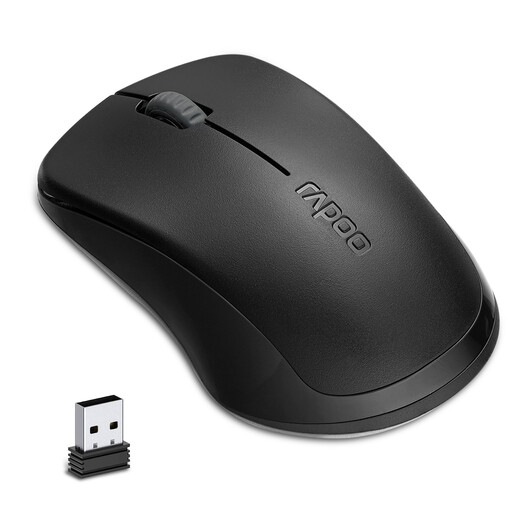
Why it stands out: This mouse focuses on the essentials: reliable, quiet, and comfortable operation for daily use.
According to the manufacturer, Rapoo, the design reduces click noise by 90%, ensuring a quiet work environment. The connection is handled by a stable 2.4GHz USB receiver, and the 1000 DPI sensor is perfect for everyday tasks.
Pros:
Who is it for? Ideal for students, office workers and home users looking for a functional and quiet mouse without any extra bells and whistles.

Why it stands out: This is a gaming mouse designed for performance, featuring an extremely low weight and a highly accurate sensor.
Logitech states that this model was developed in collaboration with esports professionals. Its ultra-light weight of just 53 grams and the HERO 2 sensor with an adjustable resolution up to 44,000 DPI are geared for rapid responses and precision. The LIGHTSPEED wireless technology ensures a low-latency connection.
Pros:
Who is it for? For the serious gamer looking for a light, fast, and reliable Logitech mouse to perform competitively.
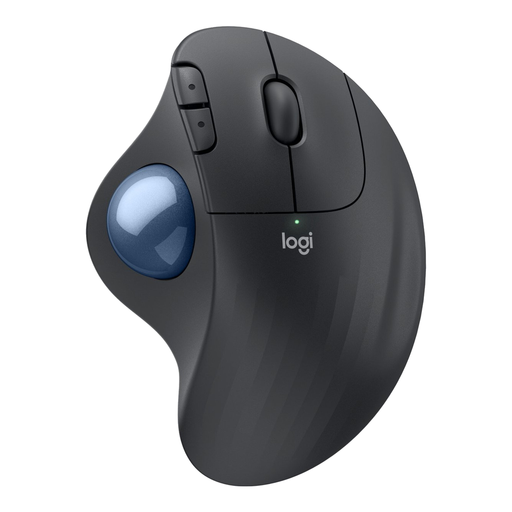
Why it stands out: This trackball mouse offers an alternative, ergonomic way of navigating that relieves strain on the arm and wrist.
Instead of moving the entire mouse, you control the cursor with the trackball under your thumb. This minimises arm movements and makes the mouse ideal for small workspaces. The ergonomic mouse is sculpted to support the hand in a natural way.
Pros:
Who is it for? Users who prioritise comfort, suffer from wrist or arm strain, or work at a desk with limited space.

Why it stands out: This rechargeable mouse is a productivity powerhouse, packed with features designed for professional users.
The MX Master 4 features an 8K DPI Darkfield sensor that tracks even on glass. The MagSpeed scroll wheel can zip through long documents at high speed or scroll with line-by-line precision. The Quiet Click technology, as Logitech calls it, reduces click noise. Its ergonomic shape with a thumb rest provides comfort during long workdays.
Pros:
Who is it for? Professionals, creatives, and power users who spend a lot of time at their computer and need advanced features, precision, and comfort.
The right mouse is a major step towards a comfortable and productive workspace. However, sometimes you need other accessories to optimise your setup. For example, are you looking for specific connection cables for your monitor or other equipment? Then check out our range of RF cables.
1. What is the difference between a Bluetooth mouse and a 2.4GHz wireless mouse? A Bluetooth mouse connects directly to your device without extra parts, which is ideal for laptops. A 2.4GHz mouse uses a USB receiver for a connection that is often more stable and faster, making it preferable for gaming and fixed PC setups.
2. How long does the battery of a rechargeable mouse last? This varies greatly by model and usage. A rechargeable mouse like the Logitech G PRO X Superlight 2c can last up to 95 hours on a full charge, according to the manufacturer. Office-use models, such as the MX Master 4, can often last for several weeks to months with normal use before needing a recharge.
3. Is a more expensive Logitech mouse worth the money? Whether a more expensive Logitech mouse is worth the investment depends on your needs. Basic models are fine for everyday tasks. More expensive models like the MX Master or G PRO series often offer better ergonomics, more advanced sensors, extra programmable buttons, and more durable materials. For intensive users, gamers, or professionals, these extra features can significantly enhance productivity and comfort.
