
Vandaag of morgen in huis

Kwaliteit gegarandeerd

Welkomstaanbiedingen ontgrendelen: GRATIS bezorging | Tot 80% korting | Gratis 30 dagen JoyPlus-proefperiode
Download de app
By the Joybuy Product Recommendation Officer Last updated: July 4, 2026
Long days at a computer can take their toll. A mouse that doesn't fit your hand properly or stutters during a crucial task not only causes frustration but can also contribute to wrist and arm strain. Therefore, finding the right wireless mouse for work isn't a luxury—it's an investment in your productivity and comfort.
My name is Joy, and as a Product Recommendation Officer at Joybuy, I'm here to help you navigate the vast selection of options. In this article, I'll provide practical guidance and present a selection of popular models that cater to different professional needs. No marketing jargon, just straightforward information to help you make an informed choice.
Before we dive into the products, it's helpful to know which specifications truly matter for professional use.
An ergonomic mouse is designed to support the natural posture of your hand and wrist, which helps reduce strain. Pay attention to the mouse's shape and size. If you have large hands, a mouse that's too small will be uncomfortable. For those seeking real relief, a vertical mouse or a trackball mouse can be a game-changer. With a trackball, you move the cursor with your thumb instead of your entire arm, which can significantly reduce the strain on your shoulder and wrist.
Do you work on multiple devices, like a laptop, desktop, and tablet? Then a multi-device mouse is essential. These mice can switch between different connections at the touch of a button. Most wireless mice connect via Bluetooth or a 2.4GHz USB receiver (dongle). Bluetooth is convenient because it doesn't occupy a USB port, while a dongle often provides a more stable and faster connection, which is ideal in environments with many wireless signals.
The precision of a mouse is measured in DPI (Dots Per Inch). For general office work, a DPI between 1000 and 1600 is sufficient. Graphic designers or data analysts working with large screens will benefit from a high-DPI mouse (4000 or more) for fast and precise cursor movements. Programmable buttons can speed up your workflow by allowing you to assign frequently used actions. Do you work in an open office? Then a silent mouse with quiet clicks is a welcome feature for you and your colleagues.
Based on the criteria above, we've rounded up some compelling options for you.
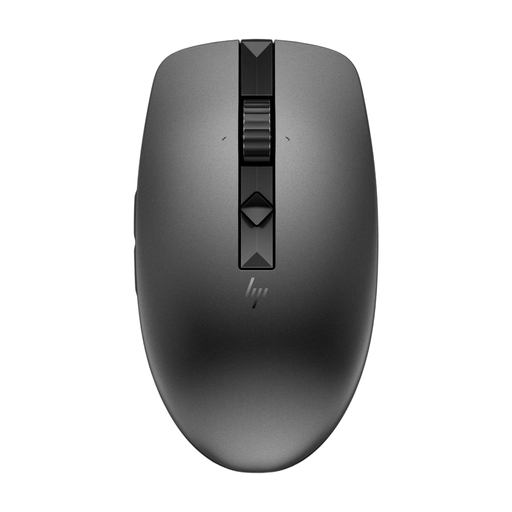
Why it stands out: The HP 635 is a practical all-rounder, designed for the modern, flexible workspace. This mouse's strength lies in its ability to switch seamlessly between up to three devices, making it an ideal mouse for multiple devices.
Pros:
Who is this mouse for? For the professional who regularly switches between a laptop, tablet, and desktop and values a quiet, clutter-free workspace. A reliable choice for general office work.
View the HP 635 Multi-Device Wireless Mouse
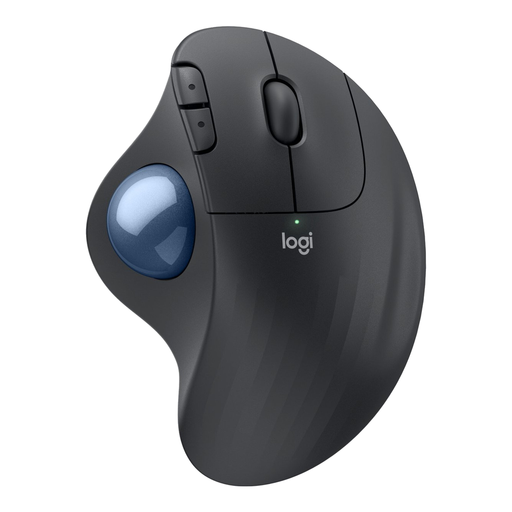
Why it stands out: The Logitech Ergo M575 is a trackball mouse that offers a different approach to ergonomics. Instead of moving your arm, you control the cursor with your thumb. This minimises movement and maximises comfort, especially during long workdays.
Pros:
Who is this mouse for? Excellent for users who experience wrist or shoulder strain, or for those who work at a small or cluttered desk. It's an accessible entry point into the world of ergonomic trackballs.

Why it stands out: The Logitech MX Master series has long been known as a go-to choice for power users. The MX Master 4 for Business continues this tradition with specifications geared towards maximum productivity and precision. This is a professional mouse through and through.
Pros:
silent mouse technology.rechargeable mouse via USB-C with the ability to connect to three devices.Who is this mouse for? For the demanding professional—such as programmers, designers, and data analysts—who is willing to invest in a tool that will noticeably improve their workflow.
View the Logitech MX Master 4 for Business
These three models cover a wide range of needs, but the perfect mouse is a highly personal choice. You might be looking for a different design, a specific colour, or a left-handed model.
For a more comprehensive overview of all our models, check out our full collection.
Discover More RF Wireless Mice
An ergonomic mouse is designed to keep your hand in a more natural, relaxed position. This can help reduce muscle strain in your wrist, arm, and shoulder, which is especially important if you spend many hours a day at the computer. Models like a trackball or vertical mouse offer the most specialised support in this area.
For standard office tasks like emailing, browsing, and working in documents, a DPI value between 1000 and 1600 is generally sufficient. If you work with high-resolution screens or do precision work like graphic design, a high-DPI mouse (above 4000) can be more comfortable, as it allows you to move the cursor across the screen faster and with less physical movement.
Yes, you can with a multi-device mouse. These mice can be paired with multiple computers, laptops, or tablets via Bluetooth and/or a USB receiver. A dedicated button on the mouse then allows you to easily switch between the connected devices, which is ideal for a flexible workflow.
