
Vandaag of morgen in huis

Kwaliteit gegarandeerd

Welkomstaanbiedingen ontgrendelen: GRATIS bezorging | Tot 80% korting | Gratis 30 dagen JoyPlus-proefperiode
Download de app
A clean, cable-free desk often starts with one simple upgrade: switching to a wireless mouse. But the search for the right model can be surprisingly tricky. Manufacturers promise the world with claims about battery life and ergonomics, but in practice, these often lead to disappointment and wasted money. Before you make a choice, it's crucial to know what to look for.
As a Product Recommendation Officer at Joybuy, I see the challenges consumers face every day. Two pitfalls stand out head and shoulders above the rest:
This guide will help you cut through the marketing jargon and choose a model that truly fits your needs.
To avoid buyer's remorse, there are a few technical specifications you need to check. These determine the real-world functionality and ease of use.
A wireless mouse connects in two main ways. The choice between them depends on your devices and how you work.
Some models offer both options, providing maximum flexibility.
The choice of power source affects both convenience and sustainability.
DPI indicates the sensitivity of the mouse sensor. A higher DPI means the cursor moves faster across the screen. For general office work and browsing, an adjustable DPI between 800 and 1600 is more than sufficient. Gamers or graphic designers may benefit from a higher DPI (4000+), but for most users, an extremely high value is unnecessary and can even feel jittery.
To help you choose, we've highlighted a few models that suit specific needs and avoid the pitfalls mentioned earlier.
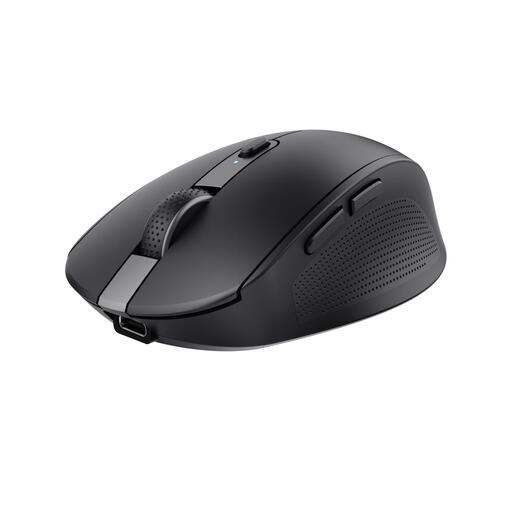
Why This Fits Their Persona: Perfect for those who seamlessly switch between a work PC, personal laptop, and tablet. The multi-device functionality (via Bluetooth and RF dongle) makes this a central control hub for a flexible workspace.
The built-in battery, rechargeable via USB-C, puts an end to unexpectedly dead batteries and waste. The silent buttons make it a considerate colleague in shared spaces.
Connects to 3 devices simultaneously; made from 60% recycled plastic.
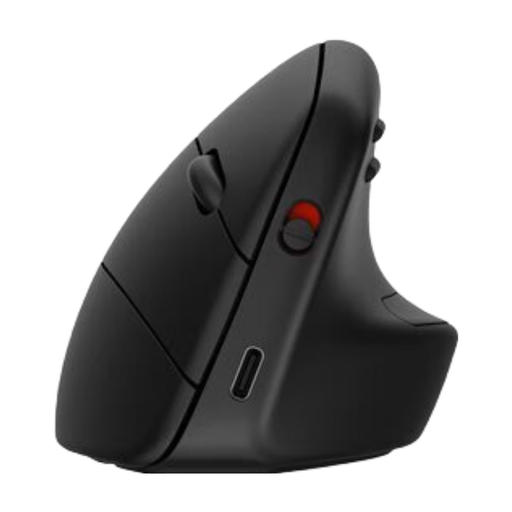
Why This Fits Their Persona: Specifically designed for professionals who spend long days at the computer and want to prevent wrist, arm, or shoulder strain. The vertical posture is a proven method for reducing muscle tension.
This isn't a vague "ergonomic" claim. The 57-degree vertical shape promotes a natural handshake position. According to HP, this reduces muscle activity by 12%, directly addressing the pitfall of empty marketing labels.
Vertical shape with detachable wrist rest; connects to 3 devices; long battery life (up to 16 weeks).
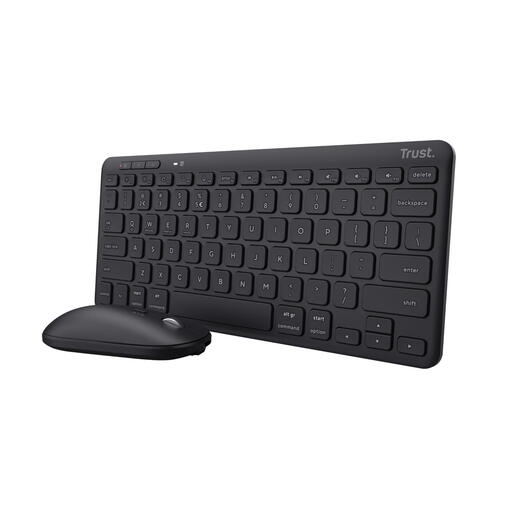
Why This Fits Their Persona: Ideal for anyone looking to create a complete, tidy, and wireless workspace in one go. This **wireless mouse and keyboard** set works across multiple devices and is designed with sustainability in mind.
This set tackles the pitfalls of connectivity and battery life. It offers both RF and Bluetooth, is rechargeable, and is made from 84% recycled plastic. No fussing with disposable batteries or unstable connections.
Complete wireless set for 3 devices; compact and sustainable design.
A wireless mouse is a great start, but a completely wireless workspace provides the ultimate peace and productivity. Check out our range of matching keyboards as well.
The lifespan of a rechargeable mouse varies greatly by model and usage. Most modern mice last from several weeks to even months on a single charge with average daily use. The battery capacity, expressed in mAh (milliampere-hour), gives an indication. A higher value typically means a longer usage time. Always check the manufacturer's specifications for a realistic estimate.
Not necessarily better, but different. A Bluetooth mouse is more versatile because you don't need a USB port and can easily switch between devices like your laptop and tablet. A mouse with an RF dongle often provides a slightly more stable and direct connection, which may be preferable for gaming or at a fixed workstation where a USB port is always available.
Generally, yes. Most wireless mice are compatible with both Windows and macOS. However, it's wise to check the product page for supported operating systems. Also, pay attention to the required connection: do you have a free USB-A port for a dongle, or does your laptop have Bluetooth? Modern laptops sometimes only have USB-C ports, for which you might need an adapter if you choose a mouse with a traditional USB-A dongle.
