
Vandaag of morgen in huis

Kwaliteit gegarandeerd

Welkomstaanbiedingen ontgrendelen: GRATIS bezorging | Tot 80% korting | Gratis 30 dagen JoyPlus-proefperiode
Download de app
A desk free of cable clutter: that's the promise of a wireless mouse. But the search for the right model often feels like navigating a jungle of marketing terms and vague promises. Before you invest in a new wireless mouse, it's wise to know what to look for to avoid buyer's remorse. As a Product Recommendation Officer at Joybuy, I'm here to cut through the noise and give you practical guidance.
We often see buyers fall into two common pitfalls:
ergonomic mouse can lead to an unnatural wrist posture.rechargeable mouse seems convenient, but if you have to charge it every week, it defeats the purpose. Models with replaceable batteries can be more expensive in the long run.To find a model that suits your work style, you need to look beyond the packaging. Focus on the specifications that truly matter.
The way the mouse connects to your computer is a crucial choice.
laptop mouse with limited ports. In an office environment with many wireless devices, interference can sometimes occur.multi-device mouse often uses Bluetooth to easily switch between your laptop, tablet, and PC, for example.Comfort is personal and depends on the size of your hands and your grip.
vertical mouse places your hand in a natural "handshake" position. This can reduce strain on your wrist and forearm, which is especially beneficial if you spend long days at the computer.rechargeable mouse with a USB-C port is convenient and more environmentally friendly. However, check how long the mouse lasts on a full charge. Models with AA or AAA batteries often have a very long lifespan, but you'll need to keep spare batteries on hand.silent mouse with muted clicks can be a relief for you and your colleagues.We've selected several popular models and matched them to specific user profiles based on their objective specifications.
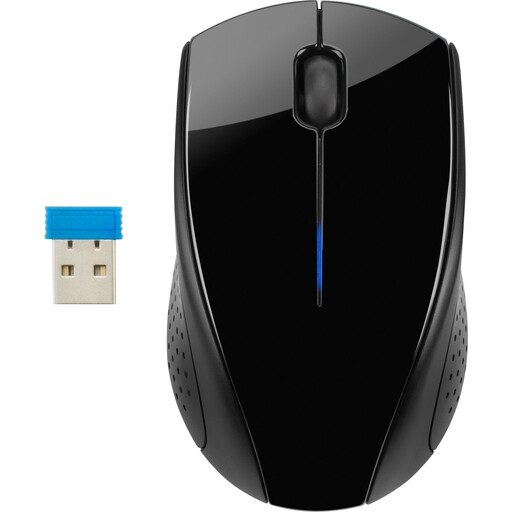
Why This Fits Their Persona: Simple, reliable, and no-fuss. Perfect for students or remote workers looking for an affordable solution that just works. Its symmetrical shape makes it suitable for everyone.
This mouse avoids the "ergonomic" hype with a comfortable, universal shape. The battery life is clear: according to HP, the included AA battery lasts up to 15 months with daily use.
Reliable 2.4 GHz connection via a USB dongle and a very long battery life. This is a `silent mouse`, which is great for a shared space.
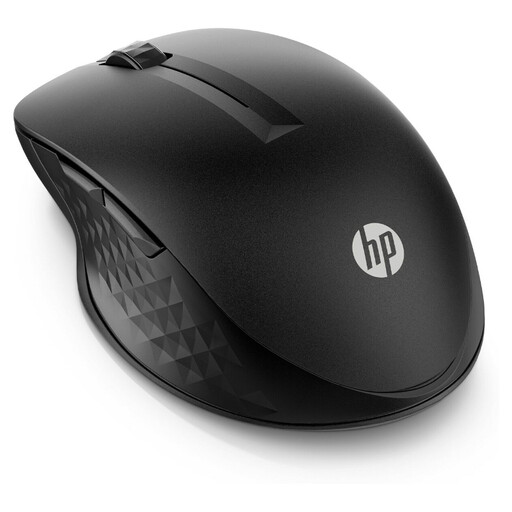
Why This Fits Their Persona: Seamlessly switches between a laptop, tablet, and PC. Ideal for professionals who work in a dynamic environment and want to streamline their workflow across multiple operating systems (Windows and macOS).
This model solves the connectivity problem by offering both a 2.4GHz dongle and Bluetooth. The multi-device capability isn't a gimmick here; it's a core feature that actually works.
Connect to multiple devices simultaneously and customise the 4 programmable buttons for a faster workflow. The battery life of up to 24 months on a single AA battery is a major plus.
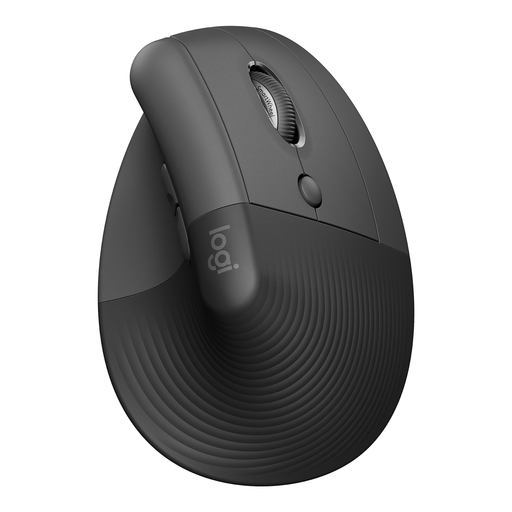
Why This Fits Their Persona: Designed for people who spend long days at the computer and want to prevent or reduce wrist strain. Suitable for small to medium-sized hands.
This is no empty "ergonomic" claim. The unique 57-degree angle is specifically designed for a natural handshake position, which Logitech states can reduce muscle strain. The model is Ergo-certified.
The vertical shape promotes a natural posture. The silent clicks and smooth SmartWheel make it a pleasant `office mouse` for a quiet work environment.
If you prefer an all-in-one solution, you could also consider a wireless keyboard and mouse set. Combos like the Trust Lyra offer a coordinated design and often use a single receiver for both devices.
We've compiled a complete, up-to-date list of products that meet these selection criteria and comply with local regulations.
The lifespan of a wireless mouse depends on two factors: the battery and its physical durability. A rechargeable mouse can last for years, provided the internal battery is of good quality. Models with replaceable batteries can theoretically last indefinitely, as long as you replace the batteries. The battery life itself varies from a few months to over two years, depending on the model and your usage.
Not necessarily better, but different. A Bluetooth mouse is ideal if you don't want to sacrifice a USB port and want to switch between devices easily. A mouse with a 2.4GHz dongle often provides a slightly more stable, direct connection that is less prone to interference and is typically easier to set up (plug-and-play).
DPI (Dots Per Inch) indicates the sensitivity of the mouse sensor. A higher DPI means the cursor on your screen travels a greater distance with a small movement of the mouse. For a standard office mouse, a DPI between 800 and 1600 is more than sufficient. Some models have adjustable DPI, which is useful if you switch between tasks that require precision (like photo editing) and fast navigation.
