
Vandaag of morgen in huis

Kwaliteit gegarandeerd

Welkomstaanbiedingen ontgrendelen: GRATIS bezorging | Tot 80% korting | Gratis 30 dagen JoyPlus-proefperiode
Download de app
A wireless mouse keeps your desk tidier and is useful if you regularly switch between a laptop, computer and tablet. However, a high DPI rating or long battery life does not automatically mean a model is right for the way you work. The shape, connection and power supply are just as important in determining whether it is comfortable to use every day.
A high DPI rating may sound appealing, but extremely high sensitivity is usually unnecessary for word processing, email and spreadsheets. What matters more is whether you can adjust the cursor precisely. A mouse with adjustable DPI offers greater flexibility when switching between large screens, photo editing and general office work.
Also consider how the DPI is adjusted. This may be done using a physical button, software or a combination of both. With some models, additional software is only available for Windows.
A Bluetooth mouse connects directly to a device that supports Bluetooth. This means you do not need a free USB-A port. A 2.4GHz mouse usually works with a small USB receiver. This connection is practical for computers without reliable Bluetooth support, but the receiver can be lost or may not fit a laptop with USB-C only without an adapter.
A wireless Bluetooth mouse is therefore not always the same as a dual-mode mouse. A dual-mode mouse usually supports both Bluetooth and 2.4GHz. Always check exactly which modes the product supports and whether your operating system is compatible.
Advertised battery life depends on settings, frequency of use and the connection mode selected. A model with a replaceable AA battery can be convenient when you want to get back to work quickly. An rechargeable wireless mouse, on the other hand, means you do not need loose batteries.
Also check the charging time, the type of connection and whether the mouse can still be used while charging. According to the product description, the Trust Ozaa+ can be used while charging. This may differ with other models.
For a laptop mouse, Bluetooth and a compact design are often practical. If your laptop has few ports, choose Bluetooth or check whether a USB-C adapter is required. For a computer mouse, a USB receiver is often straightforward: plug it in and use it.
Pay attention to the Bluetooth version and supported systems. According to the product specifications, the Lofree EP115 supports macOS 10.15+, Windows 8+, iPadOS and iOS 13+, as well as Android 8+. However, the manufacturer states that the mouse is not compatible with Boot Camp dual-system mode on Mac devices.
A compact mouse is easy to carry around, but may provide less support for larger hands. A larger model with a rubber grip may be better suited to extended office work. Also check whether the model is suitable for both right- and left-handed use.
An ergonomic wireless mouse often has a distinctive shape. The Logitech MX Vertical, for example, is set at a vertical angle of 57 degrees. Logitech says this design was developed to provide a more natural hand position. This is a product claim made by the brand, not a guarantee that every user will have the same experience. In addition, the specifications state that this model is designed for right-handed use.
A silent wireless mouse can be useful in a shared office, library or home office. Brands sometimes state a percentage reduction in noise. Treat this as an advertised product specification; the actual noise level may depend on the surface and how the mouse is used.
Also consider the number of buttons and the position of the side buttons. Horizontal scrolling can be useful for spreadsheets. For straightforward text work, three buttons and a scroll wheel are often enough.
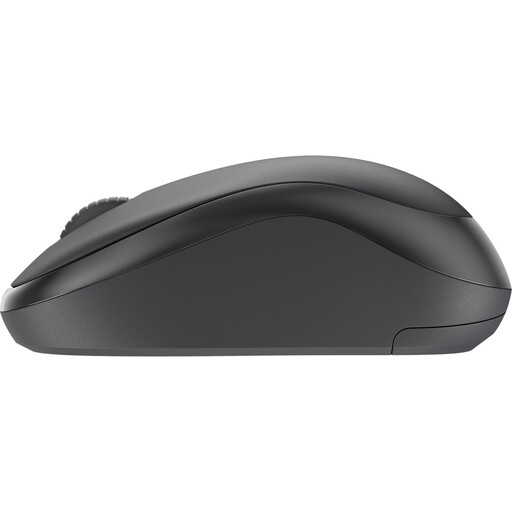
Why it suits this profile: A straightforward choice for everyday work with a laptop or desktop, without complicated features. According to the specifications, the model is suitable for both right- and left-handed use.
The product specifications list Bluetooth, Silent Touch technology and adjustable DPI. However, check exactly which connection option your particular version uses.
3 buttons, optical sensor, adjustable DPI according to the product information and power from one AA battery.

Why it suits this profile: Designed for users who spend many hours working at a computer and pay close attention to shape, adjustable sensitivity and rechargeability.
The vertical design makes this a more specialised choice than a standard mouse. The 4000 DPI sensor and cursor-speed button mean you are not restricted to a single sensitivity level.
Bluetooth and 2.4GHz via a Unifying receiver, rechargeable battery, 4000 DPI and an advertised usage time of up to four months per charge.
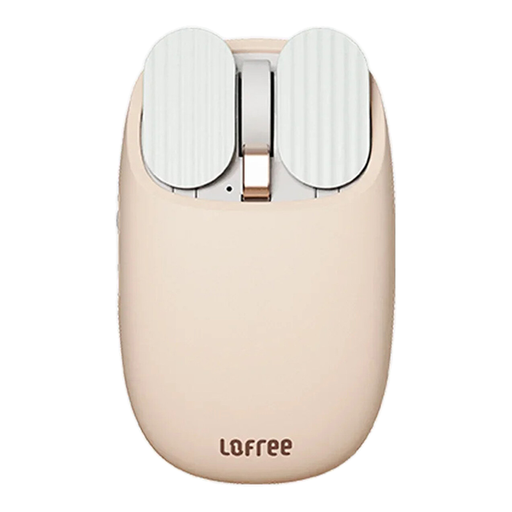
Why it suits this profile: Useful for homeworkers, students and laptop users who want to switch between Bluetooth and 2.4GHz and use multiple sensitivity levels.
The dual-mode connection reduces reliance on a single connection method. According to the specifications, the five DPI levels range from 800 to 3600.
Bluetooth 4.0 and 2.4GHz, built-in 800mAh battery, USB-C charging and compatibility with Windows, macOS, iPadOS, iOS and Android.

Why it suits this profile: Suitable for office work with multiple devices, wide spreadsheets and users who appreciate a larger mouse with additional scrolling options.
You are not limited to a single device: the product description lists a 2.4GHz receiver and two Bluetooth channels. However, the mouse is specifically designed for right-handed use and has a larger size.
Up to three paired devices, side-to-side scroll wheel, silent buttons, rechargeable battery and adjustable sensitivity up to 3200 DPI.
We have put together a complete, up-to-date list of products that fully meet these strict selection criteria and the applicable European safety regulations.
No. The laptop must support Bluetooth and the operating system must be compatible. Also check whether the mouse requires a separate receiver. A Bluetooth model without a dongle is particularly useful when you want to keep your USB ports free.
This depends on the battery, switches, casing and intensity of use. Product pages may state a battery life, but this remains a guideline. A rechargeable mouse needs to be charged regularly; a model with an AA battery can be used again more quickly after replacing the battery.
Yes, provided the shape, connection and buttons suit the way you work. In a shared space, a silent wireless mouse can be useful. If you regularly work with wide spreadsheets, look for horizontal scrolling. Also check that the mouse fits your hand and that a USB receiver or Bluetooth connection is available.
