
Vandaag of morgen in huis

Kwaliteit gegarandeerd

Welkomstaanbiedingen ontgrendelen: GRATIS bezorging | Tot 80% korting | Gratis 30 dagen JoyPlus-proefperiode
Download de app
A wireless mouse keeps your desk tidier and is handy alongside a laptop, home office or hot desk. Yet many people buy a model that disappoints after a few weeks. The problem usually isn’t how it looks, but an unsuitable connection, a poor fit or unclear specifications.
A Bluetooth mouse works without a USB receiver, but your laptop or computer needs to support Bluetooth. Check the operating system and Bluetooth version too. For example, the Microsoft Surface Arc Mouse requires Bluetooth 4.0 or later. This can make pairing tricky with older devices.
An RF mouse usually uses a small 2.4 GHz USB receiver. This is often practical for a desktop PC, but less convenient if your laptop has few USB ports or only USB-C connections.
DPI indicates how far the cursor moves in response to a given hand movement. A higher value isn’t automatically more comfortable. For word processing and spreadsheets, 1,000 to 1,600 DPI is often enough. A higher setting can be useful for large screens, graphic design or gaming.
Look in particular for a mouse with adjustable DPI. This lets you tailor the cursor speed to your work and screen size.
A compact, flat mouse can be handy when you’re on the go, but it won’t feel comfortable for everyone during long working days. A vertical ergonomic mouse also takes some getting used to. Consider which hand it’s designed for, its height and how you hold it.
A right-handed mouse often has a pronounced thumb rest. An ambidextrous mouse works for both left- and right-handed users, but usually has a more neutral shape.
Choose Bluetooth if you want to work without a dongle and use several Bluetooth-enabled devices. The HP 240 Pike Silver Bluetooth Mouse uses Bluetooth 5.1, has a 1,600 DPI optical sensor and, according to the product information, works with Windows, macOS and ChromeOS.
An RF mouse is a good choice for plug-and-play use. The Trust Yvi+ uses a 2.4GHz USB receiver, has a range of up to 8 metres and, according to the product specifications, comes with batteries. Check beforehand that your computer has a suitable USB port.
An optical mouse generally works well on a mouse mat and many matt desk surfaces. Glossy or glass surfaces can affect tracking. A resolution of 1,000 to 1,600 DPI is suitable for everyday office work. Adjustable settings, such as 800 to 1,600 DPI on the Trust Yvi+, give you more control.
For gaming, other features matter too, including polling rate, sensor performance, weight and programmable buttons. These features usually aren’t necessary for email, studying or administrative work.
A silent mouse can be useful in a shared workspace, library or home office. According to Logitech’s product information, the M330 Silent Plus reduces click noise by more than 90 per cent compared with traditional mice. This is a claim made by Logitech; the noise level you experience may vary depending on the surface and user.
Also consider the power source:
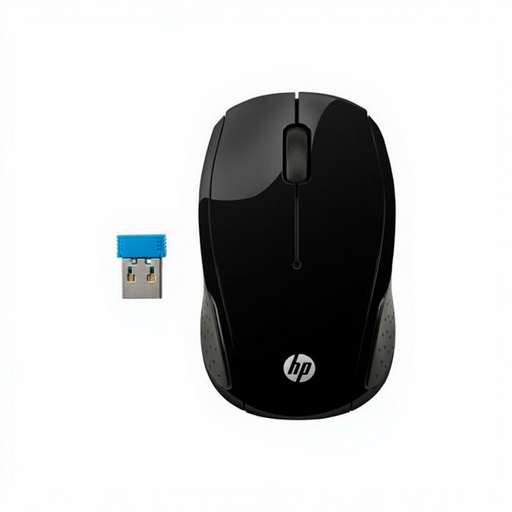
Why it suits this user: A straightforward wireless mouse for laptops, home use and everyday office work, with receiver and batteries included.
The specifications list a 2.4GHz connection, optical sensor and 1,000 DPI. So you won’t be paying for features you may not use.
Symmetrical shape, wireless range of up to 10 metres according to the product specifications, and compatibility with Windows, Mac and ChromeOS.

Why it suits this user: Ideal for long working days and anyone who prefers a vertical grip to a standard mouse shape.
The shape, handedness and DPI are clearly specified. The vertical position still needs to feel comfortable for you, so give yourself time to get used to it.
Bluetooth and 2.4GHz receiver, rechargeable battery, adjustable up to 4,000 DPI and support for multiple devices.

Why it suits this user: For users who want gaming features, a lightweight mouse and several connection options alongside their office work.
The connection options, polling rate and DPI are clearly listed. These features may be more than you need for basic office work.
Tri-mode connection, charging dock, symmetrical shape, weight of 56 grams and, according to the product specifications, adjustable resolution of up to 42,000 DPI.
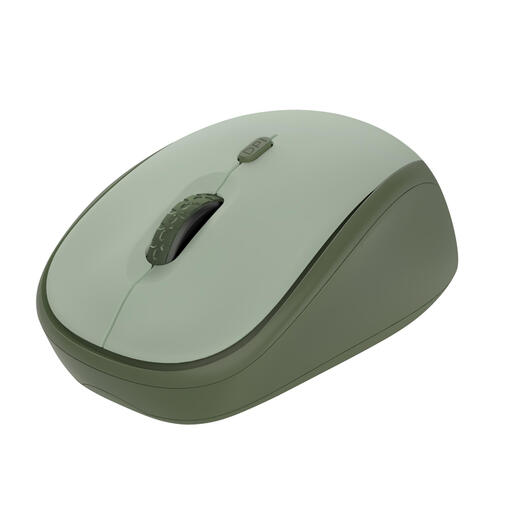
Why it suits this user: Its compact size, RF connection and quiet buttons make this model suitable for the office, library or home working.
The model clearly lists its connection type, range, quiet buttons and DPI range of 800 to 1,600.
Compact design, optical sensor, 83 per cent recycled material according to the product information, and a stated battery life of up to 12 months.
We’ve put together a comprehensive, up-to-date list of products that meet these strict selection criteria and current European safety regulations.
Not always. An RF mouse needs a spare USB port. A Bluetooth mouse requires Bluetooth support and sometimes a recent version of the operating system. Check the product details for Windows, macOS or ChromeOS compatibility before you order.
It varies by model, battery type and usage. Manufacturers may quote 12, 15, 18 or 24 months, for example. These are stated figures; intensive use, lighting and sleep settings can affect the actual battery life. A rechargeable mouse doesn’t need disposable batteries, but it does need to be plugged in regularly.
A silent mouse is designed mainly to reduce clicking noise. Also consider its shape, sensor, DPI, scroll wheel and battery life. For long periods of use, a comfortable fit matters more than noise level alone. If discomfort persists, take breaks and adjust your posture.
