
Vandaag of morgen in huis

Kwaliteit gegarandeerd

Welkomstaanbiedingen ontgrendelen: GRATIS bezorging | Tot 80% korting | Gratis 30 dagen JoyPlus-proefperiode
Download de app
A wireless mouse keeps your desk tidier and is useful with a laptop, home office or flexible office set-up. However, a high DPI value or striking design does not automatically mean that a mouse is comfortable to use. The right choice mainly depends on the connection, shape, power supply and features you need every day.
So, before buying a wireless computer mouse, watch out for these common pitfalls:
A Bluetooth mouse pairs directly with a laptop, tablet or smartphone. This saves a USB port, which is useful with thin laptops. However, check the required Bluetooth version and supported operating systems.
A wireless mouse with a USB receiver works via 2.4 GHz. This is often straightforward: connect the receiver and switch on the mouse. Laptops with USB-C only may require an adapter. A dual-mode model combines Bluetooth with 2.4 GHz, making it suitable for several types of device.
DPI determines how quickly the cursor moves across the screen. A higher value is not automatically more accurate for office work. For documents, email and spreadsheets, for example, settings between 800 and 1600 DPI are often practical. If you work with large screens, creative software or multiple monitors, you may appreciate more adjustment options.
A mouse with adjustable DPI allows you to change the speed. Check whether the DPI settings can be switched directly using a button or need to be configured through software.
A rechargeable wireless mouse means you do not need to replace batteries regularly, but you do need to charge the device in good time. Check the charging time, cable type and whether you can use the mouse while it is charging.
A mouse for laptop use should be light and compact enough to carry around. For a permanent workstation, a larger shape with a thumb rest may provide better support. Also check whether the model is suitable for left- and right-handed use.
A quiet mouse is well suited to shared offices, libraries and a peaceful home office. A brand’s product description may mention noise reduction; treat this as a manufacturer’s claim rather than a universal measurement standard. Extra buttons, a horizontal scroll wheel and programmable functions are particularly useful if you often work with spreadsheets, timelines or multiple programmes.
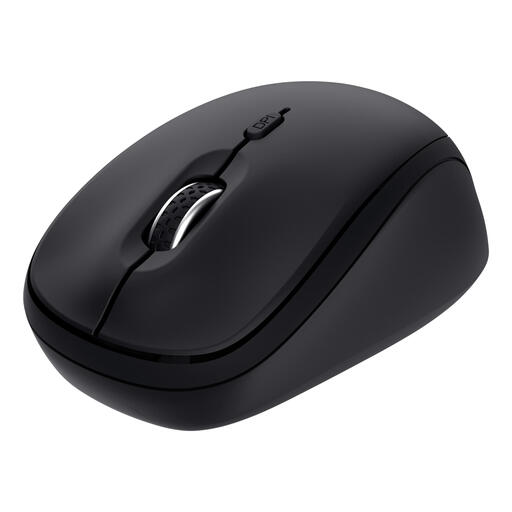
Why it suits this profile: This compact mouse is designed for everyday work, laptop use and a limited budget. According to Trust’s product information, you can connect up to three devices via 2.4 GHz and Bluetooth.
The connection is not limited to Bluetooth: a USB receiver is also included. The DPI can be adjusted between 800 and 1600, and Trust says the buttons are quiet.
Compact shape, three connection options, adjustable DPI and one replaceable AA battery.
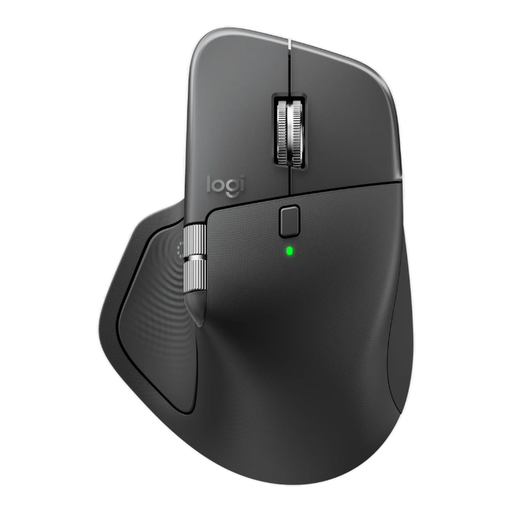
Why it suits this profile: According to Logitech, this model is aimed at business users who work with multiple devices, programmable buttons and advanced scrolling functions.
The specifications mention Bluetooth, a Logi Bolt receiver, three connectable devices and adjustable DPI. This means you do not have to rely solely on general speed claims.
8,000 DPI, eight buttons, horizontal scrolling, USB-C charging and support for up to three devices.
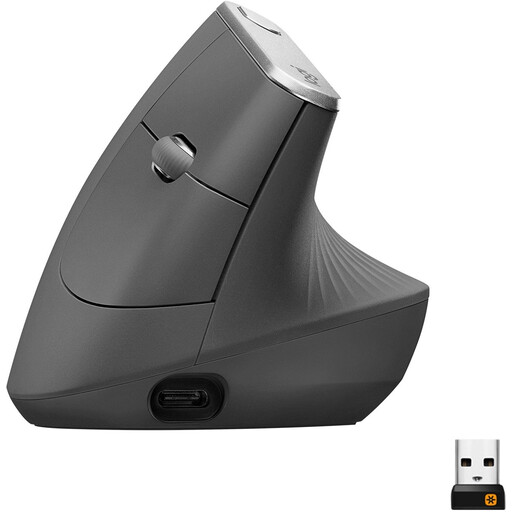
Why it suits this profile: The vertical shape is designed for users who deliberately want to try a different hand position during prolonged computer work. This model is right-handed.
The product shape and hand orientation are clearly specified. Bear in mind that a vertical mouse may feel larger and takes some getting used to.
4,000 DPI, Bluetooth and USB receiver, rechargeable battery and a dedicated vertical shape.
We have compiled a complete, up-to-date list of products that fully meet these strict selection criteria and the applicable European safety regulations.
Yes. A model with a USB receiver generally uses a 2.4GHz connection and does not need Bluetooth. However, check that your computer has a suitable USB port. If it only has USB-C, an adapter may be required.
This varies by model. According to a brand’s product information, a mouse with an AA battery can last for months or more than a year, depending on usage. Rechargeable models often have a stated usage time per charge. Treat these figures as manufacturer information; settings and usage affect the actual battery life.
A quiet mouse can be useful in a shared space, but check whether only the buttons or the scroll wheel has also been made quieter. Also consider the shape, weight and connection. A quiet button cannot make up for a mouse that does not suit your hand or laptop.
