
Vandaag of morgen in huis

Kwaliteit gegarandeerd

Welkomstaanbiedingen ontgrendelen: GRATIS bezorging | Tot 80% korting | Gratis 30 dagen JoyPlus-proefperiode
Download de app
A wireless mouse keeps your desk tidy and is convenient to use with a laptop, desktop computer or hot-desk setup. However, a low price or high DPI value does not tell you everything. Some models do not have Bluetooth, others are less suitable for long working days, and some use a USB receiver that is easy to lose.
As a Joybuy Product Recommendation Officer, I filter product information based on practical considerations: connectivity, controls, battery and shape. This helps you avoid paying for features you will not use.
A Bluetooth mouse connects directly to a Bluetooth-enabled device. This is useful with slim laptops that have few USB ports. A wireless mouse with a USB receiver uses a 2.4GHz connection and is often plug-and-play, but you will need a spare USB-A port.
Also check whether the receiver is included and whether it can be stored inside the mouse. This helps prevent it getting lost when travelling or working from home.
DPI determines how quickly the cursor moves in response to a particular hand movement. For office work, 1000 to 1600 DPI is sufficient for many users. A higher value may be useful with large screens or specific software, but it says nothing about the mouse’s shape, click feel or accuracy on your desk.
Adjustable DPI is particularly practical if you use the mouse for several tasks. Also check whether the sensor is suitable for your surface. Reflective surfaces and glass can affect tracking.
An ergonomic mouse should suit your hand size, grip and working posture. A vertical mouse may take some getting used to and is often primarily designed for right-handed users. A compact wireless mouse is easy to carry around, but may provide less support for larger hands.
With a quiet mouse, the claim usually refers to reduced clicking noise on certain buttons. According to Logitech’s own information, the M330 reduces clicking noise by more than 90% compared with traditional mice. Percentages like these are brand claims, so use them as an indication and also consider the switch type described and the user experience.
Choose a wireless mouse with a USB receiver if you mainly work with a desktop computer or office PC and have a spare USB-A port. Bluetooth is the more logical choice for a mouse for a laptop, tablet or workspace with few available connections.
A multi-device mouse can remember several devices. Pay attention to the actual number of connections and how you switch between them. According to the product information, the HP 635 supports connection via a nano-USB receiver and Bluetooth, with switching between paired devices.
Check before buying:
A model with AA or AAA batteries can be used again quickly by replacing the battery. A rechargeable wireless mouse does not need disposable batteries, but it does need to be charged in good time. Therefore, check the stated battery life, charging type and whether you can use the mouse while it is charging.
Battery claims depend on usage, connectivity and power-saving features. “Up to 12 months” therefore does not mean a fixed battery life for every user.
Consider the handedness, weight and dimensions. A symmetrical mouse is suitable for left- and right-handed use, while a vertical ergonomic mouse is often designed specifically for right-handed use. Programmable buttons are useful for shortcuts, but are not essential for straightforward office work.
These details are also relevant for everyday use:
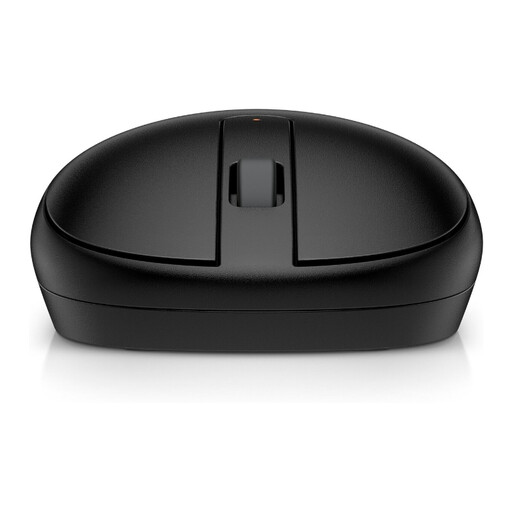
Why it suits this profile: A simple Bluetooth mouse for everyday laptop and office work, with no separate dongle. Its symmetrical design is suitable for left- and right-handed use.
The connection works via Bluetooth 5.1, so you do not need to keep track of a USB-A receiver. However, check beforehand that your device supports Bluetooth.
Optical sensor with 1600 DPI, three buttons, Bluetooth 5.1 and power from one AA battery, according to the product information.
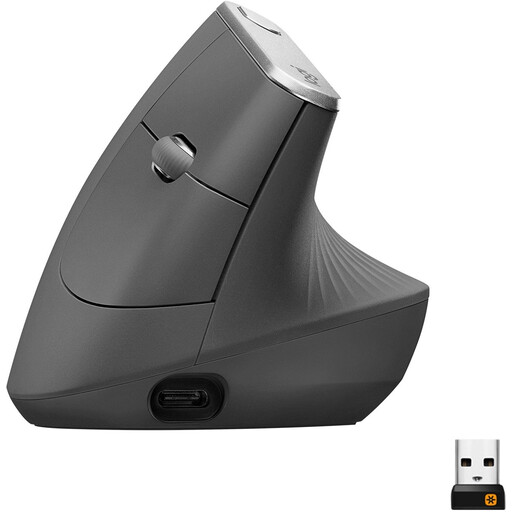
Why it suits this profile: Designed for users who value adjustable cursor sensitivity, multiple connections and a rechargeable battery during long periods of office work.
The vertical shape creates a clearly different hand position from that of a standard mouse. According to Logitech’s own information, the model is designed for a natural hand position; it is still important to assess the fit for yourself.
Bluetooth and 2.4GHz via a Unifying receiver, adjustable up to 4000 DPI and a built-in rechargeable battery.
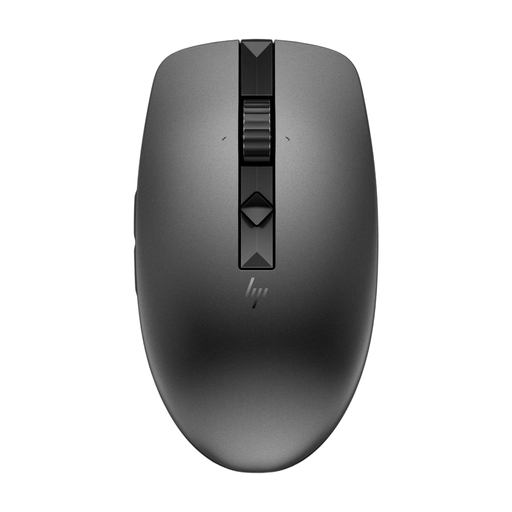
Why it suits this profile: Useful for home workers and office professionals who regularly switch between laptops, desktops and other devices.
You are not limited to a single connection: according to HP, you can pair via a nano-USB receiver and Bluetooth. The mouse also has programmable quiet buttons.
Up to three devices via the connection options described, four programmable buttons and a stated battery life of up to 12 months with a replaceable battery.
We have put together a complete, up-to-date list of products that fully meet these strict selection criteria and the applicable European safety regulations.
With a USB model, insert the nano receiver into a spare USB port and switch on the mouse. With Bluetooth, open your laptop’s Bluetooth settings, activate the mouse’s pairing mode and select the model from the list. Check compatibility with Windows, macOS or ChromeOS beforehand.
This varies by model and usage. Some models with AA or AAA batteries state a battery life of approximately 12 to 24 months, while a rechargeable mouse often specifies a shorter period per charge. Manufacturers generally use a maximum value for these claims. Intensive use, lighting and frequently switching between devices can affect battery life.
With a model that uses replaceable batteries, ongoing costs depend on the battery type and how often you replace them. A rechargeable mouse does not require separate batteries, but it does need a charging cable and time to recharge. Therefore, do not consider only the purchase price, but also the connections, battery life and expected usage.
