
Vandaag of morgen in huis

Kwaliteit gegarandeerd

Welkomstaanbiedingen ontgrendelen: GRATIS bezorging | Tot 80% korting | Gratis 30 dagen JoyPlus-proefperiode
Download de app
A wireless mouse gives you a tidier desk and greater freedom of movement. However, not every model is suited to the same situation. A compact mouse for a laptop can become uncomfortable during long working days, while a gaming mouse with numerous DPI settings is unnecessarily advanced for straightforward office work.
So don’t focus solely on price, appearance or marketing terms such as “ergonomic” and “silent”. Above all, check the connection, shape, battery and sensor. Below, you’ll find what to look out for in everyday use.
A Bluetooth mouse is only convenient if your laptop, tablet or PC supports Bluetooth. Some desktop computers do not have this feature. A mouse with a 2.4GHz USB receiver is often easier to use in that case, but you will need a free USB port.
Also check whether the receiver is included and whether it can be stored inside the mouse. This prevents the small component from getting lost when you take the mouse with you alongside a laptop.
DPI determines how quickly the cursor moves across the screen for the same hand movement. For office work, an adjustable setting between approximately 800 and 2,400 DPI is sufficient for many users. A gaming mouse may offer much higher values, but that does not automatically mean you will work more accurately.
Also consider how easy it is to adjust the DPI in practice. A dedicated DPI button is useful with a gaming mouse or when switching between large spreadsheets and precise image editing.
An ergonomic mouse needs to suit your hand, grip and working posture. A vertical mouse, for example, is operated differently from a traditional model. It may take some time to get used to. A right-handed shape is also unsuitable if you are looking for a left-handed mouse.
So look at the hand orientation, dimensions, weight and position of the thumb buttons. A small mouse for a laptop is practical when travelling, but may be less comfortable for larger hands during prolonged use.
A Bluetooth mouse saves a USB port and works well with a MacBook, tablet or slim laptop. An RF mouse with a USB receiver is often easy to connect to an office PC. A model with both options offers greater flexibility.
Do you work with multiple computers? Look for a multi-device mouse. Some models can remember two or three devices and let you switch between systems using a button. Do check that the number of paired devices matches your needs.
A mouse powered by AA or AAA batteries can work for months or even years, depending on the model and how it is used. A rechargeable wireless mouse means you do not need loose batteries, but it does need to be connected to a USB cable in good time.
Pay attention to the difference between the stated battery life and your own usage. A product listing that says “up to” provides a maximum indication. Also check whether you can continue using the mouse while it is charging.
For basic use, three buttons and a scroll wheel are usually sufficient. A programmable mouse offers extra functions for keyboard shortcuts, browser navigation or creative software. However, more buttons do not automatically make a mouse more practical.
An optical sensor works on many standard desk surfaces. According to the product information, some models are also suitable for glass or other surfaces, but always check the specific product specifications. A mouse mat can make cursor movement smoother.
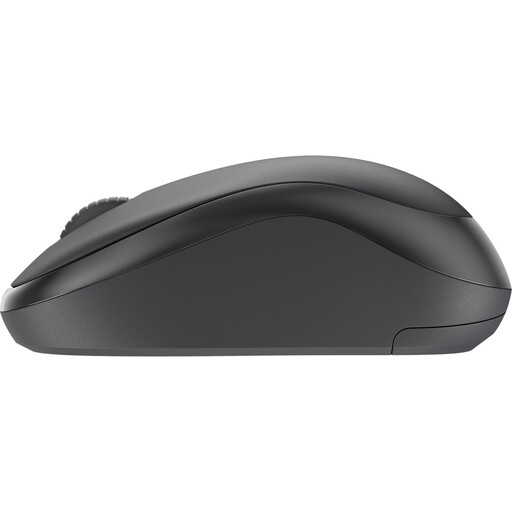
Why it suits this profile: For everyday use at home or in the office, this model offers straightforward operation with three buttons, a scroll wheel and support for both left- and right-handed use.
The product information states that it offers wireless operation, Silent Touch and an AA battery. You therefore do not need to keep a charging cable ready.
Optical sensor, 4,000 DPI according to the specifications, wireless connection and suitable for either hand.

Why it suits this profile: Suitable for professionals who scroll frequently, use keyboard shortcuts and work with both a PC and a laptop.
The choice between Bluetooth and Logi Bolt means you are not dependent on a single connection type. The mouse can remember up to three devices.
8 programmable buttons, adjustable DPI up to 8,000, horizontal scroll wheel and USB-C charging.
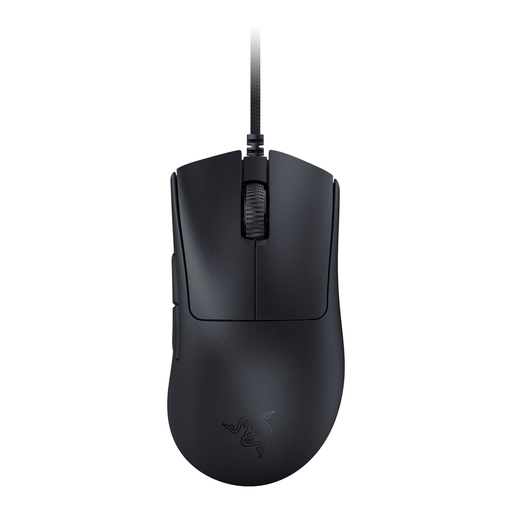
Why it suits this profile: For gamers looking for a lightweight, right-handed gaming mouse with a high-resolution sensor and extra buttons.
This is not a wireless model, but a wired USB mouse. This makes the connection clear and avoids expectations regarding battery life or wireless lag.
59 grams, optical sensor up to 30,000 DPI, six buttons and a stated polling rate of up to 8,000 Hz.
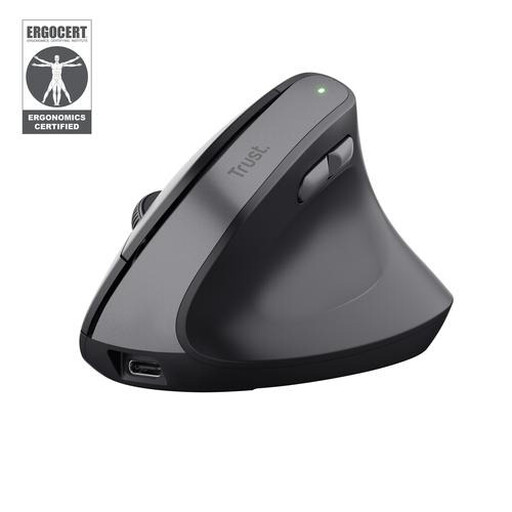
Why it suits this profile: The vertical shape, set at an angle of 57 degrees, is designed for users who want to try a different hand position during long days working at home or in the office.
The hand orientation is clearly stated as right-handed. This model is also wireless via a 2.4GHz receiver rather than Bluetooth.
Rechargeable battery, two silent buttons, two thumb buttons and adjustable DPI from 800 to 2,400.
We have put together a complete, up-to-date list of products that fully meet these strict selection criteria and the applicable European safety regulations.
With a mouse that has a USB receiver, insert the receiver into a free USB port and switch on the mouse. For a Bluetooth mouse, open the Bluetooth settings on your laptop, tablet or PC and select the mouse. Check the supported operating system beforehand.
Battery life depends on the battery type, sleep mode and frequency of use. According to their product information, models with an AA battery can operate for long periods; rechargeable variants often specify a usage time per charge. Always check whether the battery is replaceable and whether charging while in use is possible.
A silent mouse can be useful in a shared office, library or home workspace. Manufacturers use different technologies and measuring methods. According to Logitech, SilentTouch greatly reduces click noise on certain models compared with traditional mice. If you are mainly bothered by the scroll wheel or tapping on the desk, do not look only at the click-noise claim. Also consider the design and the surface you use it on.
