
Vandaag of morgen in huis

Kwaliteit gegarandeerd

Welkomstaanbiedingen ontgrendelen: GRATIS bezorging | Tot 80% korting | Gratis 30 dagen JoyPlus-proefperiode
Download de app
A wireless mouse keeps your desk tidier and is useful alongside a laptop. However, a high DPI rating or long battery life does not tell you everything. A mouse may look appealing on paper, but prove awkward in practice because of an unsuitable hand shape, a missing USB port or noisy buttons.
As a Joybuy Product Recommendation Officer, I therefore focus on verifiable specifications and the intended use case. Below, you’ll find what to look for in a wireless computer mouse and which models suit different types of user.
Many office mice work via a 2.4GHz USB receiver. This is practical with a desktop computer or laptop that has a spare USB-A port, but less suitable if your laptop only has USB-C ports. A Bluetooth mouse does not need a separate receiver, but your computer must support Bluetooth and pairing may require a little more attention.
So check the following first:
An ergonomic wireless mouse is not automatically suitable for everyone. A vertical shape can feel comfortable if you are looking for a more neutral hand position, but it takes some getting used to and is often designed for right-handed use only. A compact mouse is convenient when travelling, but may be less suitable for larger hands.
Pay attention to dimensions, weight and hand orientation. An ambidextrous model can be used by both left- and right-handed users. A pronounced right-handed shape often provides more thumb support, but limits the options for left-handed users.
DPI determines the sensitivity of the sensor, but does not automatically determine accuracy in every working environment. For word processing, email and spreadsheets, a range of around 800 to 1600 DPI is generally practical. If you work with large screens or multiple monitors, an adjustable-DPI mouse may be beneficial.
Battery life depends on usage, connection and settings. A stated battery life of, for example, 12 or 24 months is a product specification or brand claim under certain conditions. According to Logitech’s own information, the M330 Silent Plus offers up to 24 months of battery life; actual battery life may vary.
A mouse with a USB receiver usually works as soon as it is connected. Plug-and-play models often do not require additional software for basic use. This is useful in the office or at a permanent home-working station.
A Bluetooth mouse keeps your USB ports free. According to its product specifications, the HP 240 uses Bluetooth 5.1 and does not need a dongle for the connection. Do check that Bluetooth is available on your laptop, tablet or computer.
For use with multiple devices, a dual-mode or multi-device model is more appealing. According to the product information, the HP 635 can connect to up to three devices via a USB nano receiver and Bluetooth.
An optical mouse uses an optical sensor to register movement. For most desks, this works well on a flat, non-reflective surface. A mouse mat can help if your desk is very smooth, glossy or uneven.
Do not look only at the DPI figure. More important is whether the sensor responds consistently during normal office work and whether the mouse is suitable for your surface. The Logitech M280 has a 1000 DPI optical sensor; according to its product specifications, the Trust Yvi+ offers an adjustable range of 800 to 1600 DPI.
A quiet wireless mouse is useful in a shared office, library or home office where you do not want to disturb others. Brands use different methods and testing conditions to reduce noise. According to Logitech’s own information, the M330 Silent Plus offers clicks that are up to 90% quieter than those of traditional mice. Treat this as a product claim, not a universal standard.
Also consider the battery type:
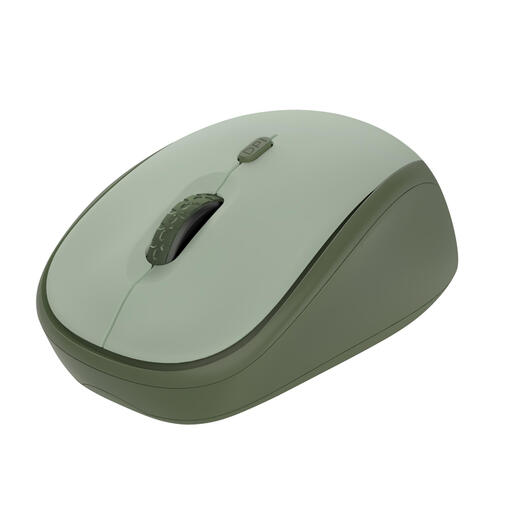
Why it suits this profile: A compact wireless mouse for everyday work, studying and use on the go. According to the product information, the RF receiver works directly via USB, and the mouse is compatible with Windows, macOS and ChromeOS.
The specifications list quiet buttons, adjustable DPI from 800 to 1600 and a range of up to 8 metres. The receiver can be stored inside the mouse.
84 grams, optical sensor, three buttons and, according to Trust, up to 12 months of battery life.
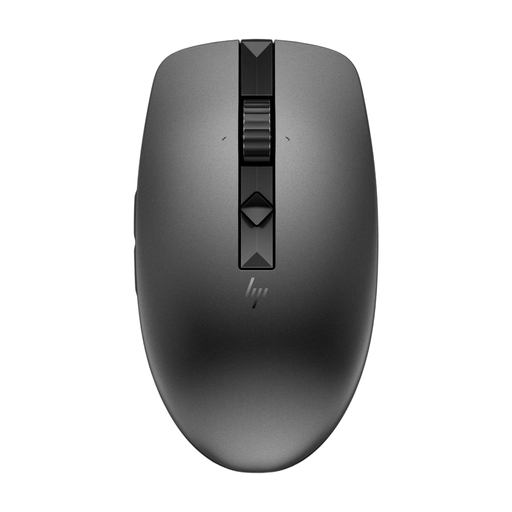
Why it suits this profile: Ideal for home workers and professionals who regularly switch between a laptop, desktop computer and another device.
According to HP, the mouse combines RF with Bluetooth and supports pairing with multiple devices. This makes you less dependent on a single USB port.
Four programmable quiet buttons, adjustable scrolling speed and, according to the product information, up to 12 months of battery life.
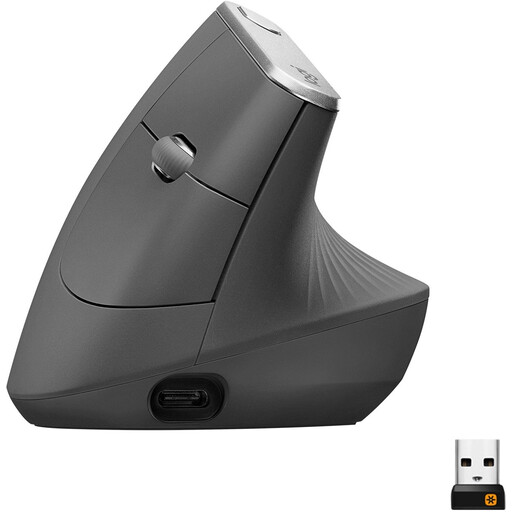
Why it suits this profile: A right-handed vertical mouse for users who spend many hours in front of a screen and want to consciously try a different grip.
The shape and right-handed orientation are clearly stated. Do check that the vertical grip suits your hand and working style before ordering.
Bluetooth and 2.4GHz connection, adjustable DPI up to 4000 and a rechargeable battery according to the product specifications.
We have put together a complete, up-to-date list of products that fully meet these strict selection criteria and the applicable European safety regulations.
When buying, also pay attention to the statutory guarantee. Consumers in the European Union are covered by statutory conformity rights; the precise rights depend on the circumstances and national regulations. Keep your proof of purchase and check the safety information for batteries and small USB components.
Yes. A mouse with a USB receiver usually uses its own 2.4GHz connection. A Bluetooth mouse communicates directly with your computer’s Bluetooth connection. Wi-Fi is not required, but a USB model does need a free, compatible port.
This varies by model and usage. Product information for some models states 12, 18 or 24 months, but these are quoted figures under specific conditions. Automatic sleep mode and the on/off switch can help limit power consumption. With a rechargeable mouse, you should mainly consider the operating time per charge and the charging time.
Quiet mice reduce clicking noise, but are not completely silent. According to information from brands such as Logitech and HP, noise reduction can reach a stated percentage. Your experience depends on the surface, the type of button and how you click. For a shared workspace, a model with explicitly stated quiet buttons is a sensible choice.
