
Vandaag of morgen in huis

Kwaliteit gegarandeerd

Welkomstaanbiedingen ontgrendelen: GRATIS bezorging | Tot 80% korting | Gratis 30 dagen JoyPlus-proefperiode
Download de app
A wireless mouse gives you more freedom of movement at your desk, but not every model suits every laptop, workspace or game. A budget wireless computer mouse can be perfectly adequate for basic use, while a Bluetooth mouse or ergonomic mouse may be better suited to a particular way of working. However, if you only look at the appearance or a high DPI figure, you could end up with an awkward connection, a flat battery or the wrong shape.
DPI indicates how sensitively the cursor responds to movement. A high-DPI gaming mouse may sound appealing, but a high maximum setting does not automatically mean you will work or play more accurately. For office work and browsing, 1,000 to 3,200 DPI is often sufficient. For gaming, the weight, sensor, polling rate and shape are also important.
A mouse with a USB receiver usually works via 2.4 GHz and requires a free USB-A port. That is practical for a desktop computer, but less convenient with a slim laptop that only has USB-C ports. A Bluetooth mouse does not need a dongle, but your laptop or tablet must support Bluetooth. Models with both options are more flexible, especially when you switch between devices.
A mouse powered by AA or AAA batteries can last for months, but you will need to replace or recharge the batteries. A rechargeable mouse eliminates loose disposable batteries, but it needs to be connected to a cable in good time. So do not just check the stated battery life; also make sure you can continue using the mouse while it is charging.
For a permanent desktop setup, a 2.4GHz connection via a nano or micro USB receiver is often straightforward: plug it in and start using it. The Logitech M280, for example, has a wireless range of up to 10 metres and comes with a nano receiver. According to the product information, the mouse works without any additional software.
A multi-device mouse with Bluetooth and 2.4 GHz gives you more options. According to its specifications, the Trust Ozaa+ can be paired with up to three devices: one via the USB receiver and two via Bluetooth. That is practical if you use a laptop, desktop computer and tablet.
An optical mouse uses an optical sensor to register movement across a surface. When buying, look at:
For everyday use, three buttons and a scroll wheel are often enough. Programmable side buttons are useful for quick navigation or gaming, but add little if you do not use them.
A mouse should suit your hand and the way you hold it. Pay attention to its length, width, height and weight. A lightweight wireless gaming mouse can support fast movements, while a larger mouse with a rubberised grip offers more palm support.
A vertical or ergonomic mouse takes some getting used to. The Logitech MX Vertical has an angle of 57 degrees and is designed to be used with your hand in a more upright position. According to Logitech’s product information, its shape is intended to encourage a natural posture; this is not a medical guarantee and does not replace personalised ergonomic advice.
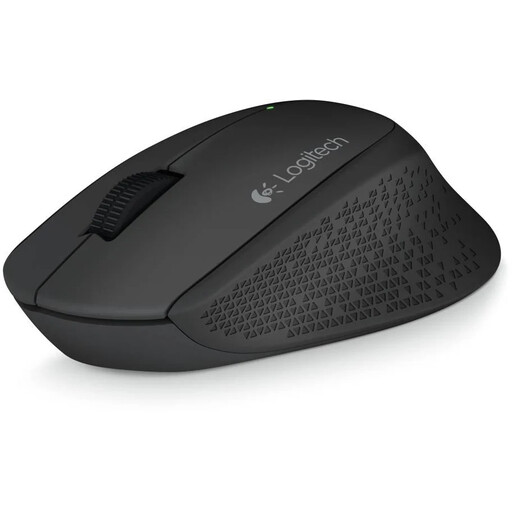
Why it suits this profile: A straightforward wireless computer mouse for home, office and everyday laptop use, without unnecessary features.
The specifications are easy to understand: a 1,000 DPI optical sensor, three buttons and a 2.4GHz receiver. You are not paying for features you do not need.
Rubberised grips, a weight of 81 grams and one AA battery included.

Why it suits this profile: Designed for people who spend a lot of time working at a screen and pay close attention to shape, control and multi-device functionality.
The vertical shape means you are not relying solely on a marketing term such as “ergonomic”: the angle, dimensions and right-handed design are clearly specified.
Bluetooth and 2.4GHz connectivity, adjustable up to 4,000 DPI and a rechargeable battery.

Why it suits this profile: For PC gamers looking for a lightweight wireless gaming mouse with programmable features and USB-C charging.
As well as the DPI figure, you can see other relevant details: a weight of 60 grams, five buttons, LIGHTSPEED wireless connectivity and a stated polling rate of 4,000 Hz.
HERO sensor according to the product description, USB-C charging and a low weight.

Why it suits this profile: A spacious mouse for anyone who switches between a laptop, PC and tablet every day and works with large spreadsheets.
The product information clearly states that this is a large model and less suitable for travelling or competitive gaming. This allows you to assess whether its shape suits your workspace.
Up to three devices, quiet buttons, horizontal scroll wheel and rechargeable battery.
We have put together a complete, up-to-date list of products that fully meet these strict selection criteria and the applicable European safety regulations.
Only if the model supports Bluetooth and your computer, tablet or laptop has Bluetooth. A mouse with a USB receiver uses a free USB port. A dual-mode model offers both connection options.
This varies by model, battery type and usage. According to the manufacturer, an AA-powered mouse can work for many months, while a rechargeable gaming mouse may have a stated battery life of several dozen to several hundred hours. Treat the battery life as a guide and recharge a built-in battery before it runs completely flat.
Yes, but for gaming, choose a model with a stable 2.4GHz connection, a suitable weight, adjustable DPI and, if required, a higher polling rate. Bluetooth is mainly useful for energy-efficient everyday use; competitive gamers generally choose a dedicated wireless gaming connection.
