
Vandaag of morgen in huis

Kwaliteit gegarandeerd

Welkomstaanbiedingen ontgrendelen: GRATIS bezorging | Tot 80% korting | Gratis 30 dagen JoyPlus-proefperiode
Download de app
A wireless mouse keeps your desk tidier and is useful with a laptop, PC or flexible workspace. However, models vary considerably in connectivity, shape, battery life and precision. A cheap wireless computer mouse may be perfectly adequate for occasional use, for example, but less suitable for long working days or multiple devices.
So don’t just focus on appearance or a high DPI rating. Above all, check how the mouse connects, whether its shape suits your hand and what you actually need.
A Bluetooth mouse connects directly to a device that supports Bluetooth. This is practical for laptops and tablets because you don’t need a spare USB port. A mouse with a 2.4GHz or RF receiver works via a small USB dongle. This can be useful with desktop PCs, but modern laptops sometimes have few USB-A ports.
Check the following in advance:
A multi-device mouse can switch between several paired devices, but Bluetooth support and the number of connections vary by model.
DPI determines how far the cursor moves when you move the mouse. A higher value does not automatically mean a better experience. For office work, a moderate, adjustable sensitivity is often sufficient. Gamers may want more control over DPI, polling rate and sensor response.
Pay attention to the difference between:
The surface remains important. Shiny or highly reflective surfaces can affect tracking.
An ergonomic mouse often has a specific shape, but that shape will not suit every hand. A vertical mouse also takes some getting used to and is usually designed for one hand. A compact ambidextrous mouse is more convenient for travel or shared workspaces, but may offer less palm support.
Consider:
A mouse can contribute to a comfortable working posture, but product shapes are no guarantee that physical complaints will be prevented or reduced.
For a wireless mouse for a laptop, Bluetooth is often practical. It leaves the USB port free and means you don’t need to carry a receiver. An RF mouse with a USB receiver is instead a straightforward choice for a PC or office computer.
Always check the operating systems listed. Windows, macOS, ChromeOS, iPadOS and Android are not supported by every model. With gaming mice, additional software may also only be available for Windows.
A model with AA or AAA batteries works straight away once the batteries have been inserted. Check whether batteries are included and whether you want to replace them regularly. A rechargeable mouse eliminates the need for loose batteries, but you do need to connect it to the cable in good time.
Long battery life is particularly relevant if you use the mouse every day. Also check whether the stated duration is a manufacturer’s specification. According to Logitech’s own information, for example, the M330 can run for up to 24 months on a single battery; actual battery life depends on usage and settings.
A silent mouse is useful in a library, shared office or home office where other people may be disturbed by clicking sounds. Check whether only the main buttons are silent or whether the scroll wheel is quiet too.
Extra buttons are useful for browser navigation, spreadsheets or games, but may be unnecessary for straightforward word processing. A horizontal scroll wheel, as found on some office-focused models, is particularly useful for wide tables and timelines.
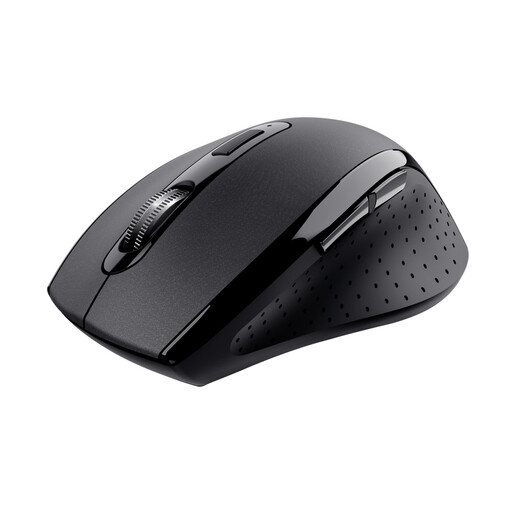
Why it suits this profile: This wireless mouse is designed for everyday home and office work and uses a USB receiver with a range of up to 10 metres according to the product specifications.
The specifications mention an optical sensor, adjustable 1500 DPI and a stowable micro-USB receiver. However, check that the receiver is compatible with your computer’s port.
6 buttons, optical tracking and a wireless range of up to 10 metres; operates on 2 AAA batteries.
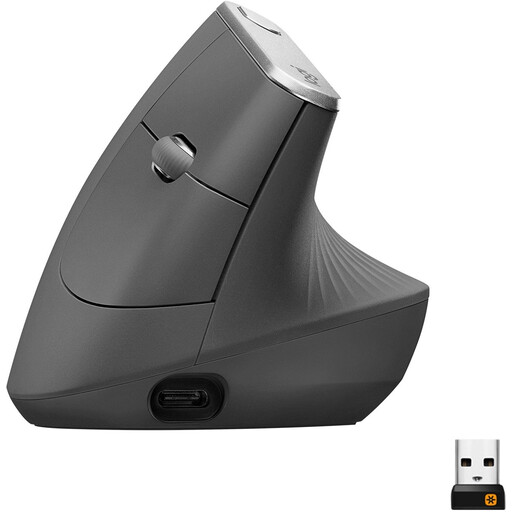
Why it suits this profile: The vertical shape, Bluetooth and USB receiver connectivity, and rechargeable battery are well suited to professionals who spend a lot of time working at a computer.
The hand orientation is listed as right-handed. This means it is not a universal choice, so check that the vertical grip suits your hand and working style.
Adjustable sensor up to 4000 DPI, Bluetooth, USB receiver and a rechargeable battery.
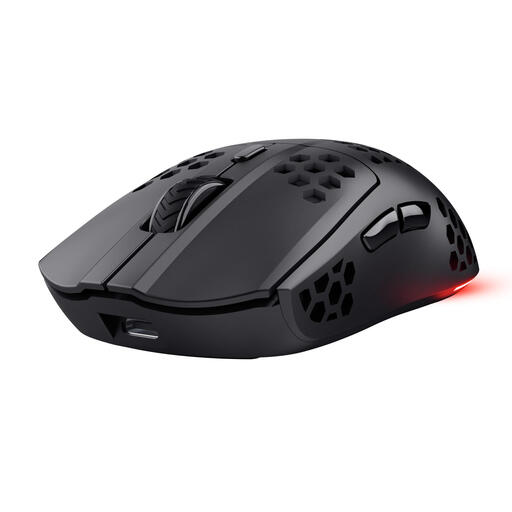
Why it suits this profile: This wireless gaming mouse is designed for PC and laptop gamers looking for low weight, programmable buttons and a fast 2.4GHz connection.
The sensor setting is not merely high: the mouse lists adjustable values from 800 to 4800 DPI and a polling rate of 1000 Hz. However, the shape is right-handed.
Approximately 75 grams, 6 programmable buttons, USB-C charging and a stated battery life of up to 80 hours.
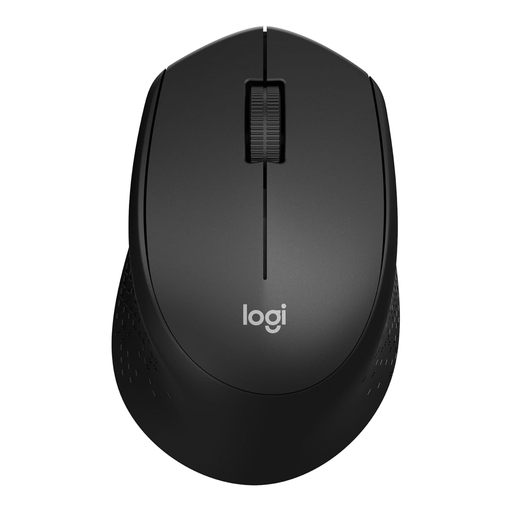
Why it suits this profile: A simple silent mouse with a USB receiver is well suited to working from home, studying and shared workspaces.
The product information mentions quiet clicks and a nano receiver. According to Logitech’s own research, the clicking sound is up to 90% quieter than with traditional mice; this is a brand claim, not a universal guarantee.
Optical tracking, 3 buttons and a stated battery life of up to 24 months.
We’ve put together a complete, up-to-date list of products that fully meet these strict selection criteria and the applicable European safety regulations.
Not necessarily. Bluetooth saves a USB port and is convenient for laptops, tablets and smartphones. A USB receiver can provide a stable, straightforward connection for a PC. Choose based on the ports and devices you use.
This depends on the model, battery type and how you use it. Manufacturers often state a maximum battery life. You need to charge a rechargeable mouse periodically; a model with AA or AAA batteries will keep working as long as you have replacement batteries available.
Many models support both systems, but check this for each product. Also pay attention to additional software: features such as button programming or DPI profiles may be limited to one operating system.
