
Vandaag of morgen in huis

Kwaliteit gegarandeerd

Welkomstaanbiedingen ontgrendelen: GRATIS bezorging | Tot 80% korting | Gratis 30 dagen JoyPlus-proefperiode
Download de app
A wireless mouse keeps your desk tidy and gives you more freedom to move. However, not every model is right for everyday work, a laptop or gaming. A compact model may feel uncomfortable after a few hours, while a gaming mouse can have more buttons and lighting than you need for the office.
So don’t focus solely on DPI, RGB lighting or a well-known brand. The most important things to consider are hand shape, connection, power and how you plan to use it.
A high DPI value means the cursor moves further with a small hand movement. That doesn’t automatically make it more accurate or comfortable. For office work, an adjustable setting of around 800 to 2,400 DPI is often practical. Gamers may need higher settings, but the sensor, polling rate and software support are what really matter.
So check whether the mouse has adjustable DPI and whether its available settings are clearly listed.
A mouse that’s too small can make you grip it tensely. A larger model may be harder to move around. Check its length, width, height and weight. Also make sure it’s designed for right- or left-handed use.
A left-handed mouse such as the Logitech Signature M650 L Left isn’t simply a standard model with its design mirrored. Its shape, thumb buttons and palm support are specifically designed for left-handed use.
A Bluetooth mouse is handy for laptops and tablets because it doesn’t need a USB receiver. A 2.4GHz connection with a USB receiver often makes for easy plug-and-play use with a PC or laptop. Just check that your device has a spare USB port and supports Bluetooth.
Some models offer both options. This is useful if you switch between a laptop, desktop and tablet. A wireless gaming mouse may also have a wired mode for charging or low-latency use.
As well as checking the connection type, see how many devices you can pair with the mouse. Models with both Bluetooth and a USB receiver offer more flexibility. The stated range, often 8 to 10 metres, is a guide. Walls, metal surfaces and other wireless devices can affect the connection.
For office work, a stable connection is usually more important than an extremely high polling rate. For gaming, a model with 2.4GHz, Bluetooth and USB-C can be a practical choice.
A mouse powered by AA or AAA batteries can run for a long time without needing to be charged. For example, the Logitech M330 Silent Plus is listed as having a battery life of up to 24 months. This figure comes from the product description and depends on how the mouse is used. The Logitech Signature M650 L is listed as lasting up to two years on a single AA battery.
A rechargeable mouse means you don’t need spare batteries. Check the stated battery life, charging time and whether you can keep using the mouse while it charges. According to its product information, the Trust Bayo II offers up to three months’ use per charge and a quick-charge feature. These are product specifications, not a guarantee for every use case.
If you do a lot of typing or work in a shared space, a quiet mouse may be a good choice. Brands use their own technologies to reduce noise. According to Logitech, SilentTouch reduces clicking noise by up to 90 per cent on the Signature M650 L. The M330 Silent Plus is also listed as reducing noise by more than 90 per cent. Treat these as manufacturer claims, and focus on whether the mouse feels comfortable to click in practice.
An ergonomic mouse or vertical mouse often encourages a different hand position from a standard model. For example, the Trust Bayo II and Logitech MX Vertical have a vertical angle of around 57 degrees. This shape takes some getting used to and won’t suit every hand or working style. You shouldn’t attribute medical benefits to a product if you already have discomfort. Choose a position that feels comfortable for you, and speak to a healthcare professional if your symptoms persist.
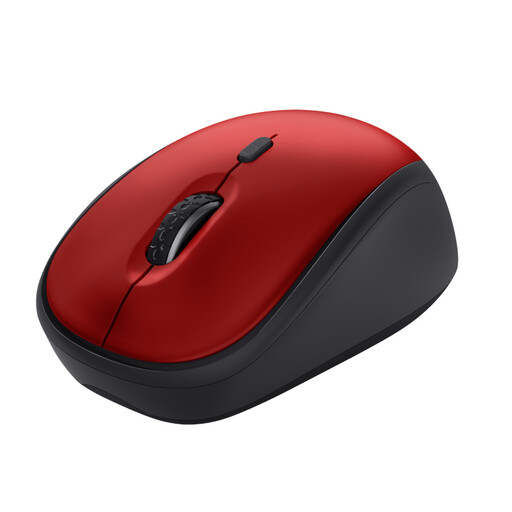
Why it suits this user: The compact Trust Yvi+ is designed for everyday office work and use on the go. Its 2.4GHz receiver makes setup simple.
The product information lists quiet buttons, adjustable DPI from 800 to 1600 and battery life of up to 12 months.
Lightweight and compact; suitable for left- and right-handed use according to the product details.

Why it suits this user: This model is designed for professionals who regularly switch between documents, spreadsheets and multiple devices.
The specifications list Bluetooth, Logi Bolt, connection to up to three devices and a rechargeable battery.
8,000 DPI, a horizontal scroll wheel, eight programmable buttons and support for use on glass, according to the product details.

Why it suits this user: For gamers who want to play wirelessly and value a light weight, high sensor settings and programmable buttons.
The mouse can be used wirelessly or with a cable, and has a rechargeable battery. Razer lists battery life of up to 90 hours.
A stated weight of 63 grams, up to 30,000 DPI and a polling rate of up to 1,000 Hz.
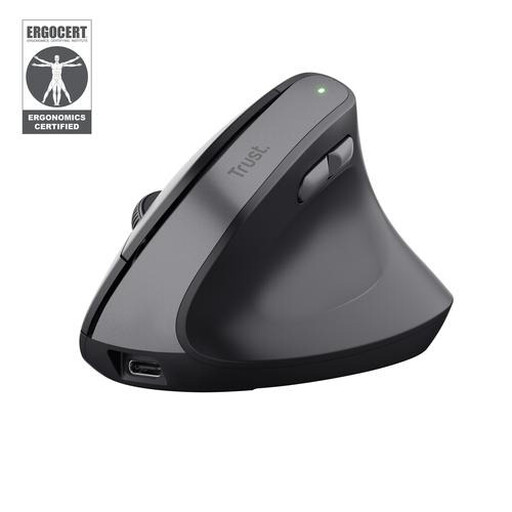
Why it suits this user: Its vertical shape and right-handed design are intended for users who want a different grip during long working or study days.
The product information clearly lists a 57-degree angle, quiet buttons and adjustable DPI from 800 to 2400.
Rechargeable, with two thumb buttons and a USB receiver that can be stored inside the mouse.
We’ve put together a complete, up-to-date list of products that meet these strict selection criteria and current European safety regulations.
Not every mouse will work without checking first. For Bluetooth, your device needs Bluetooth support. A model with a USB receiver needs a compatible USB port. Also check which operating systems are supported, especially if you’re using macOS, ChromeOS, Android or a tablet.
Battery life varies by power type and model. Manufacturers sometimes list 12 to 24 months for battery-powered models, and several weeks to months per charge for rechargeable mice. Power-saving features, lighting and intensive use can all affect battery life. Also check whether replacement batteries are available. Recharge an integrated lithium battery using the supplied cable or a suitable alternative.
Yes, but choose a model with a stable 2.4GHz connection, a suitable polling rate, adjustable DPI and enough buttons. A standard wireless computer mouse is fine for strategy games, admin and everyday use, but may offer fewer settings than a wireless gaming mouse. For office work, quiet clicks and comfort are often more important than an extremely high DPI value.
