
Vandaag of morgen in huis

Kwaliteit gegarandeerd

Welkomstaanbiedingen ontgrendelen: GRATIS bezorging | Tot 80% korting | Gratis 30 dagen JoyPlus-proefperiode
Download de app
A wireless mouse might seem simple to choose, but the differences often come down to the details. For example, a model may support Bluetooth but not be compatible with every device. A mouse with a USB receiver can be inconvenient if your laptop only has USB-C ports. And a long battery life is not much use if the shape doesn’t feel comfortable in your hand.
This buying guide will help you assess the key specifications and avoid paying for features you won’t use.
A Bluetooth mouse doesn’t need a separate dongle, but your device must support Bluetooth. Check the version and operating system too. Some models are designed mainly for Windows, while others work with Mac and Windows, ChromeOS, iPadOS or Android.
A mouse with a USB receiver will usually connect easily via USB-A, but you may need an adapter for a modern laptop. A model with both RF and Bluetooth gives you more flexibility, especially if you switch between a laptop, desktop and tablet.
DPI determines how quickly the cursor moves across the screen. For office work, an adjustable range up to, for example, 1600, 3200 or 4000 DPI is often enough. A gaming mouse may offer a much higher resolution, but that’s mainly useful for certain games, large screens or precision creative work.
Also consider the sensor and how easy it is to adjust the speed in practice. A high DPI figure won’t automatically make a mouse more comfortable to use if the software settings aren’t up to scratch.
Brands sometimes quote a battery life of several months or even years. This depends on how you use the mouse, its connection type and its settings. According to Logitech product information, the M330 Silent Plus can run for up to 24 months on batteries, while the Logitech MX Master 4 for Mac offers up to 70 days per charge according to the manufacturer. These are quoted figures; your actual battery life may vary.
Also consider the difference between a rechargeable mouse and a model with replaceable AA or AAA batteries. A built-in battery is convenient, but will eventually need charging via USB. Replaceable batteries are handy if you want to carry on working straight away.
Choose Bluetooth if you want to keep a USB port free and your laptop or tablet supports it. A mouse for Mac and Windows can be useful in a mixed-device workplace, but always check the stated system requirements.
RF uses a USB receiver and is often simple to set up, with no extra steps. A multi-device mouse lets you pair several devices and switch between them at the touch of a button. Check:
A compact mouse is easy to carry around, but may offer less support if you have larger hands. A larger, right-handed shape usually supports your palm differently from an ambidextrous model. An ergonomic mouse or vertical mouse may encourage a different wrist position, but it can take some getting used to.
Check the dimensions, weight and hand orientation. A vertical mouse, for example, isn’t necessarily suitable for both left- and right-handed use. If you have limited desk space, you could also consider a trackball, as the mouse itself barely needs to move.
A quiet mouse is handy in a shared workspace or during online meetings. Check whether the quiet operation only applies to the main buttons. Programmable buttons can be useful for shortcuts, photo editing and spreadsheets, but are less important for basic web browsing.
A horizontal scroll wheel is useful for wide spreadsheets, timelines and large images. For long documents, a free-spinning scroll wheel can save time. Also check whether the features work without extra software.
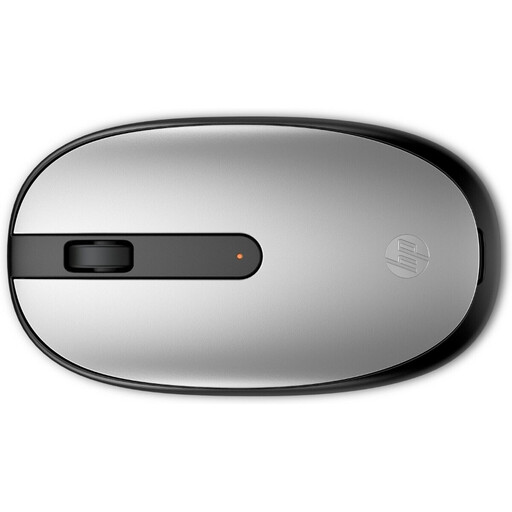
Why it suits this profile: This straightforward Bluetooth mouse is suitable for everyday office and laptop use, without a separate dongle. According to the product specifications, it works with Windows, macOS and ChromeOS.
It connects via Bluetooth 5.1, so you won’t need to carry a USB receiver. The mouse has three buttons and a 1600 DPI optical sensor.
It has an ambidextrous design, weighs 54.2 grams and, according to the product information, offers up to 15 months of battery life on an AA battery.
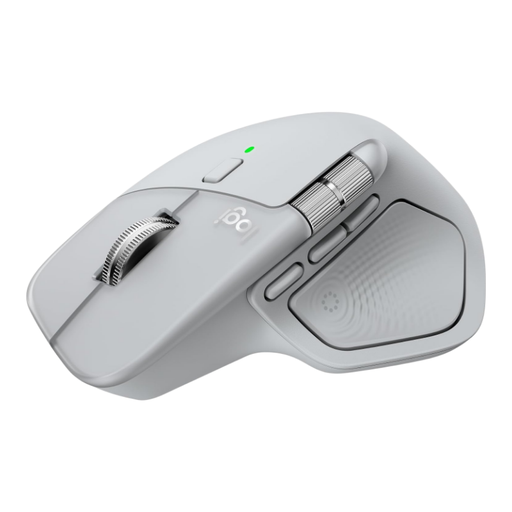
Why it suits this profile: According to the product information, this model is designed for long hours of office and productivity work. It has several programmable buttons and supports up to three devices.
You’re not limited to a single connection: Bluetooth and a Logi Bolt USB-C receiver are both available. Check that your device has the right port.
8 programmable buttons, a horizontal scroll wheel, adjustable DPI up to 8000 and a built-in USB-C rechargeable battery.

Why it suits this profile: According to the manufacturer, this gaming mouse is designed for fast, responsive control. It weighs around 53 grams, has an adjustable sensor up to 26,000 DPI and offers plenty of programmable features.
As well as wireless 8K polling, the specifications list a USB connection. That means you can switch to a wired connection if the battery runs flat or in certain situations.
10 programmable buttons, macro support and, according to the manufacturer, up to 750 hours of battery life at 1000 Hz.
If you mainly work in an office, you could also consider a quiet mouse such as the Trust Ozaa+ or Logitech M330 Silent Plus. The Trust Ozaa+ combines RF and Bluetooth, supports up to three devices and has an extra scroll wheel for horizontal scrolling through documents. If you’re looking for a different hand position, the Logitech MX Vertical and Logitech ERGO M575S are worth considering. A trackball such as the M575S takes up very little desk space.
For use on the go, Microsoft Surface Arc models are worth a look thanks to their flat design and Bluetooth connection. If you’re after a straightforward wireless computer mouse without lots of settings, consider the HP 635 Multi-Device Wireless Mouse. According to the product information, this model has four quiet, programmable buttons, connects to multiple devices and uses a replaceable battery.
We’ve put together a complete, up-to-date list of products that meet these strict selection criteria and the applicable European safety regulations.
No. A Bluetooth mouse requires Bluetooth support, while an RF model needs a suitable USB port or adapter. Check compatibility with Windows, macOS or ChromeOS before you order.
It varies by model. Product information may quote several months for a rechargeable mouse or more than a year for one with replaceable batteries. Heavy use, lighting and wireless technology all affect actual battery life.
It can be, but when choosing a gaming mouse, look at the polling rate, sensor, weight, DPI settings and connection options. For office work, quiet buttons, comfort and battery life are usually more important than an extremely high DPI.
