
Vandaag of morgen in huis

Kwaliteit gegarandeerd

Welkomstaanbiedingen ontgrendelen: GRATIS bezorging | Tot 80% korting | Gratis 30 dagen JoyPlus-proefperiode
Download de app
A wireless mouse gives you a clutter-free desk and more freedom of movement. However, it’s not wise to focus solely on the price, the look, or a high DPI number. A mouse that looks comfortable in a product photo can turn out to be too big in practice, lose connection easily, or become awkward after a short time.
Joybuy’s Product Recommendation Officer is here to help you assess the key specifications of a wireless computer mouse. That way, you can avoid paying for features you’ll never use.
DPI tells you how far the cursor moves for a given physical movement of the mouse. A high-DPI mouse can be handy for large screens or fast gaming movements, but a higher value isn’t automatically more comfortable or more accurate for office work. For documents, spreadsheets and web pages, a stable sensor and a suitable shape are often far more important.
Many mice are designed for right-handed use. A left-handed user may therefore get less support or find the buttons awkward to operate. Hand size also matters. Always check the dimensions, weight and stated hand orientation.
An ergonomic mouse or vertical mouse can encourage a different posture, but it remains a personal choice. A vertical shape feels different at first and doesn’t suit every grip.
A Bluetooth mouse uses the device’s battery or built-in cell. A model with a 2.4GHz radio usually works via a USB receiver. Both options have advantages, but check beforehand whether your laptop has enough USB ports and whether the mouse is compatible with your operating system.
Also pay attention to the difference between a rechargeable mouse and a model that uses AA batteries. A built-in rechargeable battery saves you from buying loose batteries, while a replaceable battery can be handy if you don’t have a charging cable with you on the go.
A Bluetooth mouse is practical for laptops, tablets and computers that support Bluetooth. You won’t need a separate dongle. An RF or 2.4GHz connection typically uses a USB receiver and can be a straightforward solution for desktop computers.
If you want to switch between work and personal devices, look for support for multiple devices. Some models can remember two or three devices. Do check whether all connection methods are available simultaneously or whether you need to switch manually.
An optical mouse uses an LED or optical sensor to track movement. Don’t just look at the maximum DPI; also consider the adjustability. A range of, say, 800 to 2400 DPI is usually sufficient for standard office work. Gaming models often offer much higher values and extra settings, but those features are mainly relevant for fast-paced games or specific workflows.
A glass or glossy surface can affect the tracking of some optical sensors. If in doubt, use a standard mouse mat. In the product description of certain laser models, it states that they can also work on glass; treat this as a product specification from the brand and check compatibility with your own workspace.
An office mouse should feel comfortable in the hand during prolonged use. A thumb rest, rubberised sides and a suitable weight can make daily use more pleasant. Programmable buttons are useful for shortcuts, back-and-forward navigation or creative software.
A silent mouse can be a good fit for a shared workspace or home office. Bear in mind that “silent” usually refers to the click sounds and not automatically to the scroll wheel. Claims about noise reduction come from the brand’s product information, not from a general guarantee for every usage scenario.
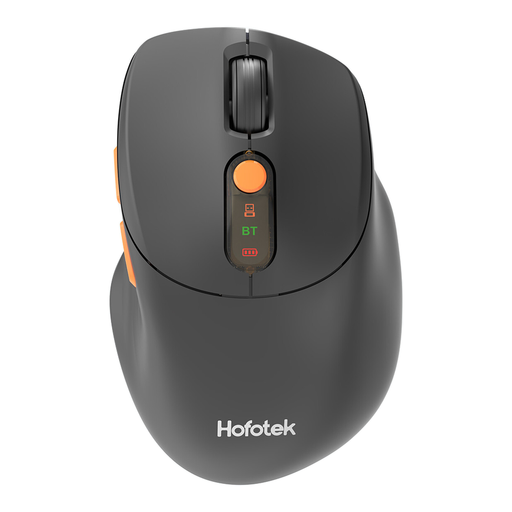
Why this fits the profile: This compact mouse is designed for everyday office and laptop use and supports both 2.4GHz and Bluetooth.
The DPI is adjustable from 800 to 4000, and you’re not reliant on just one connection type.
62 grams, support for up to three devices according to the product description, and a silent click function.
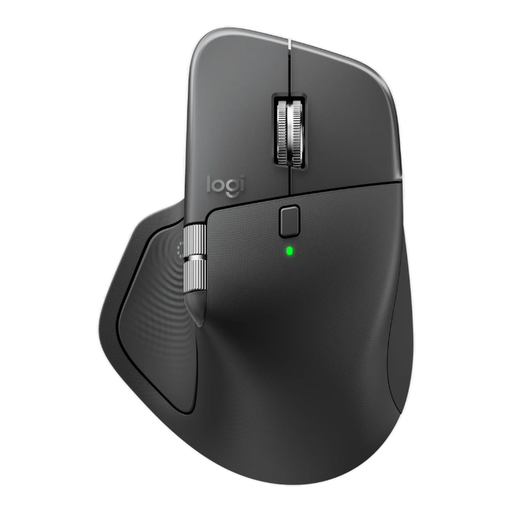
Why this fits the profile: A right-handed mouse with plenty of customisation options for office work, creative programmes and multiple devices.
The shape, thumb rest and buttons are clearly specified, so you don’t have to rely solely on general comfort claims.
8 programmable buttons, adjustable 8000 DPI, Bluetooth and Logi Bolt, plus a built-in rechargeable battery.
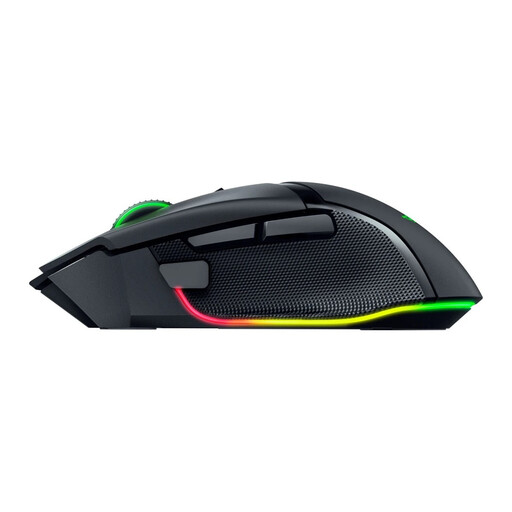
Why this fits the profile: This gaming mouse is aimed at users who need plenty of buttons, high adjustability and wireless flexibility.
The 2.4GHz, Bluetooth and wired connections are listed separately, so you can choose the mode you prefer.
35,000 DPI according to the product specifications, 11 programmable buttons and an ergonomic right-handed shape.
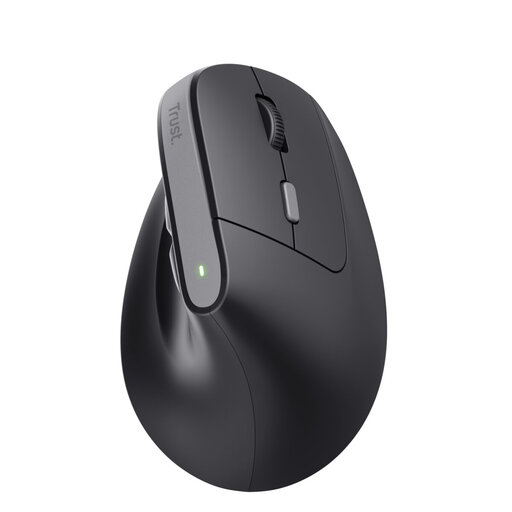
Why this fits the profile: The vertical shape with a 57-degree angle is designed for right-handed users who want to try a different grip during office work.
The hand orientation, shape, DPI steps and connection via USB receiver are all clearly stated.
Rechargeable battery, adjustable from 800 to 2400 DPI, six buttons and two silent main buttons according to the product description.
We’ve put together a full, up-to-date list of products that fully meet these strict selection criteria and comply with current European safety regulations.
Not automatically. A Bluetooth mouse works with a laptop that supports Bluetooth. An RF mouse usually needs a free USB port for the receiver. Also check whether Windows, macOS, Chrome OS, Android or iPadOS is supported.
This varies by model and usage. A mouse with AA batteries can last a long time according to the product specification, while a rechargeable mouse needs to be charged regularly via USB-C or another charging cable. RGB lighting, high polling rates and intensive use can affect battery life.
Yes, provided the connection, polling rate, sensor and shape suit your games. For fast competitive games, users often choose a 2.4GHz or wired mode with a high polling rate. For general gaming and office work, a Bluetooth mouse can be sufficient. Also check the weight, button layout and software requirements before you buy.
