
Vandaag of morgen in huis

Kwaliteit gegarandeerd

Welkomstaanbiedingen ontgrendelen: GRATIS bezorging | Tot 80% korting | Gratis 30 dagen JoyPlus-proefperiode
Download de app
A wireless mouse keeps your desk tidier and is convenient for a laptop, PC, Mac or tablet. However, not every wireless model is suitable for extended work or gaming. A low price may, for example, come with a small body, limited compatibility or a battery that needs frequent replacement.
As a Joybuy Product Recommendation Officer, I focus primarily on verifiable specifications. Below, you’ll find what to look for in a Bluetooth mouse, ergonomic mouse, silent mouse or wireless gaming mouse.
DPI indicates how sensitive the sensor can be set. A mouse with 10,000 or 30,000 DPI isn’t automatically more accurate for everyday use. For office work, an adjustable setting between approximately 800 and 4,000 DPI is often more practical. Gamers may need higher settings, but polling rate, sensor tracking and the shape of the mouse matter too.
So pay attention to:
A wireless mouse usually works via Bluetooth, a 2.4GHz USB receiver or both. Bluetooth is useful for a laptop without a spare USB port. A USB receiver can provide a stable connection, but it does take up a port. Some models also support a wired connection via USB-C.
Check the following before buying:
For example, the ET Wireless Gaming Mouse states that its software for macros and button settings only works on Windows and in wired mode. This is important if you mainly want to use the mouse with a Mac or laptop via Bluetooth.
A vertical mouse or ergonomic mouse may feel different from a traditional model. The hand position, width, height and support for your thumb or little finger determine whether the mouse is comfortable to use. A large body isn’t automatically suitable for small hands.
Pay attention to the dimensions and weight. A compact mouse is easy to carry around, but may provide less support for larger hands. A heavier model can feel more stable, while a lightweight one is useful for quick movements and travelling.
A silent mouse is practical in a shared workspace, library or home office. You should also look for:
A model with an AA battery can run for a long time without charging, but it does involve ongoing costs. A rechargeable mouse avoids disposable batteries, although its built-in battery will have a limited lifespan over time.
A multi-device mouse is ideal if you use, for example, a laptop, desktop computer and tablet. Check how many devices can be paired simultaneously and how switching works. Some mice support up to three devices via Bluetooth and a receiver.
A mouse for Mac and PC must not only be physically compatible. Check that all buttons and software functions are available on both systems too. A mouse with USB-C is convenient for modern laptops, but check whether the cable, receiver or adapter is actually included.
A wireless gaming mouse may offer extra buttons, RGB lighting, a high polling rate and adjustable DPI. A programmable mouse is also useful for video editing, spreadsheets and graphics software.
RGB lighting is primarily a visual feature. According to the manufacturer’s own information, the ET Wireless Gaming Mouse offers 16.8 million colour options and seven lighting effects. This says nothing about the sensor or comfort. Treat RGB as an added feature, rather than a reason to choose a model with less suitable ergonomics.
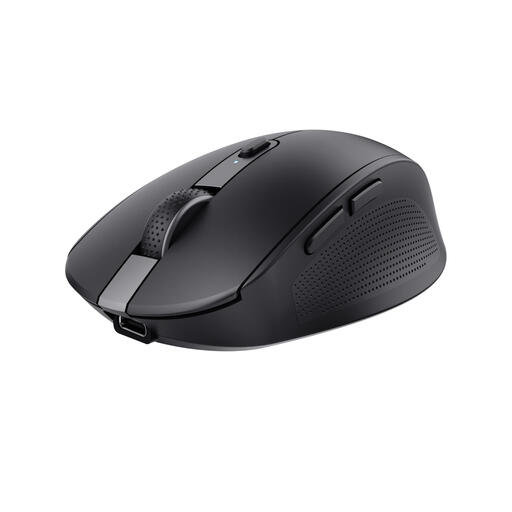
Why it suits this profile: This right-handed mouse combines Bluetooth with a USB receiver. Its built-in battery and silent buttons make it suitable for everyday office and laptop use.
The specifications list both USB and Bluetooth connectivity, USB-C charging and connections with up to three devices.
Optical sensor, six buttons, adjustable DPI and a stated battery life of up to one month.

Why it suits this profile: This model is designed for productivity, with multiple buttons, horizontal scrolling and connections with up to three devices.
You get both Bluetooth and a Logi Bolt receiver, along with USB-C charging. However, check that your laptop has the correct USB port.
8,000 DPI, eight programmable buttons, a rechargeable battery and silent clicking according to the product specifications.

Why it suits this profile: Ideal for gamers and users who need three connection options: 2.4GHz, Bluetooth and wired via USB-C.
The wired backup means you won’t be left without a connection if the battery runs flat. Please note: according to the description, the configuration software is limited to Windows.
Adjustable DPI up to 10,000, four polling rates, eight programmable buttons and RGB lighting.
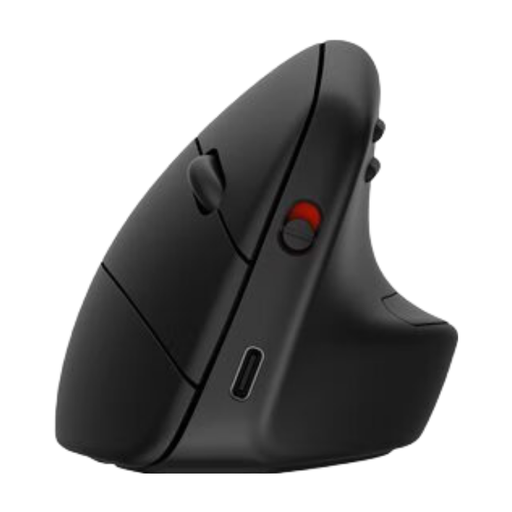
Why it suits this profile: The vertical design, detachable wrist rest and combination of Bluetooth 5.3 and RF are well suited to extended office work.
The product specifications list a USB-C charging port, a built-in battery and support for up to three devices.
4,000 DPI, six buttons, a rechargeable battery and support for Windows, Mac and ChromeOS.
We’ve put together a complete, up-to-date list of products that fully meet these strict selection criteria and the applicable European safety regulations.
No. The laptop must support Bluetooth and have the correct operating system. Also check whether the manufacturer offers all the features for your system. A model with a USB receiver can be an alternative if Bluetooth isn’t available.
Battery life depends on the type of power source, connection method and usage. Manufacturers often state a maximum battery life under specific conditions. A rechargeable mouse needs to be charged regularly; with a model using AA or AAA batteries, the cost depends on how often you replace them.
It can be, particularly when the model offers a stable 2.4GHz connection, low latency, adjustable DPI and an appropriate polling rate. For competitive gaming, a wired mode can be a useful backup. Also consider the weight, grip and number of programmable buttons, rather than focusing solely on RGB lighting or a high DPI rating.
