
Vandaag of morgen in huis

Kwaliteit gegarandeerd

Welkomstaanbiedingen ontgrendelen: GRATIS bezorging | Tot 80% korting | Gratis 30 dagen JoyPlus-proefperiode
Download de app
A wireless mouse gives you more desk space and is handy with a laptop, home office or flexible workspace. But it’s not a good idea to look only at the price, DPI or eye-catching design. A mouse may seem packed with features on paper, yet prove impractical in everyday use.
The most common buying mistakes come down to three pitfalls:
A Bluetooth mouse is practical for laptops and tablets because you don’t need a USB receiver. Check that your device supports Bluetooth and that the operating system is compatible. Some models combine Bluetooth with a 2.4GHz USB receiver. This is handy if you switch between a laptop, desktop and tablet.
Also look out for:
A multi-device mouse is especially useful if you regularly switch between your work computer and personal laptop. Check how you switch between devices and whether all functions are available on each operating system.
An ergonomic mouse should first and foremost suit your hand size and the way you work. Check the mouse’s length, width and height. A large model with a thumb rest can be comfortable for larger hands, while a compact mouse is easier to carry around.
A vertical mouse places your hand in a different position. According to Logitech, the 57-degree angle on models such as the Lift and MX Vertical is designed to make the hand position feel more natural. This is a product design claim by the brand, not a guarantee of a particular physical effect. If you’re unsure, take time to get used to the new shape and keep your wrist relaxed.
Left-handed? Don’t rely on the product photo alone. Check the left-handed/right-handed specification explicitly. The Logitech Signature M650 L, for example, is designed for left-handed use and has a larger body.
A mouse runs on replaceable batteries or a built-in rechargeable battery. A rechargeable mouse means you won’t need to replace batteries regularly, but you will need to charge it in good time. If a model uses AA or AAA batteries, it’s handy to keep a spare set to hand. Remove the batteries if you won’t be using the mouse for a long time, to prevent leakage.
A quiet mouse is suitable for a shared workspace, library or home office. Pay attention to the wording: “quiet click” generally means less clicking noise, not that the mouse is completely silent. According to Logitech, SilentTouch reduces clicking noise on certain models to the level stated by the brand. Check whether the scroll wheel is quiet too.
DPI determines cursor sensitivity. For office work, an adjustable setting between, for example, 1,000 and 4,000 DPI is often sufficient. A mouse with adjustable DPI offers more flexibility for large screens, photo editing or different working styles. An extremely high DPI isn’t automatically useful for everyday use.

Why it suits this type of user: This model combines a wireless USB connection with Bluetooth, and works with laptops, desktops and tablets. Its shape is designed for office work and working with wide documents.
The specifications list support for up to three devices, quiet buttons and a rechargeable battery. That means you don’t have to choose between several separate mice or keep buying new batteries.
Adjustable DPI up to 3200, horizontal scroll wheel, six buttons and USB charging while in use.

Why it suits this type of user: A business-ready choice for anyone who works extensively with documents and spreadsheets, uses multiple devices and wants to customise extra buttons.
The built-in rechargeable battery means you won’t need separate batteries. The product specifications also list USB-C, Bluetooth, a receiver and multi-device control.
8,000 DPI, customisable buttons, horizontal scrolling, quiet clicks and a rechargeable battery.
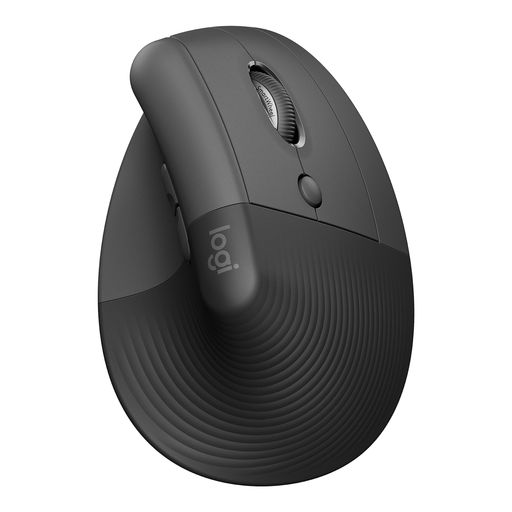
Why it suits this type of user: This vertical mouse is designed for right-handed users with small to medium-sized hands who want to try a different hand position.
The shape, handedness and recommended hand size are clearly described. This helps you avoid buying a vertical mouse that doesn’t suit your hand.
Bluetooth and USB receiver, 4,000 DPI, customisable buttons, quiet clicks and a battery life of up to two years according to the product specifications.
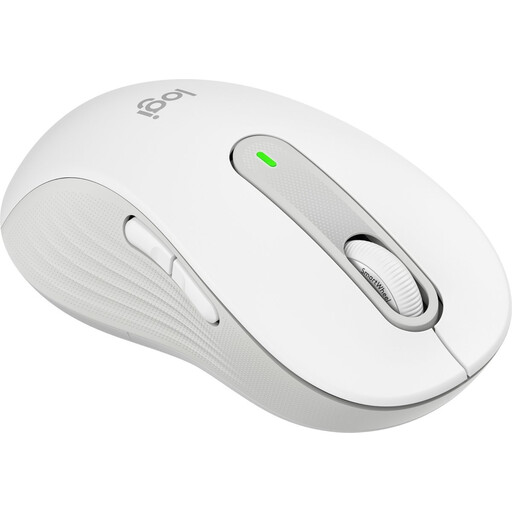
Why it suits this type of user: Its left-handed shape and larger body suit users who work on a laptop for long periods at the office or at home.
It is explicitly listed as left-handed. You can also choose between Bluetooth Low Energy and the Logi Bolt receiver.
5 buttons, an optical sensor with 2,000 DPI, a rubber grip and SilentTouch technology for quieter clicks, according to Logitech.
We’ve put together a complete, up-to-date list of products that meet these strict selection criteria and comply with current European safety regulations.
No. A Bluetooth mouse requires Bluetooth support on your laptop. A model with a USB receiver needs a free USB port. Also check the stated operating system and any minimum Bluetooth version.
It varies by model and usage. Product specifications give battery life ranging from a few months to around two years at most. For a rechargeable mouse, usage time depends on the battery and how many hours you work each day. A battery indicator helps prevent the mouse from running out unexpectedly.
Not necessarily. A vertical mouse has an unusual shape and may feel less familiar at first. Check whether it’s designed for your hand, along with hand size, dimensions and the position of the thumb rest and buttons. Above all, choose a model that suits your working posture and desk setup.
