
Vandaag of morgen in huis

Kwaliteit gegarandeerd

Welkomstaanbiedingen ontgrendelen: GRATIS bezorging | Tot 80% korting | Gratis 30 dagen JoyPlus-proefperiode
Download de app
A wireless mouse keeps your desk tidy and is a handy partner for your laptop. Even so, a high DPI figure or long battery life doesn’t automatically mean a model suits the way you work. A compact mouse can be great on the go, yet less comfortable during long workdays. And a Bluetooth mouse will only run smoothly if your laptop or tablet supports the right Bluetooth version.
The Joybuy Product Recommendation Officer sums up the key things to consider. That way you compare a wireless computer mouse on qualities that really matter in everyday use.
DPI shows how sensitively the cursor reacts to movement. A higher number doesn’t automatically mean more accuracy. For word processing, email and spreadsheets, an adjustable value between roughly 800 and 1600 DPI is usually enough. For large screens or quick navigation, a higher setting can help.
So check whether the mouse offers multiple DPI levels and how you switch between them. A mouse with adjustable DPI is more versatile than a model with just one fixed sensitivity.
A Bluetooth mouse usually doesn’t need a USB receiver. That’s practical with a slim laptop that has few USB ports. A model with a 2.4GHz receiver, on the other hand, often works straight away via plug-and-play, but does require a free USB port.
Some models offer both options. A multi-device mouse can then be paired with several computers, tablets or laptops. Check in advance how many devices are actually supported and whether you switch via a button.
Shape, dimensions and hand orientation determine whether a mouse feels comfortable. A large right-handed mouse isn’t ideal for someone with small hands or a preference for a symmetrical model. A vertical ergonomic mouse also takes getting used to, as your hand rests differently on the mouse.
According to Trust’s product information, the Bayo II has a vertical angle of 57 degrees. That’s a verifiable design detail, but not a guarantee that every user will have the same experience. If you use a mouse for long periods, take regular breaks and maintain a neutral working posture.
Check these points before you order:
A dual‑mode model, such as the Lofree EP115, supports Bluetooth and 2.4G. The product information lists compatibility with macOS, Windows, iPadOS, iOS and Android, among others. The manufacturer also states that the mouse isn’t suitable for Boot Camp on a Mac system. Those kinds of exceptions matter more than a generic claim like “suitable for all devices”.
An optical mouse uses a sensor to track movement across the surface. A smooth, non-reflective desk or a mouse mat usually gives predictable tracking. Highly reflective surfaces can, according to the product information, affect performance.
Watch for:
A rechargeable wireless mouse saves you from regularly replacing loose batteries. Check the charging time, the charging port and whether you can use the mouse while it’s charging. For models using AA or AAA batteries, the quoted lifespan depends on usage, sleep mode and battery type.
On the move, a long battery life is practical. At a fixed workstation, being able to plug in via USB while charging can matter more than a quoted number of months. Also note where the USB receiver is stored; a tiny dongle is easy to misplace.
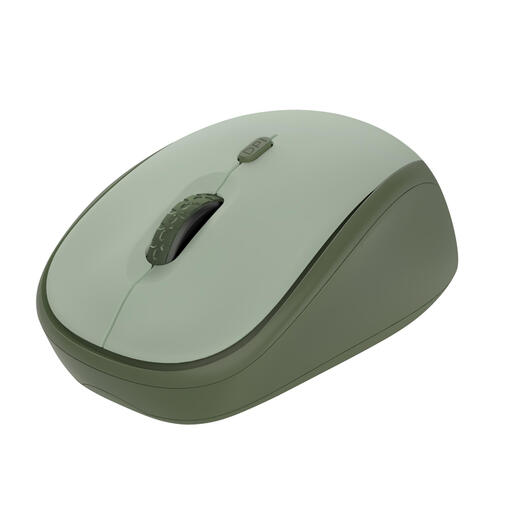
Why it suits this profile: The compact shape and 2.4GHz receiver are ideal for everyday use at home, in the office or on the go.
The product information lists an adjustable range from 800 to 1600 DPI and a wireless reach of 8 metres, so you don’t have to rely on marketing claims alone.
Optical sensor, silent buttons, compact size and, according to the product details, up to 12 months’ battery life.
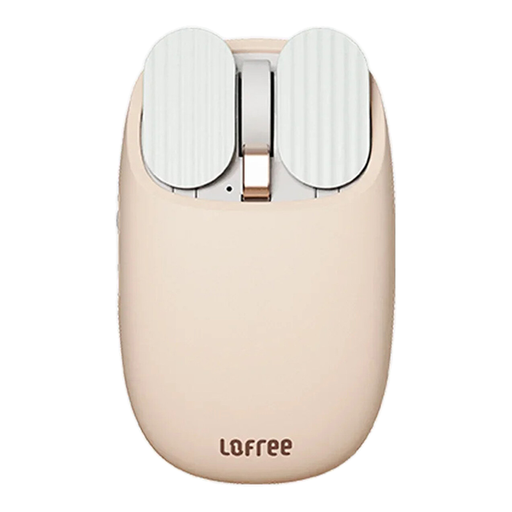
Why it suits this profile: For anyone using multiple devices who values adjustable sensitivity and a built‑in battery.
The specifications list both Bluetooth and 2.4G, five DPI levels and an 800mAh rechargeable battery. Do check the stated system limitation for Mac Boot Camp.
DPI settings from 800 to 3600, dual‑mode connectivity and, according to the product information, around one month’s use per charge.

Why it suits this profile: The large right‑handed body, three device connections and horizontal scroll function suit wide spreadsheets and intensive office work.
Silent buttons, an LED battery indicator and a rechargeable battery make the practical details clear. Its larger size is less suitable for small hands or travel.
Up to three paired devices, sideways scrolling, adjustable sensor up to 3200 DPI and 60% recycled plastic according to the product information.
A silent mouse is especially useful in shared workspaces, libraries or a home office where others might be distracted by clicking sounds. Note the difference between silent primary buttons and a fully silent mouse: the scroll wheel and side buttons can still make noise. Manufacturers sometimes quote a percentage noise reduction; treat that as a brand’s product specification, not a guarantee for every working environment.
No. A Bluetooth mouse requires Bluetooth support on the laptop. A mouse with a USB receiver needs a compatible USB port, often USB‑A. Also check the stated operating system and any exceptions in the product information.
That varies by model. Product details, for example, quote around one month for the Lofree EP115, up to 12 months for the Trust Yvi+ and up to 18 months for certain HP models. These are quoted figures; how often you use it, sleep mode and battery type affect the actual duration.
It can be, because you don’t have to replace disposable batteries. Do compare the purchase price, charging time and whether you can keep working while it charges. For occasional use, a mouse that takes AA batteries can be the simpler option.
We’ve compiled a complete, up-to-date list of products that fully meet these strict selection criteria and current European safety regulations.
