
Vandaag of morgen in huis

Kwaliteit gegarandeerd

Welkomstaanbiedingen ontgrendelen: GRATIS bezorging | Tot 80% korting | Gratis 30 dagen JoyPlus-proefperiode
Download de app
A wireless mouse keeps your desk tidy and gives you more freedom to move. However, not every model is right for every laptop, hand or working environment. A compact Bluetooth mouse can be handy when you’re out and about, but less comfortable during long working days. A wireless mouse with a USB receiver usually works straight away, but it does need a spare USB port.
As a Joybuy Product Recommendation Officer, I focus on specifications you can check: connectivity, sensor resolution, shape, power and compatibility. That way, you can avoid paying a premium for marketing claims alone.
A Bluetooth mouse doesn’t need a separate dongle, but your laptop, tablet or PC must support Bluetooth. A wireless mouse with a USB receiver, on the other hand, needs a spare USB-A port. Check whether the receiver is included and whether your device has a USB-A port or only USB-C.
A model with several connection options can be more convenient if you switch between a laptop, desktop and tablet. Check how many devices can actually be connected at the same time.
DPI indicates how sensitively the cursor responds to movement. A higher number doesn’t automatically mean greater accuracy. For word processing, email and spreadsheets, an adjustable setting of around 1,000 to 3,200 DPI is practical for many users. For gaming, higher settings and a higher polling rate may be relevant, depending on the game and your settings.
So consider the whole picture: the type of optical mouse, the available DPI settings, the shape and how you plan to use it.
A mouse that feels small and light in the box may be less comfortable during a full working day. Check the dimensions, weight and handedness. A right-handed model won’t suit everyone. If you regularly work with long documents or spreadsheets, extra buttons or horizontal scrolling may also be useful.
An ergonomic mouse with a vertical design changes your hand position, but it often takes some getting used to. Don’t think of this design as a medical solution. If discomfort persists, taking breaks, maintaining good posture and seeking professional advice are important.
Always check which operating systems are supported. Windows, macOS and ChromeOS are often listed, but features such as button customisation may vary by system.
An optical sensor uses a light source and camera to track movement. It generally works well on a smooth desk. Glass, highly reflective surfaces and dirt can affect tracking.
DPI is mainly a matter of preference. An office mouse with 1,000 or 1,600 DPI may be enough for everyday use. A gaming mouse may support up to 24,000 or 30,000 DPI, for example, but settings like these aren’t necessary for word processing.
Look out for the difference between a rechargeable mouse and a model that uses AA or AAA batteries.
Longer battery life can reduce running costs, but also consider the price of replacement batteries and the charging options.
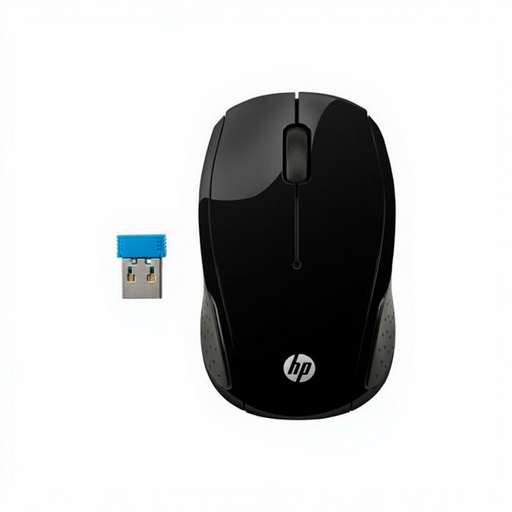
Why it suits this user: This straightforward wireless computer mouse uses a 2.4 GHz USB receiver, has a rounded shape and works without any software installation. It’s a good fit for basic use with a laptop or PC.
The connection type is clearly specified, and the two AAA batteries are included. Bear in mind that it doesn’t have Bluetooth.
1,000 DPI optical sensor, symmetrical shape and compatibility with Windows, Mac and ChromeOS.

Why it suits this user: For people working from home and office users who switch between devices and work with wide spreadsheets, this model combines Bluetooth with a USB receiver.
You don’t need a separate mouse for each device. It can connect to up to three devices, although the mouse is relatively large and designed for right-handed use.
Up to 3,200 DPI, a side-scrolling wheel, quiet buttons and a built-in rechargeable battery with an LED indicator.
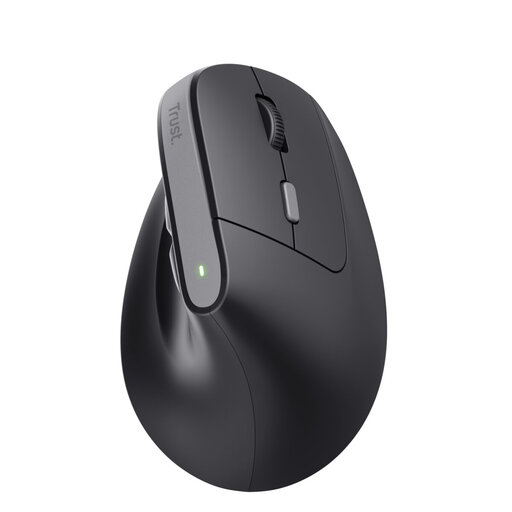
Why it suits this user: The vertical design is aimed at users who want to try a different hand position during long office or home-working sessions.
The hand position and right-handed design are clear from the outset. This model doesn’t have Bluetooth and is less suitable for left-handed users.
57-degree vertical design, quiet buttons, adjustable 800–2,400 DPI and a rechargeable battery, according to the product description.
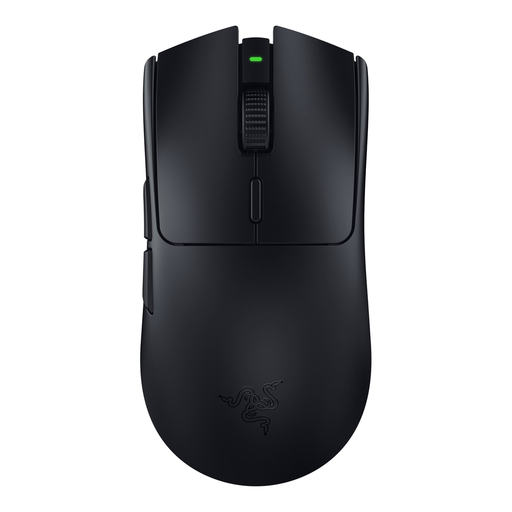
Why it suits this user: Gamers looking for low latency, programmable buttons and high sensor resolution get a different set of features here than they would with a standard office mouse.
The gaming features are clearly specified: an optical sensor, a wireless HyperSpeed connection and adjustable DPI. This model is designed for right-handed use and takes one AA battery.
Sensor up to 30,000 DPI, six buttons, a stated polling rate of up to 4,000 Hz and Bluetooth alongside the wireless connection.
We’ve put together a complete, up-to-date list of products that meet these strict selection criteria and comply with the applicable European safety regulations.
No. A Bluetooth mouse requires Bluetooth support. A model with a USB receiver needs a compatible USB port. If your laptop only has USB-C ports, you may need an adapter, unless the mouse connects directly via Bluetooth.
That depends on the model, battery, usage and the quality of the buttons and scroll wheel. A rechargeable mouse will need charging from time to time; with a model that uses AA or AAA batteries, costs depend on how often you replace them. The statutory guarantee in the EU applies in accordance with the rules of the country where you bought it.
A quiet mouse can be useful in a shared workspace or during online meetings. Check whether only the main buttons are quiet, or whether the scroll wheel and extra buttons are too. The word ‘quiet’ says nothing about accuracy, comfort or battery life.
