
Vandaag of morgen in huis

Kwaliteit gegarandeerd

Welkomstaanbiedingen ontgrendelen: GRATIS bezorging | Tot 80% korting | Gratis 30 dagen JoyPlus-proefperiode
Download de app
A wireless mouse keeps your desk tidy and gives you more freedom of movement than a wired model. However, not every wireless computer mouse is right for every user. A compact model can be handy for travelling, but less comfortable during long working days. A high DPI rating sounds appealing, but it doesn't solely reflect practical accuracy. And a Bluetooth mouse doesn't always work seamlessly if your computer's Bluetooth isn't well supported.
In this buying guide, you'll discover what to look out for, which marketing claims to take with a pinch of salt, and which type of mouse suits office work, working from home, studying or gaming.
DPI determines how fast the cursor moves across the screen for the same hand movement. A mouse with adjustable DPI gives you more control, but a higher maximum isn't automatically more useful. For word processing, spreadsheets and browsing, a range of around 800 to 1600 DPI is often practical. Gamers may need higher settings, depending on the game and their playing style.
So check whether the DPI is adjustable and whether the controls are easy to reach. A DPI button is handy when you regularly switch between precision work and fast navigation.
An RF wireless mouse usually works via a small USB receiver on the 2.4 GHz band. This is practical for desktop computers and laptops with a free USB port. A Bluetooth mouse doesn't need a separate receiver, but your computer or tablet must support Bluetooth.
Some models combine both options. That's useful if you use a laptop, desktop and tablet, for example. Do check whether the USB receiver is included and whether it can be stored safely inside the mouse.
A mouse with a rubberised grip feels nice, but ergonomics is also about the shape, height, width and support for your hand. A classic ergonomic mouse doesn't suit everyone. A vertical mouse also requires a different way of holding it and may be less suitable for small hands or fast gaming movements.
Pay attention to the hand orientation. Many models are specifically right-handed. If you're left-handed, you'll need a symmetrical or explicitly left-handed mouse.
An optical mouse uses a sensor to track movements on the surface. Use a suitable mouse mat or a clean, flat desk for stable cursor control. Alongside the maximum DPI, look at the available presets and the ability to adjust sensitivity.
For office work, quiet buttons, a comfortable shape and a reliable sensor are often more important than extreme DPI values. With a gaming mouse, polling rate, weight, response time and programmable buttons also play a bigger role.
A mouse that runs on AAA or AA batteries needs timely replacement. Check how many batteries are required and whether they're included. A rechargeable mouse means you don't need disposable batteries, but it does need to be charged regularly.
The stated battery life is a manufacturer specification and can vary depending on usage, connection and settings. According to the product information, Trust quotes up to 12 months of battery life for the Yvi+, while Logitech claims up to 24 months on one AA battery for the M720 Triathlon.
More buttons are useful for shortcuts, browser navigation or games, but can be unnecessary for simple office work. Also check the dimensions. A lightweight model is easy to carry around, while a larger model can offer more hand support.
For an office mouse or a mouse for working from home, six buttons, a scroll wheel and a comfortable grip are often sufficient. For gaming, programmable buttons and a low weight may be more relevant.
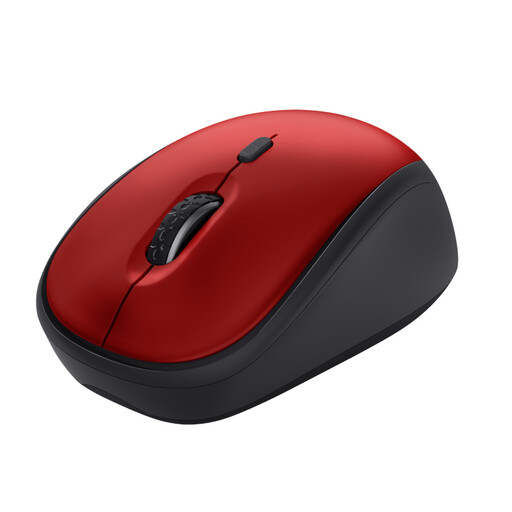
Why it fits this profile: This compact RF wireless mouse is designed for everyday office work, study and use on the go. The DPI is adjustable between 800 and 1600.
The product information mentions quiet buttons, so this model could be suitable for a shared workspace. The USB receiver makes pairing simple.
Optical sensor, adjustable DPI, quiet click and support for Windows, macOS and ChromeOS.
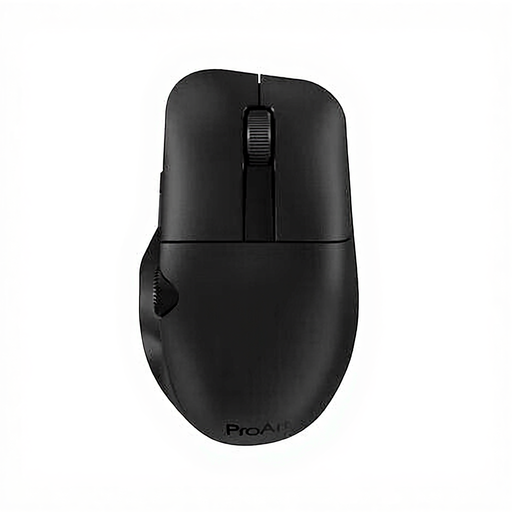
Why it fits this profile: This model combines RF and Bluetooth with six programmable buttons and a built-in rechargeable battery.
The two connection types reduce reliance on a single port or device. Do check beforehand whether you find the right-handed shape comfortable.
4200 DPI, six programmable buttons, RF plus Bluetooth and an 800 mAh battery according to the specifications.

Why it fits this profile: This wireless gaming mouse is designed for right-handed players looking for a low weight, programmable buttons and high sensor resolution.
The low weight of 63 g and the wireless connection support fast movements. The battery life of up to 90 hours is a claim from Razer.
Razer Focus Pro sensor up to 30,000 DPI, rechargeable battery and use via wireless or USB-C.

Why it fits this profile: According to the product information, the Ozaa+ can connect to up to three devices via RF and two Bluetooth channels.
You're not limited to one connection. The quiet buttons and rechargeable battery are practical in a shared home or office environment.
Up to three devices, horizontal scroll wheel, adjustable sensor up to 3200 DPI and rechargeable battery.
We've put together a full, up-to-date list of products that fully meet these strict selection criteria and comply with current European safety regulations.
That depends on the type of connection. An RF wireless mouse typically uses a USB receiver. A Bluetooth mouse can be paired directly with a compatible device. With a model that offers both options, you choose the most practical connection for each device.
The battery life varies by model, battery type and intensity of use. A mouse with AA or AAA batteries can last for months. A rechargeable mouse needs to be charged periodically with a cable. Be sure to check the stated battery life and whether the battery is replaceable or built-in.
Yes, but when choosing a gaming mouse, look beyond just wireless functionality. Check the sensor, polling rate, weight, battery life and software for button settings. For competitive gaming, a model with a stable RF connection and low latency may be more practical than a simple Bluetooth mouse.
