
Vandaag of morgen in huis

Kwaliteit gegarandeerd

Welkomstaanbiedingen ontgrendelen: GRATIS bezorging | Tot 80% korting | Gratis 30 dagen JoyPlus-proefperiode
Download de app
A wireless mouse gives you more freedom of movement at your desk, but not every model suits every user. A compact mouse for a laptop, for example, can become uncomfortable during long workdays. A wireless gaming mouse, on the other hand, may be unnecessarily expensive or heavy for straightforward office work.
So don’t focus solely on DPI, RGB lighting or long battery life. Connectivity, shape, hand size and software support have at least as much influence on whether your purchase remains comfortable over time.
A mouse with 10,000, 24,000 or even 35,000 DPI sounds impressive. DPI primarily indicates how sensitively the cursor can be configured, however. For office work, browsing and studying, a lower setting is often more than sufficient.
Also consider the sensor type, adjustability and connection. A high DPI rating cannot compensate for an unstable Bluetooth connection or a shape that doesn’t suit your hand.
A Bluetooth mouse only works when your laptop, PC, tablet or Mac supports Bluetooth. A 2.4GHz mouse usually uses a small USB receiver. That can be convenient on a desktop, but less practical with a laptop that has few USB ports.
A multi-device mouse can remember several devices, but check how many can actually be connected simultaneously. With some models, switching only works via Bluetooth, while others also support a receiver.
An ergonomic mouse should match your hand size, grip and working posture. A vertical mouse feels more natural to some users, but often requires a short adjustment period. A compact, flat mouse is better suited to travel, but provides less support for the palm.
Therefore, check the dimensions, weight and whether the model is designed exclusively for right- or left-handed use.
Check the listed compatibility for each operating system. Software for programmable buttons or macros is not always available for macOS. For the ET Wireless Gaming Mouse, the product information states that the configuration software is available only for Windows and works in wired mode.
A rechargeable mouse means you don’t have to replace AA or AAA batteries regularly. Check the charging port, cable and stated battery life. Manufacturer figures depend on settings, connection type and lighting.
A model powered by a single AA battery can be convenient for travel or if you don’t have a regular charging routine. According to the product information, the Logitech M330 Silent Plus and Logitech M720 Triathlon offer battery life of up to 24 months. This is Logitech’s stated figure and not a guarantee for every usage scenario.
For everyday work, a comfortable thumb rest and suitable width are often more relevant than an exceptionally high sensor resolution. A lightweight wireless mouse is comfortable for quick movements and mobile use. For larger hands, an extremely compact model can quickly become tiring.
Extra buttons are particularly useful for spreadsheets, creative software and gaming. Check whether they are programmable and which operating systems support the associated software.
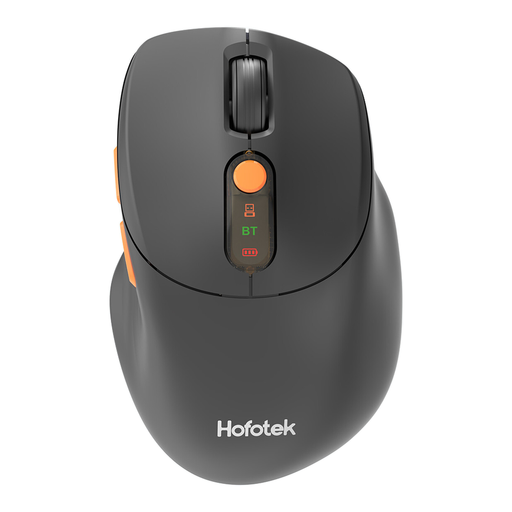
Why this profile fits: A practical choice for students, remote workers and everyday office work on Windows, macOS or Android.
The mouse uses both Bluetooth 5.1 and 2.4GHz and supports three devices according to the description. You’re therefore not dependent on a single connection type.
62 grams, quiet clicks and adjustable DPI settings from 800 to 4000. The mouse runs on one included AA battery.

Why this profile fits: Designed for office professionals and creative users who work across multiple devices and rely on numerous shortcuts.
The combination of Bluetooth and Logi Bolt provides an alternative when your laptop has few USB ports. Do check beforehand whether you can use the included receiver.
Eight programmable buttons, horizontal scrolling, USB-C charging and support for up to three paired devices according to the product specifications.

Why this profile fits: For PC gamers who want to play wirelessly but also need a wired mode and extra buttons.
The stated 10,000 DPI can be adjusted across six settings. RGB lighting can be switched off, so it doesn’t have to remain on continuously.
Eight programmable buttons, a polling rate of 125 to 1000 Hz and a choice of Bluetooth, 2.4GHz or USB-C. According to the product information, the software works only on Windows.
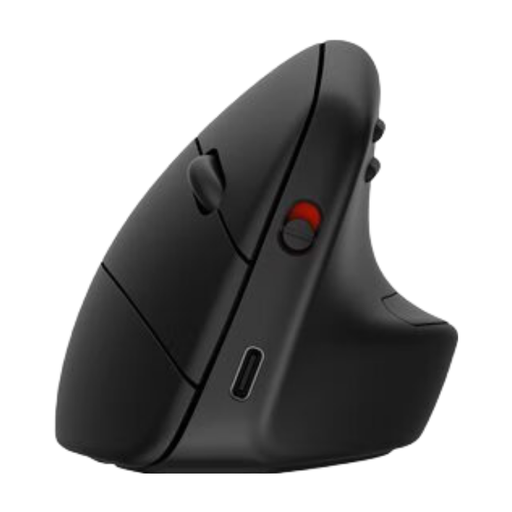
Why this profile fits: For right-handed remote workers and professionals who want to try a different grip during long workdays.
The vertical design is clearly stated in the specifications. Note, however, that this model is right-handed and relatively large.
4000 DPI, USB-C charging and connectivity for up to three devices via Bluetooth 5.3 or a USB receiver.
A silent mouse is practical in a shared workspace, library or office. Pay attention to the difference between quiet primary clicks and a completely silent mouse: the scroll wheel and side buttons may still be audible.
According to Logitech, the Logitech Signature M650 L Left features SilentTouch technology, which is said to reduce click noise by up to 90 percent. The Logitech M330 Silent Plus likewise lists noise reduction of more than 90 percent. These are claims from Logitech’s own product information; the actual experience may vary depending on the surface and how the mouse is used.
When choosing a mouse for Mac, look at Bluetooth support, macOS compatibility and whether configuration software is available. A USB-A receiver will not fit every modern laptop without an adapter.
The Microsoft Surface Arc Mouse is slim and lightweight and, according to the product specifications, works with Bluetooth 4.0 or later. The mouse uses AAA batteries and is not rechargeable. The Arc Mouse is primarily designed for portability; for extended desk work, a mouse with a thumb rest or fuller shape may be more comfortable.
Not necessarily. Bluetooth saves a USB port and is convenient for laptops and Macs. A 2.4GHz receiver may be simpler to use with a PC and is often recognised immediately. Choose based on your devices and check the supported Bluetooth version.
That depends on the battery type, charging habits, switches and usage. According to the manufacturer, AA-powered models can last for months or even years. A rechargeable mouse needs to be charged periodically, but does not require disposable batteries. Always check the warranty terms and use the mouse according to the safety instructions.
It can be, but extra DPI, RGB lighting and programmable buttons are not useful to everyone. A gaming mouse makes the most sense if you need low latency, multiple buttons or a lightweight body. For quiet office work, a silent mouse with straightforward controls may be a better fit.
Browse our current selection and compare wireless mice by connectivity, comfort, battery type, compatibility and intended use.
