
Vandaag of morgen in huis

Kwaliteit gegarandeerd

Welkomstaanbiedingen ontgrendelen: GRATIS bezorging | Tot 80% korting | Gratis 30 dagen JoyPlus-proefperiode
Download de app
A wireless mouse keeps your desk tidy and is handy with a laptop, home office setup or gaming PC. But not every model suits every situation. A compact Bluetooth mouse for use on the go has different requirements from an ergonomic mouse for long working days or a gaming mouse with low latency.
Most costly mistakes come down to three common misconceptions:
A Bluetooth mouse pairs directly with a Bluetooth-enabled laptop, tablet or computer, so you don’t need a spare USB port. For example, the HP 240 uses Bluetooth 5.1 and, according to its product specifications, doesn’t need a dongle.
A mouse with a 2.4GHz USB receiver often works on a simple plug-and-play basis. This is practical for desktop PCs and laptops without a reliable Bluetooth connection. Check that it’s compatible with USB-A, and keep the receiver somewhere safe.
Some models offer both options. According to its product description, the Trust Ozaa+ can connect to up to three devices: one via a USB receiver and two via Bluetooth. That’s handy if you switch between a laptop, desktop PC and tablet.
An optical mouse uses an optical sensor to track movement. For office work, browsing and documents, an adjustable resolution of around 800 to 3200 DPI is enough for many users. An adjustable-DPI mouse can be tailored to small movements, large screens or fast navigation.
For gaming, polling rate, sensor software, weight and connectivity also matter. A model with an exceptionally high DPI figure won’t necessarily be more comfortable for everyday use. Check that the DPI can actually be adjusted and that the required software works with your operating system.
An ergonomic mouse should suit your hand and working posture. Look out for:
Also check whether the manufacturer quotes battery life as a maximum. Actual battery life depends on the connection, settings and how intensively you use the mouse.
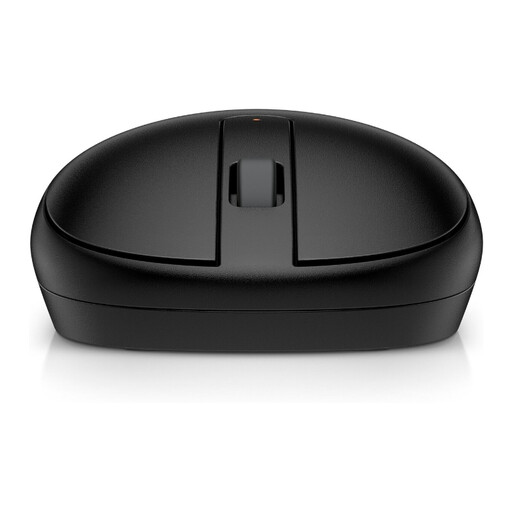
Why it suits this profile: This compact wireless mouse is a good choice for everyday laptop and office work. Bluetooth 5.1 means there’s no need for a USB dongle, according to the product specifications.
The connection method and 1600 DPI optical sensor are clearly specified. Just check beforehand that your device supports Bluetooth.
Ambidextrous design, optical sensor, Bluetooth 5.1 and one AA battery.

Why it suits this profile: This large mouse is designed for office work involving multiple devices, wide spreadsheets and long documents.
The mouse combines a USB receiver with Bluetooth and has a dedicated horizontal scroll wheel. That makes its features easy to check, rather than relying on marketing claims alone.
Connects to up to three devices, adjustable DPI up to 3200, quiet buttons and a rechargeable battery.
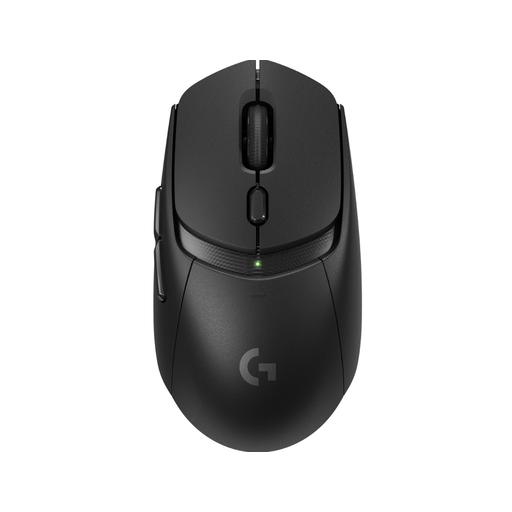
Why it suits this profile: Lightspeed and Bluetooth give you the choice of a connection for gaming or everyday use. This model is designed for right-handed players.
The two connection options, six programmable buttons and optical HERO sensor are clearly listed. However, these features may be unnecessary if you only need a mouse for office work.
Up to 25600 DPI according to the product information, six programmable buttons and a quoted battery life of more than 300 hours.
No. A Bluetooth mouse requires Bluetooth support. A model with a USB receiver needs a compatible USB port. Also check that your operating system is supported.
It can be. Choose a gaming mouse with a reliable 2.4GHz connection, a suitable polling rate, adjustable DPI and a shape that suits your grip. Bluetooth is particularly handy for everyday use, but some gamers may not find it responsive enough.
It varies by model. A mouse powered by AA or AAA batteries may last for months, while a rechargeable model needs charging from time to time. Bear in mind the difference between the quoted maximum and the battery life you can expect in your own situation.
We’ve put together a complete, up-to-date list of products that meet these strict selection criteria and comply with the applicable European safety regulations.
