
Vandaag of morgen in huis

Kwaliteit gegarandeerd

Welkomstaanbiedingen ontgrendelen: GRATIS bezorging | Tot 80% korting | Gratis 30 dagen JoyPlus-proefperiode
Download de app
A wireless mouse keeps your desk tidy and is handy with a laptop, home office setup or gaming PC. But the range can be more complicated than it first appears. A high DPI figure doesn’t automatically mean a mouse is comfortable to use, and a long battery life won’t help much if it doesn’t have the right type of connection.
In this buying guide, you’ll find out what to look for, which marketing claims are worth checking and what type of wireless mouse suits the way you use it.
DPI determines how sensitively the cursor responds to movement. A mouse with 12,000 or 24,000 DPI won’t be more useful for everyone than one with 1,000 or 4,800 DPI. Lower settings are often enough for office work, word processing and browsing online shops. Gamers may prefer adjustable DPI so they can change the sensitivity for each game.
Check the sensor, the number of adjustable levels and whether you can change the DPI directly using a button.
A Bluetooth mouse connects directly to a compatible device. That’s handy with laptops and tablets, as you won’t need a USB receiver. A 2.4 GHz mouse usually uses a USB-A receiver and is often ready to use as soon as you plug it in.
So check the following:
For gaming, a 2.4 GHz connection is often chosen for its stated low latency. Check that the receiver is included and that there’s somewhere to store it.
A rechargeable mouse means no loose batteries, but you’ll need to charge it regularly. A model with an AA battery can last from months to years, depending on use and sleep mode. Manufacturers usually state battery life under specific conditions.
So check the type of power supply:
A charging cable that lets you carry on using the mouse while it charges is handy if you want to avoid interruptions.
When choosing a computer mouse for a laptop or PC, the connection and operating system matter more than the appearance. A USB receiver must fit the port you have available. Also check that the mouse is compatible with Windows, macOS, ChromeOS or any other systems you use.
A mouse with both Bluetooth and 2.4 GHz gives you more flexibility. A mouse that only uses a receiver is often simple to set up and use, but less suitable if you regularly switch between devices.
A compact mouse fits neatly into a laptop bag, while a larger model can provide more support for your hand. Check the dimensions, weight and shape. Many gaming mice are designed for right-handed use. Left-handed users may be better off looking for a symmetrical model or one specifically designed for left-handed use.
An ergonomic mouse often has an unusual shape, such as a vertical design. Logitech describes the MX Vertical as having a 57-degree angle and a position similar to a handshake. This is a design choice, not a guarantee that the shape will be comfortable for everyone. Try the hand position gently and take breaks if you spend a long time at your computer.
Three buttons are usually enough for everyday work. A gaming mouse may have extra thumb buttons, a DPI button and programmable functions. Check that the software works with your operating system.
A polling rate of 1,000 Hz means that, according to the product specifications, the mouse position is reported up to 1,000 times per second. This can matter for gaming, but usually offers little benefit for standard office work.
RGB lighting is mainly a style choice. A mouse with RGB lighting can complement a gaming setup, but the lighting may affect battery life.
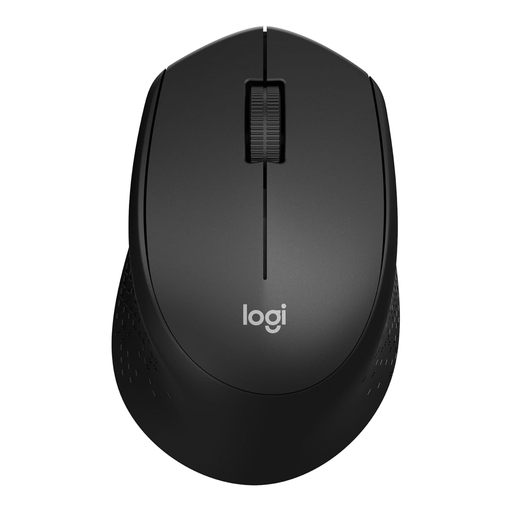
Why it suits this user: This quiet mouse is designed for everyday use at home, in the office or with a laptop. The USB receiver is easy to connect.
The specifications list an optical sensor, a range of up to 10 metres and battery life of up to 24 months. Logitech says the clicks are up to 90% quieter than those of traditional mice.
3 buttons, 1,000 DPI, right-handed design and automatic sleep mode.

Why it suits this user: Its vertical shape, rechargeable battery and choice of Bluetooth or USB receiver make it a good fit for users who value comfort and flexibility.
There’s more to consider than a high DPI figure: the sensor offers 4000 DPI, with a separate button for adjusting the speed. The mouse is designed for right-handed use.
57-degree design, Bluetooth, USB receiver, rechargeable battery and support for multiple devices.

Why it suits this user: This wireless gaming mouse is designed for PC gamers looking for a lightweight design, programmable buttons and lighting.
The product details list a 2.4 GHz connection, a polling rate of up to 1,000 Hz and a built-in battery. You can charge and use it at the same time via USB-C.
75 grams, adjustable from 800 to 4800 DPI, six programmable buttons, RGB lighting and up to 80 hours of battery life according to the product specifications.
We’ve put together a full, up-to-date list of products that meet these strict selection criteria and comply with current European safety regulations.
Yes. A wireless mouse uses Bluetooth or its own radio connection via a USB receiver. It doesn’t need the internet. For the initial pairing, your computer may need Bluetooth settings or a spare USB port.
It varies by model and usage. According to the product specifications, a battery-powered mouse can last from several months to 24 months. A rechargeable mouse has a stated usage time per charge, such as up to 80 hours for a gaming model. Switching to sleep mode and turning off the lighting can help reduce power consumption.
Yes, but check the connection, polling rate, sensor, DPI settings and weight. A 2.4 GHz model with low stated latency is generally a better choice for gaming than a basic office mouse. For competitive gaming, it’s also worth checking that the software and buttons suit the games you play.
