
Vandaag of morgen in huis

Kwaliteit gegarandeerd

Welkomstaanbiedingen ontgrendelen: GRATIS bezorging | Tot 80% korting | Gratis 30 dagen JoyPlus-proefperiode
Download de app
A wireless mouse gives you more freedom of movement in the office, at home or on the go. But there are a few pitfalls to watch out for. A low price may be tempting, but an uncomfortable shape, no Bluetooth support or expensive batteries can make a mouse less practical than you expected.
This buying guide will help you compare the key specifications. That way, you can choose the right silent, ergonomic or Bluetooth mouse, or a wireless computer mouse for everyday use.
Some mice work exclusively with a 2.4GHz USB receiver. This generally gives you a straightforward connection, but you’ll need a spare USB-A port. That can be tricky if you have a slim laptop with USB-C ports only.
A Bluetooth mouse connects directly to a compatible device. Other models combine Bluetooth with a USB receiver, which is handy if you switch between a laptop, desktop computer and tablet.
DPI determines how quickly the cursor moves in response to a particular hand movement. A mouse with adjustable DPI can be useful, but you usually won’t need an extremely high setting for word processing and spreadsheets. Also consider the sensor, the surface you’ll be using it on and whether you can adjust the speed to suit the task.
An ergonomic mouse should suit your hand size, grip and working posture. A vertical mouse, for example, works differently from a standard model. If you often work on a compact laptop, a large mouse may feel cumbersome. So check the dimensions and the stated hand orientation.
Check the following before you order:
According to its product specifications, a multi-device mouse such as the Trust Ozaa+ can connect to up to three devices via a 2.4GHz receiver and two Bluetooth channels.
An optical mouse uses an LED or light sensor and is suitable for most desks and mouse mats. According to product specifications, a laser sensor may work on more surfaces, but always check whether glass or a reflective desk is explicitly supported.
As well as the maximum DPI, look out for:
For everyday office work, 1,000 to 3,200 DPI is often enough. Gamers may place more importance on a high polling rate, low latency and a lightweight design. The RAPOO VT9Pro 4K, for example, is designed for gaming and lists an optical sensor of up to 26,000 DPI and a weight of 68 grams.
A rechargeable mouse saves you from having to replace batteries regularly, but you’ll need to charge it in good time. A mouse powered by AA or AAA batteries may be more convenient if you want to keep working straight away with a spare battery.
Also check:
Claims about silent clicks or battery life come from product specifications or manufacturer information. Treat them as a guide, as actual results may vary.
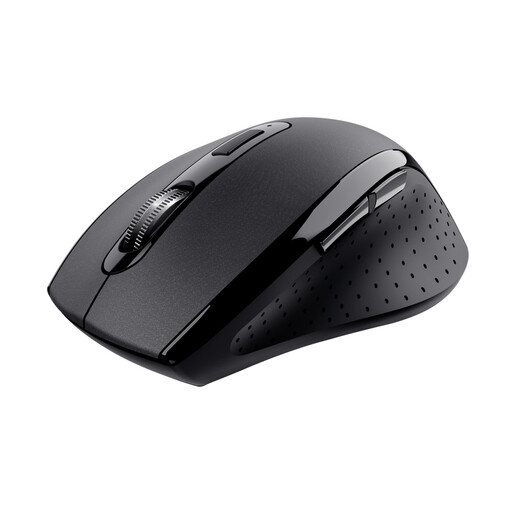
Why it suits this user: This wireless computer mouse uses a 2.4GHz USB receiver and has a range of up to 10 metres. That makes it easy to set up for people working from home and students.
The product specifications list 1,500 DPI, an optical sensor and six buttons. So you’re not paying for an over-the-top gaming setup that you don’t need for office work.
Ergonomic shape, DPI switch, stowable receiver and powered by two AAA batteries.

Why it suits this user: This model combines Bluetooth and a Logi Bolt receiver with a rechargeable battery, eight buttons and support for up to three devices.
The connection options, battery status and adjustable DPI are clearly listed. That means you can check in advance whether the features suit your workspace.
8,000 DPI, horizontal scroll wheel, programmable buttons, silent clicks and USB-C charging.

Why it suits this user: The Ozaa+ is designed for people who work with wide spreadsheets, timelines and multiple devices. Its extra side wheel supports horizontal scrolling.
You can check the large body and 110-gram weight in advance. This helps you avoid choosing a compact mouse for extended work with wide documents.
Up to three devices, Bluetooth plus RF, silent buttons, rechargeable battery and adjustable DPI up to 3,200.
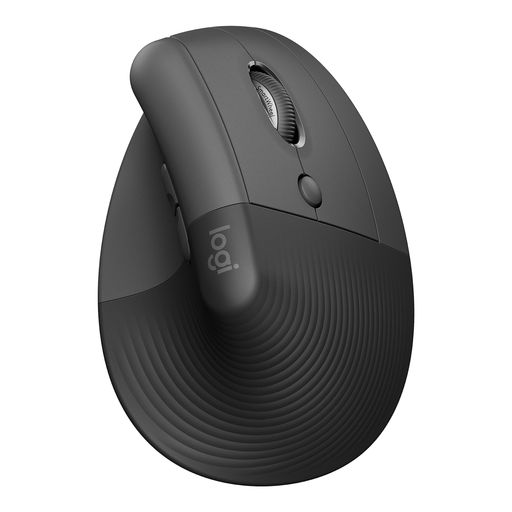
Why it suits this user: This vertical mouse is designed for right-handed users with small to medium-sized hands. You can connect via Bluetooth or the included USB receiver.
The shape, hand orientation and recommended hand size are clearly specified. So you’ll know in advance that this isn’t a universal, symmetrical model.
Vertical design, optical sensor, silent clicks, four programmable buttons and a stated battery life of up to two years.
We’ve put together a complete, up-to-date list of products that meet these strict selection criteria and current European safety regulations.
Only if the model supports Bluetooth and your computer or laptop has Bluetooth. An RF mouse usually needs a USB receiver. Also check the connector type: some receivers use USB-A, while modern laptops may mainly have USB-C ports.
It varies by model, battery type and usage. A mouse powered by AA or AAA batteries may work for months or longer. A rechargeable mouse needs charging from time to time, and more often with intensive use. Manufacturers often state a maximum battery life, but this isn’t guaranteed for every working situation.
It can be, but for a gaming mouse, pay particular attention to polling rate, sensor resolution, weight, connection and battery life. An office mouse with silent clicks and extra scrolling features isn’t automatically suited to fast-paced games. For competitive gaming, the RAPOO VT9Pro 4K product specifications are more relevant than those of a basic office mouse.
