
Vandaag of morgen in huis

Kwaliteit gegarandeerd

Welkomstaanbiedingen ontgrendelen: GRATIS bezorging | Tot 80% korting | Gratis 30 dagen JoyPlus-proefperiode
Download de app
A wireless mouse keeps your desk tidy and gives you more freedom of movement than a wired mouse. However, not every model is suitable for everyday use. A compact mouse may be convenient when you’re out and about, for example, but feel less comfortable during long working days. A high DPI value also does not automatically mean that the mouse is better suited to your work.
This guide will help you compare important specifications and spot common pitfalls. Afterwards, you’ll find some popular choices for different types of user.
An RF wireless mouse usually works via a 2.4GHz USB receiver. This is practical for computers with a spare USB-A port. However, the receiver can be inconvenient when using a laptop with limited connectivity. A Bluetooth mouse does not need a separate dongle, but your laptop or tablet must support Bluetooth.
So check the following in advance:
DPI determines how far the cursor moves with a particular hand movement. A mouse with adjustable DPI gives you more choice, but a range of around 800 to 1600 DPI is often sufficient for word processing, spreadsheets and browsing. Higher values are mainly useful if you want to move quickly across a large screen or use specific creative applications.
Also consider the surface you use the mouse on. An optical sensor generally works well on a standard, matt mouse mat. Highly reflective surfaces can affect tracking.
A quiet wireless mouse is useful in a shared office, library or home office. However, “quiet” mainly refers to the clicking sound; it says nothing about the shape, weight or support for your hand. A small, flat mouse may be suitable for travelling, but may not fit as comfortably in a larger hand.
So consider:
A wireless mouse with a USB receiver is usually simple to use: connect the receiver, switch on the mouse and get started. This is often referred to as plug-and-play. However, check whether your laptop has a suitable USB port. Some compact laptops only have USB-C ports.
Bluetooth is useful if you do not want to carry a receiver. A model such as the HP 240 Pike uses Bluetooth 5.1 and, according to the stated product specifications, works with Windows, macOS and ChromeOS. Compatibility may differ with older or unusual devices.
For use with multiple devices, a multi-device mouse is more appealing. Do not just consider the number of possible connections; also look at how you switch between devices.
A mouse powered by AA or AAA batteries can last for months, depending on use and power-saving features. A rechargeable wireless mouse means you do not have to replace loose batteries, but it does need to be charged regularly.
Pay attention to the difference between:
According to Logitech’s own information, the M330 Silent Plus has a battery life of up to 24 months. Treat this as a product specification rather than a guaranteed usage period for every user.
An ergonomic wireless mouse may have a fuller shape, a rubberised grip or a vertical design. This can be comfortable if you prefer a larger mouse. A vertical shape does take some getting used to, however, and takes up more space on your desk.
For travelling and flexible working, a compact wireless mouse weighing around 80 to 100 grams is often practical. If you mainly work at a fixed desk, you may place greater value on a wider body, extra buttons or a thumb rest.
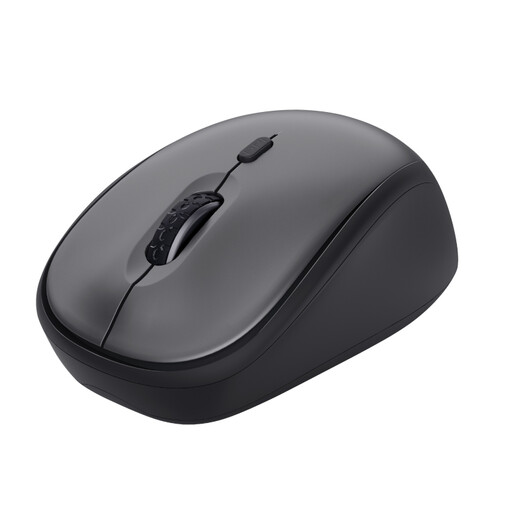
Why it suits this profile: This compact wireless computer mouse is designed for everyday use at home, in the office and while travelling. The USB micro receiver can be stored inside the mouse, and the speed can be adjusted between 800 and 1600 DPI.
The specifications make it clear that this is an RF model with a USB receiver. So you should not expect Bluetooth or multi-device functionality that is not listed.
Silent buttons, 84 grams, a range of up to 8 metres and, according to the product information, up to 12 months of battery life.

Why it suits this profile: This model combines Bluetooth and 2.4GHz connectivity via a USB receiver with a vertical design, adjustable DPI of up to 4000 and a rechargeable battery.
The vertical design and 135-gram weight are clearly stated in the specifications. Check in advance that this larger shape suits your hand and workspace.
Bluetooth and USB receiver, rechargeable battery, adjustable DPI and a stated range of 10 metres.

Why it suits this profile: The large right-handed shape, silent buttons, horizontal scrolling and connection for up to three devices are well suited to spreadsheets, wide documents and a fixed workspace.
This model is not positioned as a compact travel mouse. Instead, the product information highlights its larger size and additional side-scrolling function.
RF and Bluetooth, rechargeable battery, DPI of up to 3200 and support for up to three devices.
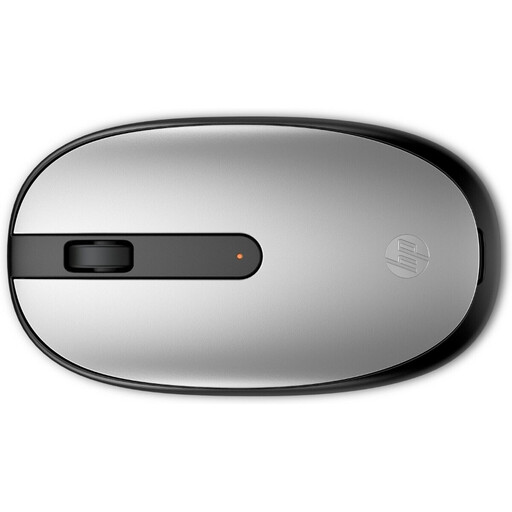
Why it suits this profile: This symmetrical Bluetooth mouse works without a separate dongle and has three buttons, a scroll wheel and a 1600 DPI optical sensor.
The connection is explicitly Bluetooth 5.1. So you do not need to carry a USB receiver, but you should check that your device supports Bluetooth.
54.2 grams, symmetrical design, Bluetooth 5.1 and, according to the product information, up to 15 months of battery life.
We have compiled a complete, up-to-date list of products that fully meet these strict selection criteria and the applicable European safety regulations.
Not automatically. An RF model usually needs a spare USB port. A Bluetooth mouse requires Bluetooth support and may need to be paired initially through your laptop’s settings. Also check the supported operating system and the receiver supplied.
This depends on the model, the type of battery and how the mouse is used. Manufacturers sometimes state a maximum duration, such as 12, 18 or 24 months. This remains an indication. A rechargeable mouse needs to be connected to a cable periodically, but means you do not have to buy loose AA or AAA batteries.
No. According to the product description, silent buttons reduce clicking noise, but scrolling, movement and clicking other parts of the mouse may still be audible. For a shared workspace, it is sensible to consider comfort, size and connection as well as “silent click”.
