
Vandaag of morgen in huis

Kwaliteit gegarandeerd

Welkomstaanbiedingen ontgrendelen: GRATIS bezorging | Tot 80% korting | Gratis 30 dagen JoyPlus-proefperiode
Download de app
A wireless mouse gives you more freedom to move your mouse around your desk and is handy alongside a laptop. However, not every model suits every user. A compact Bluetooth mouse can be convenient when you’re out and about, but less comfortable during long working days. A wireless gaming mouse can be very responsive, but may require more software and have a shorter battery life.
As a Joybuy Product Recommendation Officer, I focus on verifiable features: connectivity, shape, sensor, weight, buttons and power supply. That way, you can avoid paying extra just for a high DPI figure or a flashy marketing label.
A high DPI value means the pointer moves faster across the screen. That doesn’t necessarily make for a better user experience. For office work, an adjustable sensor with a practical sensitivity range is often more important than an extremely high maximum. For gaming, DPI, polling rate and sensor type can all matter, but only if they’re suited to your computer and game settings.
A mouse may connect via Bluetooth, a 2.4GHz receiver or both. Bluetooth is handy for a laptop mouse because you don’t need a spare USB port. A receiver can provide a stable connection on a desktop PC or gaming PC. Check the connector, too: some receivers use USB-C, while older PCs often have USB-A ports.
“Up to” a certain number of hours or days doesn’t mean every user will get that much use. Lighting, polling rate, connection type and software settings all affect power consumption. A model that uses AAA batteries is ready to use again as soon as you have spare batteries. A rechargeable mouse saves you from dealing with loose batteries, but you’ll need to connect it to a USB-C cable in good time.
When choosing a wireless mouse for Mac and Windows, first check the operating system and the connection options included. The Microsoft Surface Arc Mouse Platinum uses Bluetooth 4.0 or later. This makes it suitable for compatible laptops and tablets, but older devices without Bluetooth 4.0 aren’t covered by the stated support.
A mouse with both Bluetooth and a receiver offers more flexibility. The Logitech MX Master 4 for Business supports Bluetooth and Logi Bolt and can be paired with up to three devices, according to the product specifications. That’s useful if you switch between a work laptop, a PC and a second device.
There’s no one-size-fits-all shape when it comes to an ergonomic mouse. A right-handed model with a thumb rest offers extra support for some users, while a symmetrical or lightweight mouse may suit a claw or fingertip grip better. So check the length, width and weight before you order.
For use on the move, a slim profile and low weight are important. A larger ergonomic mouse is generally less suitable for carrying around in a laptop bag every day. A vertical mouse also takes a little time to get used to, as your hand and wrist sit in a different position.
For office work, a scroll wheel, quiet clicks and, if needed, horizontal scrolling are often more useful than an extremely high resolution. A quiet mouse is especially handy in a shared workspace. For gaming, also consider weight, polling rate, programmable buttons and software compatibility.
A lightweight gaming mouse weighing around 53 to 68 grams can feel comfortable during fast movements. Just check that the model has enough buttons for the games you play. For productivity, eight programmable buttons, a thumb scroll wheel and the ability to switch between devices can be more useful than RGB lighting.
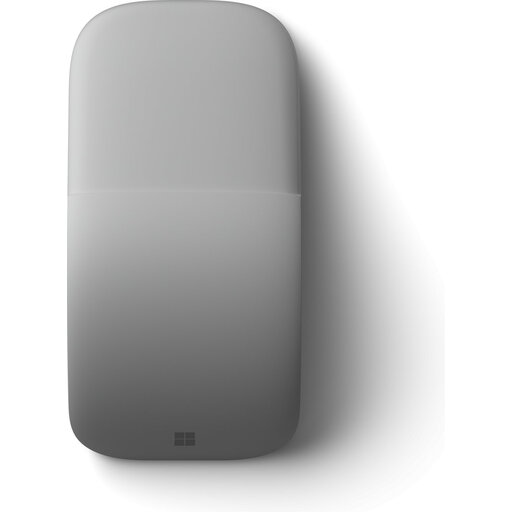
Why it suits this user: Its slim, lightweight shape makes it suitable for laptop use and carrying around. The mouse connects via Bluetooth 4.0 or later and has a simple design with two buttons and a touch scrolling surface.
The connection type and system requirements are clearly stated. Check in advance that your laptop supports Bluetooth 4.0 or later.
Slim profile, low weight, foldable design and Bluetooth connectivity without a separate USB receiver.

Why it suits this user: This right-handed model is designed for long hours of office work and productivity. The product specifications list eight buttons, adjustable DPI up to 8,000, horizontal scrolling and a rechargeable battery.
DPI isn’t the only thing that matters: this mouse combines programmable buttons with Bluetooth, Logi Bolt and a horizontal scroll wheel.
Rechargeable via USB-C, with quiet clicks according to the product specifications and pairing with up to three devices.

Why it suits this user: This model is designed for gamers looking for a lightweight mouse with plenty of buttons and extensive customisation options. Rapoo lists a weight of 53 grams, up to 30,000 DPI, an 8KHz polling rate and ten programmable buttons.
Rapoo claims a battery life of “up to 750 hours”, which, according to the product information, requires low-power mode. Treat this as a maximum under specific conditions.
Lightweight design, optical switches, USB receiver and software for macros and programmable buttons on Windows and Mac.
We’ve put together a complete, up-to-date list of products that meet these strict selection criteria and the current European safety requirements.
No. A Bluetooth mouse requires a laptop with Bluetooth support. If you choose a model with a USB receiver, check that you have the right type of USB port available. Also check which operating systems are supported, especially macOS, Windows and ChromeOS.
It depends on how you use it. A rechargeable mouse doesn’t need disposable batteries, but it does need to be charged regularly. A model with AAA batteries is handy if you want to keep working without a charging cable. Whichever option you choose, check the battery indicator and stated battery life.
Its lifespan depends on the switches, battery, charging habits and daily use. Keep the mouse dry, don’t pull on the USB cable and only use suitable charging accessories. If it has a built-in lithium battery, don’t open the casing yourself. The statutory guarantee and any additional terms are listed with the relevant product.
