
Vandaag of morgen in huis

Kwaliteit gegarandeerd

Welkomstaanbiedingen ontgrendelen: GRATIS bezorging | Tot 80% korting | Gratis 30 dagen JoyPlus-proefperiode
Download de app
A wireless mouse keeps your desk tidier and is handy with a laptop, home office setup or gaming PC. But “wireless” alone tells you little about what it’s like to use day to day. For example, a model may work only via Bluetooth, need a USB receiver or require new batteries after a short time.
The main pitfalls often aren’t about appearance, but connectivity, fit and power. Use the checks below to compare computer mice on the features that make a difference in practice.
A Bluetooth mouse connects directly to a compatible device. This is useful with laptops that have few spare USB ports. Check that your computer supports Bluetooth and that the operating system is compatible.
A mouse with a USB receiver usually connects via 2.4GHz. You’ll need a spare USB-A or USB-C port, depending on the receiver. If your laptop only has USB-C ports, you may need an adapter. Some models support both connection methods, giving you extra flexibility.
DPI determines how quickly the cursor moves across the screen for a given hand movement. A moderate setting is often enough for office work. A higher adjustable DPI can be useful for photo editing or working with large screens. For gaming, the sensor, polling rate, weight and shape also matter.
Watch out for conflicting product information. Check the specifications to see whether the stated figure is the sensor’s maximum resolution and whether you can actually adjust the DPI. A mouse with adjustable DPI is more practical than a model with just one fixed speed.
An ergonomic mouse should suit your hand size, grip and working posture. A vertical mouse with an angle of, for example, 57 degrees feels different from a traditional mouse, so it may take some getting used to. A model that’s too large can be awkward for smaller hands, while a compact model may not offer enough support.
Marketing claims about reducing strain or improving comfort aren’t established medical facts. According to some brands’ product information, a particular shape is designed to encourage a more natural posture. If you use a mouse for long periods, change your posture regularly and take breaks.
Check these points before you order:
A mouse powered by AA or AAA batteries is ready to use straight away, and it’s easy to carry a spare battery with you. A rechargeable mouse means no loose batteries, but you’ll need to charge it via USB in good time.
Check whether the battery life is a manufacturer’s estimate. According to Logitech’s product information, the MX Master 4 for Business can run for up to 70 days on a single charge. Actual battery life depends on factors such as the connection, settings and intensity of use.
A quiet mouse is worth considering for shared offices, libraries and working from home alongside others. Also check the number of buttons. Extra programmable buttons can be useful for spreadsheets, editing software and games, but may be unnecessary for simple tasks.
For a wireless gaming mouse, look beyond DPI and consider:
A high polling rate can place a greater demand on your computer. According to the product information for some gaming models, a higher setting can increase processor usage.
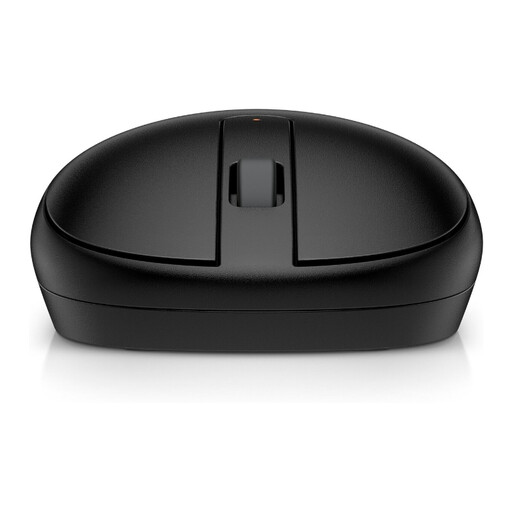
Why it suits this profile: This compact Bluetooth mouse works without a dongle and is suitable for both left- and right-handed use. Its optical sensor has a resolution of 1600 DPI.
The connection is clearly specified as Bluetooth 5.1, so you don’t have to rely on a USB receiver. Just check in advance that your laptop supports Bluetooth.
1600 DPI, three buttons, optical tracking and a symmetrical shape for left- and right-handed use.

Why it suits this profile: This wireless mouse is designed for intensive office work, with Bluetooth, a Logi Bolt receiver, horizontal scrolling and eight programmable buttons.
The mouse combines two wireless connection options with USB-C charging. According to Logitech, its Quiet Click switches reduce clicking noise, although the result depends on the environment in which you use it.
Adjustable 8000 DPI, rechargeable battery, connection to three devices and support for horizontal scrolling.
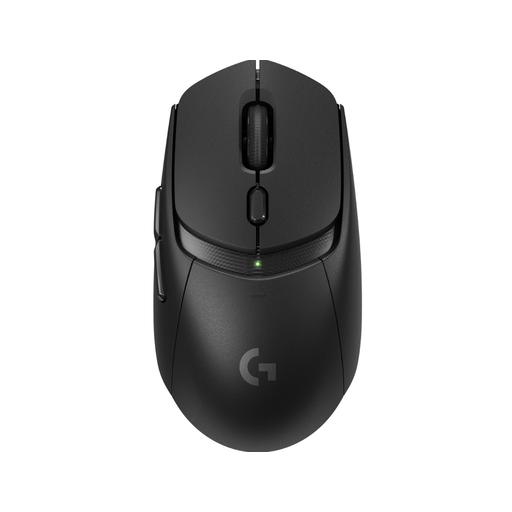
Why it suits this profile: This wireless gaming mouse offers Lightspeed or Bluetooth connectivity, six buttons and a low weight for players who value fast movements.
The receiver is included, and the mouse uses an AA battery. You won’t need to wait for it to charge, but you will need to replace the battery when necessary.
Optical HERO sensor, adjustable DPI, up to six programmable buttons and a stated battery life of more than 300 hours with an AA battery, according to Logitech.
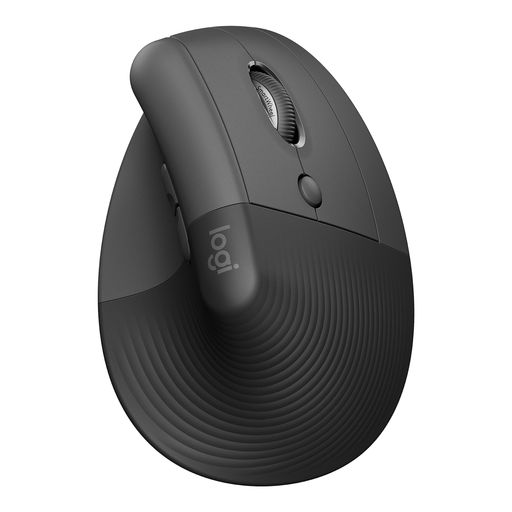
Why it suits this profile: The vertical shape is designed for right-handed users with small to medium-sized hands. You can connect via Bluetooth or the included USB receiver.
The product specifications state the hand orientation, dimensions and vertical shape. This makes it easier to compare the fit in advance, rather than relying on the word “ergonomic” alone.
57-degree vertical shape, four programmable buttons, quiet clicks and a stated battery life of up to two years, according to Logitech.
We’ve put together a complete, up-to-date list of products that meet these strict selection criteria and the applicable European safety requirements.
No. A Bluetooth mouse needs Bluetooth support. A model with a USB receiver needs a suitable port. Also check the operating system and whether the receiver uses USB-A or USB-C.
Its lifespan depends on the switches, battery type, usage and maintenance. A model with replaceable batteries can keep working as long as replacement parts are available. The battery capacity of a rechargeable mouse will decrease over time. The statutory guarantee in the European Union is separate from any stated battery life.
It can be, but check the other specifications too. A quiet mouse is mainly designed to reduce clicking noise. For gaming, sensor precision, polling rate, weight, connectivity and programmable buttons also matter. Use the product details—not just the marketing name—to make your choice.
