
Vandaag of morgen in huis

Kwaliteit gegarandeerd

Welkomstaanbiedingen ontgrendelen: GRATIS bezorging | Tot 80% korting | Gratis 30 dagen JoyPlus-proefperiode
Download de app
A wireless mouse keeps your desk tidy and is handy for a laptop, home office or gaming PC. Yet many models look similar. A low price can be tempting, but the mouse might only work via a USB receiver, run out of battery quickly or not feel comfortable in your hand.
So don't just focus on the looks or a high DPI value. The right wireless mouse should suit your devices, how long you use it and the way you work. Below, you'll find out what to look for and which popular choices match different user profiles.
DPI determines how sensitive the cursor is to movement. A high value can be useful for large screens or gaming, but for word processing and browsing, adjustable DPI matters more than an extreme maximum. A 30,000 DPI sensor, for example, is mainly relevant for specific gaming setups, not automatically for daily office work.
Also check whether the DPI can be adjusted via software or a physical button. Some models only offer a few fixed levels.
A wireless computer mouse can connect via:
Check how many devices can be paired at the same time. A multi-device mouse is practical if you switch between, say, a work laptop and a personal computer.
An ergonomic mouse doesn't have the same shape for everyone. Pay attention to hand preference, dimensions, weight and grip. A right-handed model isn't suitable for someone who works left-handed. A vertical shape can feel different from a conventional mouse and usually takes some getting used to.
With a quiet mouse, it's mainly about the click sound. The scroll wheel and side buttons can still be audible. According to Logitech's own information, SilentTouch reduces click noise by up to 90 per cent on certain models compared to traditional mice. Treat this as a product specification from the brand, not a guarantee of a completely silent experience.
First, look at the ports on your device. A Bluetooth mouse only works if Bluetooth is supported. A USB receiver is handy for a desktop, but modern laptops sometimes have few USB-A ports. So check whether an adapter is needed.
For gaming, the connection method is especially important. A 2.4GHz connection or cable can offer a different user experience than Bluetooth. Also check whether the software for programmable buttons works only with Windows. For the ET Wireless Gaming Mouse, for example, it states that the programming software is only available for Windows and in wired mode.
An optical sensor is common for office and gaming mice. A laser sensor can work on more surfaces according to the product information, but the surface still matters. Avoid highly reflective desks when the manufacturer warns against them.
For daily use, 1,000 to 4,000 DPI is often sufficient. Gaming models usually offer higher values and sometimes a polling rate of up to 1,000 Hz. A higher specification is only useful if you actually use it.
A model with AA or AAA batteries can be practical because you can insert a spare battery straight away. A rechargeable mouse avoids loose batteries, but check the stated battery life and charging time.
A low weight can support fast movements, especially with a wireless gaming mouse. A heavier model can feel more stable for office work. Also compare the dimensions with your hand and note the position of the thumb rest and side buttons.
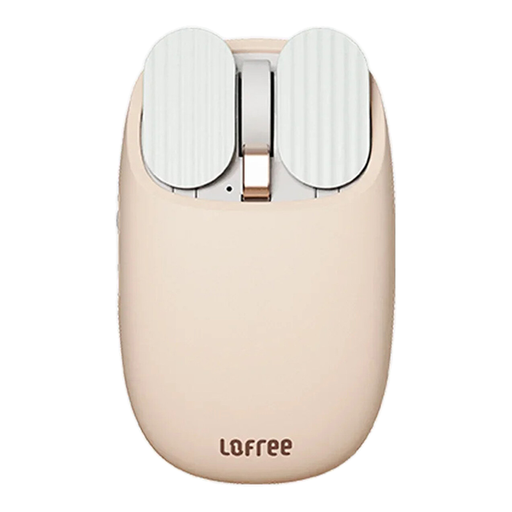
Why this fits the profile: This model combines Bluetooth and 2.4GHz, making it suitable for laptop use, office work and travel. The five DPI levels keep operation straightforward.
The dual-mode connection prevents reliance on just one connection type. The built-in 800mAh battery also means you won't need a loose battery straight away during use.
PAW3220LU optical sensor, DPI levels from 800 to 3,600, Bluetooth 4.0 and a stated battery life of up to around one month.

Why this fits the profile: A business user who scrolls a lot, switches between devices and needs programmable buttons gets multiple customisation options in one mouse.
The specifications mention Bluetooth, Logi Bolt, three paired devices and a rechargeable battery. This lets you tailor the connection to your laptop, desktop or office environment.
8,000 DPI, eight buttons, horizontal scrolling, adjustable DPI and USB-C charging. According to Logitech's own information, Quiet Click reduces click noise by 90 per cent.

Why this fits the profile: This wireless gaming mouse is aimed at FPS gaming and fast movements. The low weight and right-handed shape suit a specific gaming setup.
The choice isn't just about DPI: the product information also mentions an optical sensor, 1,000 Hz polling rate, wireless HyperSpeed connection and a weight of around 63 to 64 grams.
Razer Focus Pro 30K sensor, five programmable buttons, USB-C, right-handed ergonomic shape and a battery life of up to 90 hours as stated by Razer.
We've put together a full, up-to-date list of products that fully meet these strict selection criteria and comply with current European safety regulations.
That depends on the model. A Bluetooth mouse can connect directly to a laptop or tablet if the device supports Bluetooth. A mouse with a 2.4GHz connection usually needs a USB receiver. Models with dual-mode or tri-mode offer more flexibility.
The battery life varies a lot. Some mice work for months or up to two years on one AA battery, while a rechargeable mouse has a stated battery life per charge. Also look at the charging time, sleep mode and battery type. The values in product descriptions are stated usage indications and can vary depending on intensity and settings.
Yes, as long as the connection, sensor and shape suit your games. For competitive gaming, low latency, adjustable DPI, polling rate and low weight are relevant points. For casual gaming, a standard Bluetooth mouse can be sufficient. Also check whether the programmable features work with your operating system.
