
Vandaag of morgen in huis

Kwaliteit gegarandeerd

Welkomstaanbiedingen ontgrendelen: GRATIS bezorging | Tot 80% korting | Gratis 30 dagen JoyPlus-proefperiode
Download de app
A wireless mouse keeps your desk tidy and is handy for use with a laptop, PC or tablet. However, not all models are suitable for the same situation. A compact Bluetooth mouse for on the go, for example, can be less comfortable during a long working day. A wireless gaming mouse with high DPI offers plenty of settings, but it isn't automatically comfortable for office work.
The biggest buying mistakes usually come down to three pitfalls:
A mouse for laptop is often practical with Bluetooth, because you don't need to use a USB port. The Microsoft Surface Arc Mouse, for example, works via Bluetooth 4.0 or higher and can be stored flat. Check beforehand whether your device supports the required Bluetooth version.
A wireless mouse with a 2.4GHz receiver is generally straightforward: plug in the receiver and switch on the mouse. This is handy for an office PC or desktop. Do pay attention to the type of USB connection. Some receivers use USB-A, while modern laptops mainly have USB-C ports.
For those who regularly switch between laptop, PC and tablet, a multi-device mouse is more convenient. The Trust Ozaa+ supports connection with up to three devices: via the USB receiver and two Bluetooth channels.
DPI stands for dots per inch and determines how far the cursor moves with a given hand movement. For word processing and web pages, around 1,000 to 2,000 DPI is often sufficient. For large screens, image editing or games, an adjustable higher value can be useful.
An optical mouse works with an optical sensor and generally performs well on a suitable, flat surface. However, a high DPI is no guarantee of a better experience. Also check:
Gaming models often add polling rate, programmable buttons and lighting. The Rapoo VT7 MAX, for example, states a wireless polling rate of up to 8,000 Hz and a sensor of up to 30,000 DPI. According to Rapoo's product description, these are technical features of the model; for office work, such values are not necessary.
An ergonomic mouse should fit your hand size and grip. A compact mouse is easy to carry, but may offer less support for larger hands. A left-handed mouse or ambidextrous model means you're not limited to right-handed designs only.
A vertical mouse places the hand in a different position. The Trust Bayo II has, according to the product description, an angle of 57 degrees and is intended for right-handed use. That is a design choice, not a guarantee of a specific physical effect. If you use it for long periods, take regular breaks and pay attention to your posture.
For shared workspaces, a silent mouse can be pleasant. Logitech states for the Signature M650 L that SilentTouch reduces click noises by up to 90% compared to traditional mice. This is a claim from Logitech itself; the actual noise experience may vary depending on the surface and user.
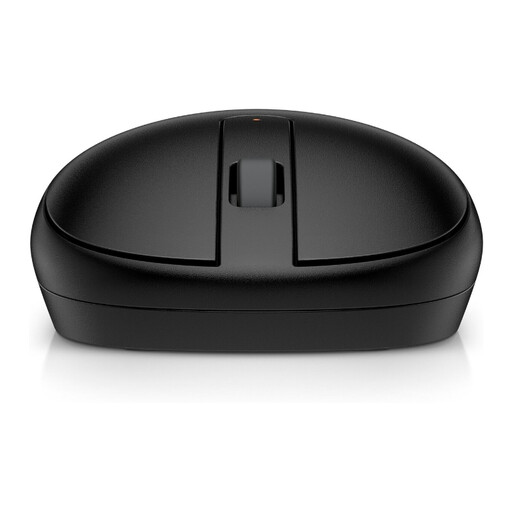
Why this fits the profile: A simple Bluetooth mouse for daily use with laptop, PC or tablet, without a separate USB receiver.
The product information states Bluetooth 5.1 and an optical sensor of 1,600 DPI. Do check beforehand whether your device supports Bluetooth.
Ambidextrous design, three buttons, Bluetooth 5.1 and a compact weight of 54.2 grams.

Why this fits the profile: Aimed at home workers and office professionals who use multiple devices and wide spreadsheets.
The specifications mention both 2.4GHz and Bluetooth, plus a sideways scroll wheel. This means you don't have to rely solely on a high DPI.
Up to three paired devices, rechargeable battery, silent buttons and adjustable optical sensor up to 3,200 DPI.
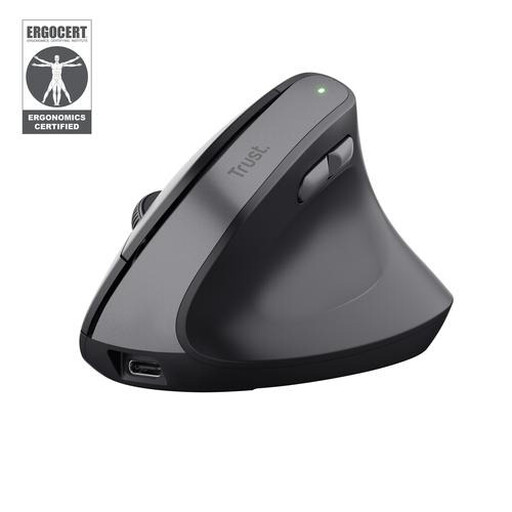
Why this fits the profile: A vertical mouse for right-handed users who want to try a different hand position during office work.
The shape and hand orientation are clearly specified. This model is not suitable for left-handed users or those who need Bluetooth.
57-degree vertical shape, silent buttons, rechargeable battery and DPI settings from 800 to 2,400.

Why this fits the profile: For gamers looking for a lightweight wireless gaming mouse with plenty of DPI settings, programmable buttons and a long stated battery life.
According to Rapoo's own information, the mouse weighs 53 grams and the battery lasts up to 750 hours at 1,000 Hz. Check whether you actually need these features.
Optical switches with a stated lifespan of 120 million clicks, adjustable X/Y DPI up to 30,000 and support for Windows and macOS via A HUB.
We've put together a full, up-to-date list of products that fully meet these strict selection criteria and current European safety regulations.
No. A model with a USB receiver needs a suitable USB port. A Bluetooth mouse requires Bluetooth support and usually needs to be paired once through your laptop's settings. Also check the supported operating system.
That varies by model. A mouse with an AA battery can last from months to around two years according to the product specification, while a rechargeable mouse needs to be recharged after a certain number of hours or months. Bear in mind that manufacturer claims are based on specific usage conditions.
Yes, as long as the connection, polling rate, sensor and shape suit your games. A wireless gaming mouse with a 2.4GHz receiver is often designed for low latency. For casual gaming, a standard wireless mouse with adjustable DPI may be sufficient. Also check the weight, button layout and whether the software works on your operating system.
