
Vandaag of morgen in huis

Kwaliteit gegarandeerd

Welkomstaanbiedingen ontgrendelen: GRATIS bezorging | Tot 80% korting | Gratis 30 dagen JoyPlus-proefperiode
Download de app
A wireless mouse tidies up your desk and gives you more freedom to move. Even so, the range isn’t easy to compare. A low price may look tempting, only for you to run into limited battery life, an awkward shape or connectivity issues later.
So don’t focus solely on DPI or a flashy design. For Dutch home workers, laptop users and PC gamers, the connection, power, size and controls matter most.
A mouse with 10,000 or 24,000 DPI isn’t automatically more precise in everyday use. DPI mainly determines how quickly the cursor moves across the screen. For office work, a range of about 800 to 3,200 DPI is often sufficient. With a wireless gaming mouse, higher settings can be useful, but only if the sensor, software and polling rate match.
Also check whether the DPI is adjustable. A mouse with adjustable DPI lets you tailor it better to word processing, image editing or a game.
A mouse can connect via a 2.4GHz USB receiver, Bluetooth or both. A receiver usually works straight away with a PC or laptop with a free USB-A port. Bluetooth is more convenient for slim laptops and tablets, because you don’t need a dongle.
Check:
A multi-device mouse is especially practical if you regularly switch between a work laptop, desktop and tablet.
A large mouse can be pleasant if your hand rests fully on the body, but may be less suitable for small hands or for use on the go. A vertical ergonomic mouse also takes some getting used to and is often designed specifically for right- or left-handed use.
Pay attention to the dimensions, weight and the shape of the buttons. A model that looks comfortable on paper can in practice be too wide, too tall or too heavy for your grip.
For office work, Bluetooth and 2.4GHz are usually sufficient. For gaming, a stable 2.4GHz connection with low latency is often the logical choice. The polling rate indicates how often the mouse reports its position to the computer. A value of 1,000 Hz is found on various gaming models.
A Bluetooth mouse is handy when you want to keep USB ports free. Do check that your operating system and Bluetooth version are compatible.
A rechargeable mouse saves you from regularly replacing AA or AAA batteries. Pay attention to the stated runtime and the charging method. Some models can be used while charging. That’s practical if you don’t want to wait for the battery to fill up.
With models that use standard batteries, look at the type and expected consumption. Long battery life means less maintenance, but says nothing about the shape, click sounds or connection quality.
A silent mouse can be pleasant in a shared workspace, library or office. Claims such as “90% quieter” come from the brand’s product information and may be based on a comparison with a specific reference model. Treat this as a product specification, not a universal standard.
Also look at the number of buttons. For simple office work, three buttons and a scroll wheel are often enough. Programmable side buttons are especially useful for shortcuts, browser navigation and games.
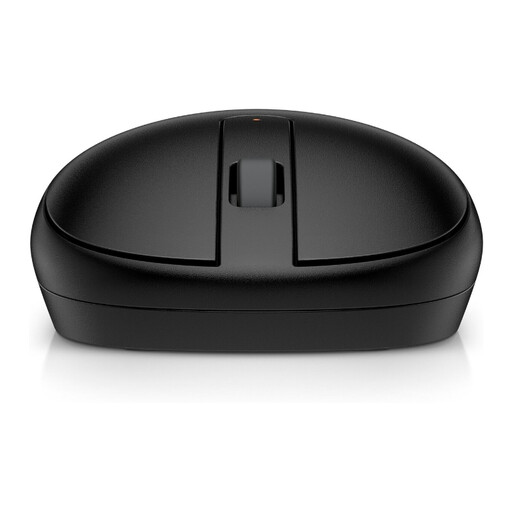
Why this fits the profile: A simple everyday mouse with Bluetooth 5.1, no separate USB dongle. The ambidextrous shape suits left- and right-handed users.
The product specs clearly state the Bluetooth 5.1 connection, battery type and compatible systems. So you don’t need to carry a receiver.
1600 DPI, three buttons plus scroll wheel, 54.2 grams and support for Windows, macOS and ChromeOS.

Why this fits the profile: For those who spend long hours at a screen and value a vertical shape, Bluetooth, a USB receiver and a rechargeable battery.
The shape and the right-handed design are clearly stated. According to Logitech’s own research, the handshake position can influence muscle activity; this is not a medical guarantee.
57-degree vertical shape, adjustable up to 4000 DPI, Bluetooth, USB receiver and fast charging.

Why this fits the profile: Aimed at PC gamers who want a lightweight mouse with a 2.4GHz connection, programmable buttons and RGB lighting.
The product information mentions the weight, DPI options, polling rate and battery life. That lets you set marketing terms against concrete specifications.
73 grams, optical sensor up to 4800 DPI, 1000 Hz polling rate, six programmable buttons and up to 80 hours of battery life according to the product description.
We’ve put together a complete, up-to-date list of products that fully meet these strict selection criteria and the applicable European safety regulations.
No. A model with a USB receiver needs a suitable USB port. A Bluetooth mouse only works if the laptop or PC supports Bluetooth. Also check the operating system, especially with programmable buttons and extra software.
That varies by model, connection and usage. Products with AA or AAA batteries can, according to the product specifications, last several months. A rechargeable mouse usually states an estimated runtime per full charge. Intensive use of lighting or a high polling rate can increase power consumption.
With a rechargeable model you mainly pay for the purchase and the charging. A model with disposable batteries incurs extra costs over time. On the other hand, you don’t need a charging cable. So compare not only the purchase price, but also the battery type, the expected runtime and the features you actually need.
