
Vandaag of morgen in huis

Kwaliteit gegarandeerd

Welkomstaanbiedingen ontgrendelen: GRATIS bezorging | Tot 80% korting | Gratis 30 dagen JoyPlus-proefperiode
Download de app
A wireless mouse keeps your desk tidier and is useful with a laptop, PC or flexible workspace. However, many models look very similar. A low price may seem appealing, only for you to discover later that the mouse is uncomfortable to hold, works only with a USB receiver or regularly needs new batteries.
Joybuy Product Recommendation Officer helps you translate marketing claims into specifications you can check. That way, you can choose a wireless computer mouse that suits your working day, studies or use on the go.
DPI determines how far the cursor moves when you move the mouse. For office work, an adjustable range of, for example, 800 to 1600 DPI is often sufficient. A higher setting may be useful on a large screen, but it does not automatically make a mouse more accurate or comfortable.
So check whether the mouse has multiple DPI settings and whether you can adjust them easily. An optical mouse generally works well on a standard mouse mat or a matt surface. Glass and highly reflective surfaces can affect tracking.
A wireless mouse with a USB receiver usually uses a 2.4GHz radio connection. This is practical for a PC or laptop with a spare USB-A port. If you have a slim laptop with USB-C ports only, you may need an adapter.
A Bluetooth mouse can be paired directly with compatible laptops, tablets and some PCs. Check the operating system and the number of devices you want to connect beforehand. Some models combine Bluetooth with a USB receiver, giving you greater flexibility.
A mouse powered by AA or AAA batteries can be used straight away, but will incur replacement costs over time. A rechargeable mouse eliminates loose batteries, but does need to be connected to a USB cable regularly.
Also consider the dimensions. A compact mouse is convenient for a laptop bag, but may provide less support for larger hands. A bigger model offers more palm support, but also takes up more space and is less suitable for use on the go.
Choose a USB receiver if you mainly work with a fixed mouse for PC or an office computer. Check whether the receiver can be stored inside the mouse. This reduces the risk of losing the small component.
Use Bluetooth when you want to keep your USB ports free or regularly switch between devices. For models with multiple connection options, it is important to check how many devices can be paired at the same time and how you switch between them.
For word processing, spreadsheets and browsing the internet, three standard buttons and a scroll wheel are usually sufficient. Extra buttons can be useful for browser navigation or shortcuts, but add little if you do not use them.
A side-scrolling wheel is useful for wide spreadsheets, timelines and large images. An adjustable DPI button is practical when you switch between precise selection and moving quickly across a large screen.
A silent mouse is well suited to a shared office, library or home-working space where others do not want to be disturbed. However, pay attention to the product description: “silent buttons” usually refers to the clicking sound and not necessarily the scroll wheel.
An ergonomic mouse may have a shape that positions your hand differently from a standard model. According to Trust’s own information, the Bayo II is designed with a 57-degree vertical angle and has been certified with a three-star ErgoCert rating. These are product specifications; the effect on comfort varies from user to user. If in doubt, compare the hand position and mouse dimensions with those of your current model.
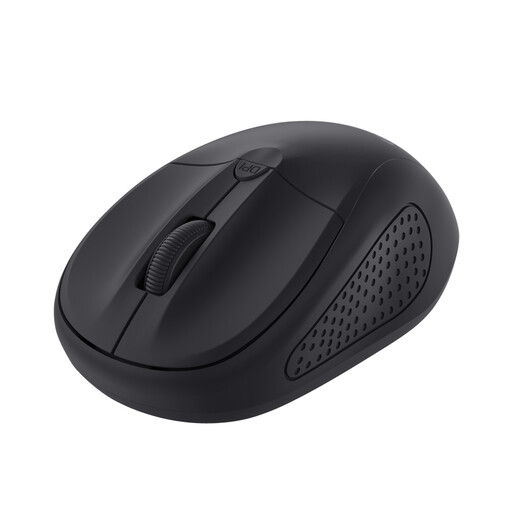
Why it suits this profile: This compact wireless computer mouse is designed for everyday use and portability. Its symmetrical shape is suitable for both left- and right-handed use.
The specifications are straightforward: a USB receiver, optical sensor and adjustable DPI from 1000 to 1600. Battery costs are still something to bear in mind.
Compact size, 6-metre wireless range and suitable for either hand.

Why it suits this profile: The Ozaa+ is aimed at office and home workers who use a laptop, PC and tablet, and work with wide documents.
The connection is not limited to one method: 2.4GHz and two Bluetooth channels support up to three devices in total.
Adjustable up to 3200 DPI, side-scrolling wheel, silent buttons and rechargeable battery with LED indicator.
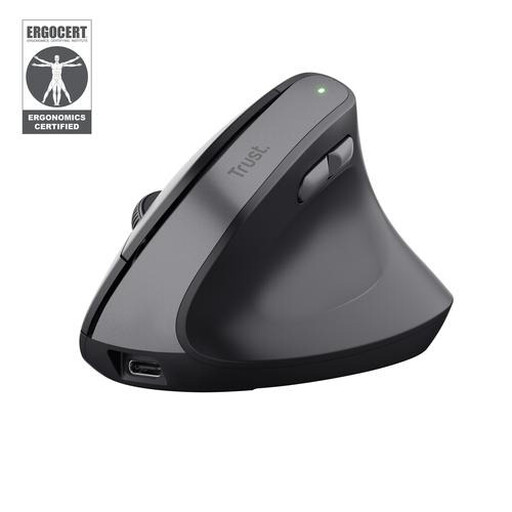
Why it suits this profile: The vertical design is intended for right-handed users who want to try a different wrist and hand position from that of a standard mouse.
The shape, hand orientation and DPI settings are clearly specified. Bluetooth is not included; the mouse works via a 2.4GHz USB receiver.
57-degree vertical angle according to Trust, silent buttons, six buttons and rechargeable battery.
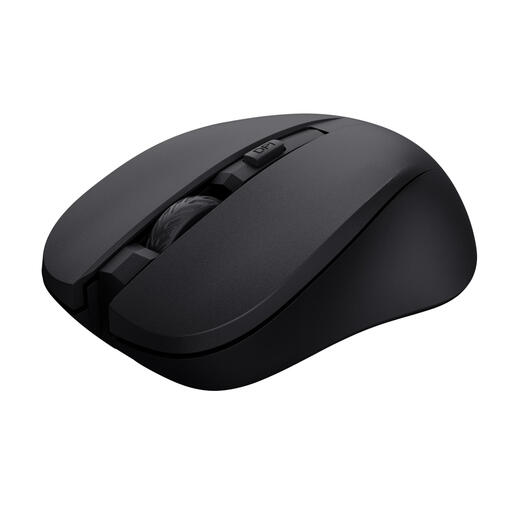
Why it suits this profile: The Mydo combines silent main buttons with a symmetrical body for everyday left- and right-handed use.
The product description explicitly mentions two silent main buttons and an adjustable speed of 1000 to 1800 DPI.
Wireless range of up to 10 metres, four buttons and two AAA batteries included.
We have put together a complete, up-to-date list of products that fully meet these strict selection criteria and the applicable European safety regulations.
Not always. A model with a USB receiver needs a suitable USB port. If your laptop has USB-C only, you may need an adapter. A Bluetooth mouse requires Bluetooth support and, in some cases, one-time pairing through the system settings.
Battery life depends on the battery type, settings and usage. Models with AA or AAA batteries can last for months, while a rechargeable mouse needs to be connected to the cable periodically. Check the stated battery life as a guide and look for the option to continue working while the mouse is charging.
No. According to the product description, silent buttons make clicking less audible, but the scroll wheel, movement across the desk and any extra buttons may still produce sound. For a shared workspace, it is still sensible to assess the scrolling mechanism and the shape of the mouse as well.
