
Vandaag of morgen in huis

Kwaliteit gegarandeerd

Welkomstaanbiedingen ontgrendelen: GRATIS bezorging | Tot 80% korting | Gratis 30 dagen JoyPlus-proefperiode
Download de app
A wireless mouse gives you a clutter-free desk, more freedom of movement and fewer cables in your laptop bag. However, models vary greatly in comfort, connection and battery life. A mouse that works well for a gamer isn’t necessarily comfortable for long working days. And a compact model for on the go can offer too little support at home.
Pay particular attention to these common pitfalls:
A Bluetooth mouse pairs directly with a compatible device. This is practical for a laptop on the go, a tablet or a MacBook. You don’t need a USB receiver, but the device must support Bluetooth.
A wireless mouse with a 2.4GHz receiver usually uses a small dongle. This can be a suitable choice for a PC mouse, especially if you have a fixed workstation. Pay attention to the connection type: some receivers use USB-A, while modern laptops more often only have USB-C.
Models with three connection options often combine Bluetooth, 2.4 GHz and USB-C. This is useful when you switch between, for example, a laptop, desktop and tablet. However, check whether all functions work in every connection mode. With the ET Wireless Gaming Mouse, for instance, the product description states that the programming software is only available on Windows and in wired mode.
DPI determines how much cursor movement you get for a given mouse movement. For word processing, spreadsheets and browsing, a range of around 800 to 3,600 DPI is sufficient for many users. A wireless gaming mouse can offer a higher range, such as 24,000 or 35,000 DPI, but that is mainly relevant for specific play styles and personal preference.
The polling rate indicates how often the mouse sends position information. A higher value can reduce response time, but generally requires more power and support from your computer. For office work, 1,000 Hz is usually more than enough. Gaming models with 4,000 or 8,000 Hz are aimed at users who consciously choose them.
Also pay attention to the sensor technology. An optical sensor is common for daily use and gaming. A laser sensor can, according to the product description of some models, work on more surfaces, but always check whether the mouse is suitable for your desk. A mouse mat often remains the most predictable surface.
An ergonomic mouse must fit your hand and grip. Right-handed models often have a clear thumb rest or curved shape. A symmetrical mouse can be more convenient if you alternate between left and right hands.
For fast movements, gamers sometimes choose a lightweight gaming mouse of less than 70 grams. This makes lifting and repositioning easier, but a low weight doesn’t automatically mean more comfort. For productivity, a heavier model with a thumb rest and horizontal scroll wheel can actually be more pleasant.
Also look at the number of buttons. A programmable mouse can support shortcuts, macros or application functions. For simple office work, two main buttons and a scroll wheel are often enough. Extra buttons are only useful if you actually use them.
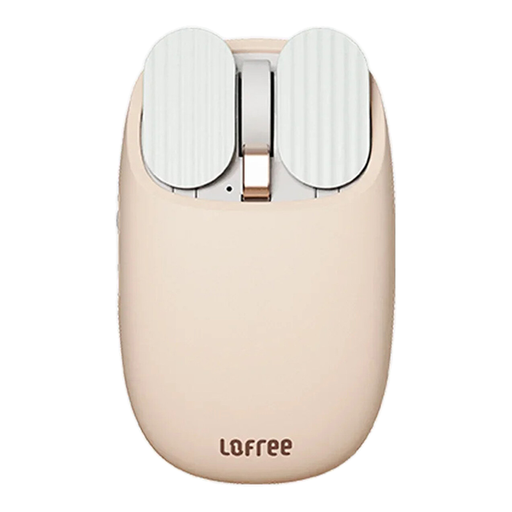
Why this fits the profile: The dual-mode connection and five DPI settings make this model suitable for laptop use, working from home and travel. According to the product description, the mouse works with Windows, macOS, iPadOS, iOS and Android.
The adjustable values range from 800 to 3,600 DPI, so you’re not dependent on one excessively high default. The Bluetooth and 2.4GHz modes offer more flexibility.
800mAh battery, USB-C charging, five DPI levels and Kailh micro switches according to the product information.

Why this fits the profile: According to the product description, this model is aimed at FPS gaming and combines a low weight with an optical sensor and wireless HyperSpeed connection.
The specifications mention 54 grams, six buttons and both wired and wireless use. This means you can temporarily continue with USB-C if the battery runs out.
35,000 DPI sensor, adjustable polling rate up to 8,000 Hz and a stated battery life of up to 95 hours according to the product description.
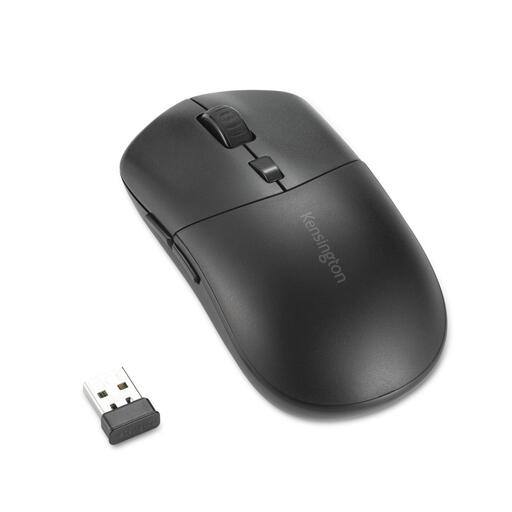
Why this fits the profile: This is a practical choice for the office, hybrid working and small to medium-sized hands. According to the product information, the mouse supports three active devices.
The silent buttons limit clicking noise in a shared workspace. You can also connect the mouse via Bluetooth or the included 2.4GHz USB-A receiver.
Rechargeable battery, six buttons, 2,400 DPI and a stated usage time of up to four months according to the product description.
Use this short checklist:
An RGB mouse can complement your desk, but lighting has no effect on cursor precision. For intensive gaming, the sensor, polling rate, shape and connection are more important than the light effect.
We’ve put together a full, up-to-date list of products that fully meet these strict selection criteria and comply with current European safety regulations.
That depends on the model. A Bluetooth mouse can pair directly with a device that supports Bluetooth. Models with only 2.4 GHz usually need a USB receiver. A tri-mode mouse often offers both options and can also work wired via USB-C.
The usage time varies depending on the battery, connection and settings. Manufacturers often state a maximum duration under specific conditions. RGB lighting and a high polling rate can drain the battery faster. A mouse with USB-C is practical because you can sometimes continue working while it charges.
Yes, provided the connection, sensor and polling rate suit your games. For competitive FPS games, users often pay attention to weight, low latency and a precise optical sensor. For casual gaming and office work, Bluetooth, comfort and battery life are often more important than a very high DPI value.
