
Vandaag of morgen in huis

Kwaliteit gegarandeerd

Welkomstaanbiedingen ontgrendelen: GRATIS bezorging | Tot 80% korting | Gratis 30 dagen JoyPlus-proefperiode
Download de app
A wireless mouse keeps your desk tidy and is handy with a laptop, home office setup or gaming PC. However, it’s not always easy to compare the options. A low price tells you little about click noise, connectivity, hand position or battery life. If you focus only on DPI or appearance, you could end up with an impractical mouse after just a few weeks.
In this buying guide from the Joybuy Product Recommendation Officer, you’ll find out what to look for, which marketing claims to treat with caution and what type of wireless computer mouse is right for you.
DPI determines how far the cursor moves in response to a particular hand movement. A mouse with 12,000 or 24,000 DPI may sound impressive, but a lower adjustable range is often enough for word processing, spreadsheets and browsing. It’s more important to be able to adjust the sensitivity and for the optical sensor to work reliably on your desk surface.
For gaming, a higher DPI can offer more settings to choose from. However, the right value depends on the game, your screen resolution and your personal preference.
An RF wireless mouse usually connects via 2.4 GHz using a small USB receiver. This is handy for a PC or laptop with a spare USB-A port. A Bluetooth mouse connects directly to a compatible device without a separate dongle. That’s useful with slim laptops that have few ports.
So, before you buy a wireless mouse, check:
A mouse with both RF and Bluetooth is more versatile, but it may also have more features than you need.
A large mouse with a palm rest can feel comfortable during long hours of office work, while a compact model fits more easily in a laptop bag. A vertical mouse changes the position of your hand, but usually takes a little time to get used to. Also check which hand it’s designed for: some models are only suitable for right-handed use.
An ergonomic mouse isn’t a medical solution. Think of its design as a practical feature, and choose a shape that suits your hand, grip and posture.
A range of, for example, 8 to 10 metres is usually more than enough for a desk or presentation room. Obstacles, other wireless devices and the position of the USB receiver can affect the connection. An RF model is often plug and play; a Bluetooth mouse needs to be paired through your device’s settings first.
An optical mouse uses a sensor to track movement across a surface. Don’t just look at the maximum DPI figure; check whether the DPI can be adjusted. For office work, ranges such as 800 to 1600 DPI are common. Gaming models often offer several settings and sometimes include software for further customisation.
A mouse powered by AA or AAA batteries can last for months, but battery life depends on the model and its settings. Rechargeable models mean you won’t need to replace batteries regularly, but they do need charging. Also check whether you can continue working or playing while the mouse charges.
It’s also worth checking how loud the clicks are. A quiet mouse is useful in a shared home office, library or workplace. Claims such as “90% quieter” come from the brand’s product information; the perceived reduction in noise can vary depending on the user and the surface.
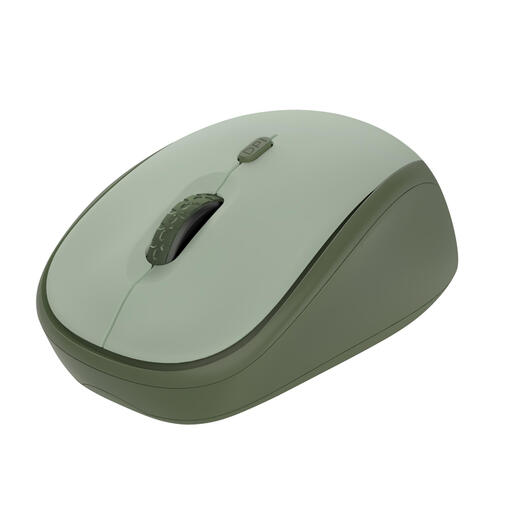
Why it suits this type of user: This compact model is designed for everyday office and laptop use. It connects via USB using 2.4 GHz, and its DPI can be adjusted from 800 to 1600.
The specifications make it clear that you’ll need a USB receiver. This makes the connection less confusing than with models that only have Bluetooth.
Quiet buttons, an 8-metre wireless range, a weight of 84 grams and a stated battery life of up to 12 months.

Why it suits this type of user: This right-handed model combines Bluetooth with a USB receiver, a rechargeable battery and a 57-degree vertical angle.
The shape and handedness are clearly stated. Check in advance whether a vertical mouse suits your grip and right hand.
Adjustable DPI up to 4000, a rechargeable battery, fast charging and support for Bluetooth and 2.4 GHz via the receiver supplied.

Why it suits this type of user: This mouse is designed for PC and laptop gamers who value a low weight, programmable buttons and a rechargeable battery.
The product information lists both the 2.4 GHz connection and a polling rate of up to 1000 Hz. You can compare these features with your own gaming needs.
An optical sensor up to 4800 DPI, six programmable buttons, USB-C charging and a weight of around 73 grams.

Why it suits this type of user: According to the product specifications, this larger right-handed model can connect to up to three devices via RF and Bluetooth.
The connection options and larger size are clearly stated. This makes it easier to decide in advance whether it’s suitable for your laptop, PC and tablet.
Adjustable DPI up to 3200, quiet buttons, a horizontal scroll wheel and a rechargeable battery with a charging indicator.
We’ve put together a complete, up-to-date list of products that meet these strict selection criteria and comply with the applicable European safety regulations.
Not every model works with every device. An RF model usually needs a spare USB-A port. A Bluetooth mouse requires Bluetooth support on your laptop or PC. Also check the listed operating systems, such as Windows, macOS and ChromeOS.
It varies by model. Product information for some mice states a battery life of a few months to up to 24 months. Rechargeable models often specify a number of hours or months per charge. Heavy use, lighting and sleep mode all affect how long the battery actually lasts.
Yes, but check the connection, polling rate, sensor, weight and battery. A wireless gaming mouse with 2.4 GHz and low latency is designed for fast movements. A standard wireless computer mouse may be enough for casual gaming. Also check whether the mouse is right-handed and whether its buttons are programmable.
