
Vandaag of morgen in huis

Kwaliteit gegarandeerd

Welkomstaanbiedingen ontgrendelen: GRATIS bezorging | Tot 80% korting | Gratis 30 dagen JoyPlus-proefperiode
Download de app
A wireless mouse gives you more freedom of movement at your desk, but not every model works equally well with a laptop, office PC or gaming computer. A low price says little about the connection, click noise or battery. Likewise, a high DPI value does not automatically mean that a mouse is more accurate for your needs.
When comparing models, pay particular attention to these three common pitfalls:
A connection that is not suitable for your device
A Bluetooth mouse works without a USB receiver, but your laptop or tablet must support Bluetooth. A mouse with a USB receiver is often easy to connect, but it occupies a USB-A port. Also check whether the receiver is included and where you can store it.
DPI as a marketing figure
An adjustable DPI mouse with 24,000 or 26,000 DPI is mainly of interest for specific gaming setups. Lower values are often more practical for word processing and browsing. So look at the number of DPI levels available and how you can adjust them.
Battery life without clear usage conditions
Manufacturers often state battery life based on their own test conditions. According to brands’ own specifications, a rechargeable mouse may last for weeks or months, but actual battery life depends on the connection, lighting and intensity of use. Also check whether the battery is built in or replaceable.
A Bluetooth mouse is convenient for laptops, tablets and devices with few available ports. Bluetooth 4.0 or higher is sufficient for everyday use with many models, but always check compatibility with Windows, macOS, iPadOS, Android or ChromeOS.
A mouse with a USB receiver usually uses 2.4 GHz. This is practical for desktops and laptops with USB-A. A dual-mode or tri-mode model combines Bluetooth with 2.4 GHz and sometimes a wired USB-C connection. This allows you to switch between devices, but check how many devices can actually be paired at the same time.
An ergonomic mouse may be a suitable choice if you work long hours, but “ergonomic” does not mean that every shape will suit every hand. Check:
A vertical design, such as that of the Logitech MX Vertical, often takes some getting used to. A compact mouse for laptop use is easy to carry around, but may offer less support for your hand.
DPI determines how far the cursor moves with a particular hand movement. A mouse with several adjustable levels is more flexible for different tasks. For office work, values of around 1,000 to 1,600 DPI are suitable for many users. Gamers also consider polling rate, sensor resolution, weight and programmable buttons.
A silent mouse reduces clicking noise and is suitable for shared offices, libraries or working from home alongside others. However, check whether only the main buttons are silent, or whether the scroll wheel and side buttons are quiet too.
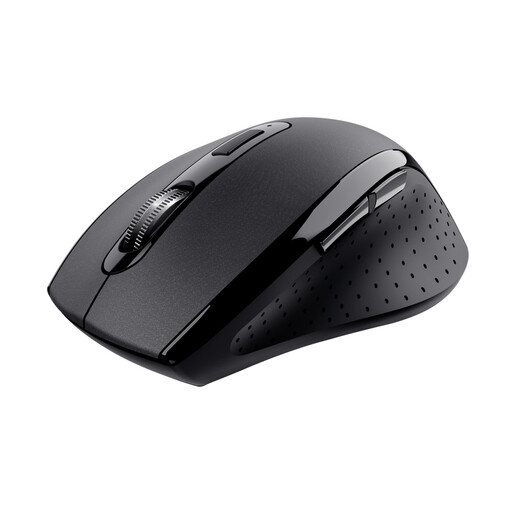
Why it suits this profile: This wireless computer mouse is designed for everyday use at home or in the office, with a 2.4GHz connection, 1,500 DPI and a range of up to 10 metres.
The main connection method, range and two AAA batteries are clearly specified. The receiver can be stored inside the mouse.
6 buttons, DPI switch and optical sensor; suitable for right-handed use.
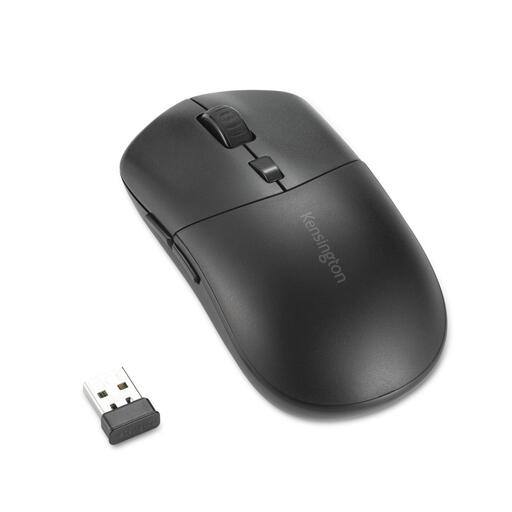
Why it suits this profile: This rechargeable mouse can be connected to up to three devices: two via Bluetooth Low Energy and one via the included USB-A receiver.
The manufacturer states a battery life of up to four months and silent buttons. The charging cable uses USB-C, but the battery is built in.
6 buttons, customisable via KensingtonWorks and suitable for both left- and right-handed use.
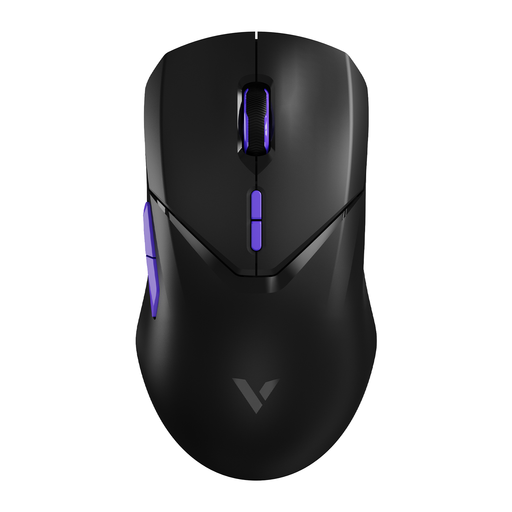
Why it suits this profile: This gaming mouse is designed for PC gamers who pay attention to polling rate, weight, sensor resolution and programmable buttons.
The specifications state 4,000Hz polling, 26,000 DPI and a weight of 68 grams. At 4,000Hz, CPU usage may increase; if you experience stuttering, 1,000Hz is an alternative.
PAW3398 sensor, 10 programmable buttons and, according to the manufacturer, battery life of up to 180 hours.

Why it suits this profile: This vertical ergonomic mouse combines Bluetooth with 2.4 GHz via a Unifying receiver and is compatible with Windows, macOS and iPadOS.
The shape and right-handed orientation are clearly stated. This allows you to assess in advance whether the angle and controls suit your hand.
4,000 DPI with adjustable speed, rechargeable battery and stated battery life of up to four months.
We have put together a complete, up-to-date list of products that fully meet these strict selection criteria and the applicable European safety regulations.
That depends on the type of connection. A Bluetooth model works directly with a device that supports Bluetooth. A model with a 2.4GHz receiver usually needs a USB-A port. A dual-mode mouse offers both options.
A model with replaceable AA or AAA batteries may, according to the product specifications, work for several months to a year and a half. With a rechargeable mouse, the stated usage time varies from dozens of hours to several months. This depends on lighting, connection and usage. Also check whether charging while in use is possible.
Yes, but when choosing a gaming mouse, pay attention to polling rate, sensor, weight, connection and latency. A high DPI value alone is not enough. For competitive games, 2.4GHz models with a high polling rate may be worth considering. For casual gaming and everyday computer use, a simpler wireless model is often sufficient.
