
Vandaag of morgen in huis

Kwaliteit gegarandeerd

Welkomstaanbiedingen ontgrendelen: GRATIS bezorging | Tot 80% korting | Gratis 30 dagen JoyPlus-proefperiode
Download de app
A wireless mouse keeps your desk tidy and works well with a laptop, desktop computer or tablet. But the range can be more complex than it first appears. A high DPI, long battery life or the word “ergonomic” tells you little on its own about how practical a mouse will be day to day.
The most common buying mistakes come down to three pitfalls:
A Bluetooth mouse pairs directly with a compatible device. This is handy for laptops, tablets and workspaces with few USB ports. Check first that your computer supports Bluetooth and that the operating system is compatible.
A mouse with a USB receiver usually uses a 2.4GHz wireless connection. Plug the receiver into a USB-A port and you can usually get started straight away. Some models let you store the receiver inside the mouse, which is useful when you’re on the move.
A mouse with both connection types offers more flexibility. According to its product specifications, the Trust Ozaa+ can connect to up to three devices using a 2.4GHz receiver and two Bluetooth channels.
DPI indicates how quickly the cursor moves in response to a mouse movement. A mouse with adjustable DPI is useful if you switch between editing text, working with large spreadsheets, graphic design and gaming.
For everyday office work, settings of around 1,000 to 1,600 DPI are often practical. Gamers may need finer adjustments or a higher maximum setting. Also consider the sensor, polling rate, button layout and weight. A high DPI figure on the box can’t make up for an unsuitable shape or inconsistent tracking.
Most of the models below use an optical mouse sensor. For best results, use one on a mouse mat, desk or another smooth surface. Reflective surfaces and glass can affect tracking.
A mouse powered by AA or AAA batteries can run for a long time, but you’ll need to keep spare batteries handy. An rechargeable wireless mouse means you won’t need disposable batteries, but it will need charging regularly.
So check:
Claims such as “up to 18 months” or “more than 300 hours” come from the brand’s product information. Actual battery life depends on the settings, how intensively you use the mouse and the battery type.
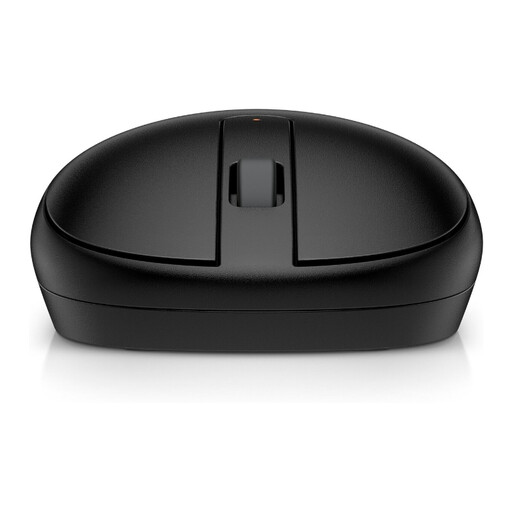
Why it suits this user: A straightforward mouse for laptop users who don’t want a separate dongle and mainly browse the web, check email and edit documents.
Bluetooth 5.1 means you don’t need a USB receiver. The product specifications list 1600 DPI and a symmetrical shape.
Bluetooth 5.1, optical sensor, 1600 DPI, three buttons and suitable for left- and right-handed use.

Why it suits this user: Designed for home workers and office staff who switch between a laptop, PC and tablet, and work with wide spreadsheets.
Having both a USB receiver and Bluetooth makes the connection options clearer than on a model with just one. The extra horizontal scrolling means less dragging through wide documents.
Connects to up to three devices, adjustable up to 3200 DPI, quiet buttons and a rechargeable battery according to the product description.
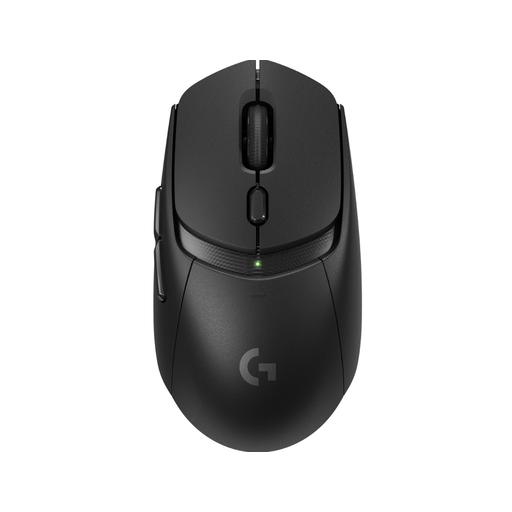
Why it suits this user: A gaming mouse for players looking for a lightweight design, programmable buttons and a choice between Bluetooth and Lightspeed.
The specifications list both Bluetooth and a Lightspeed receiver. This lets you use the mouse in different situations without relying on just one connection.
Optical HERO sensor, six programmable buttons and a stated weight of 86 grams with an AA battery.
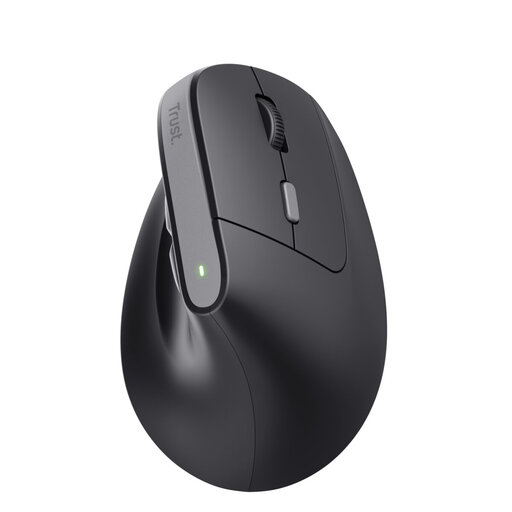
Why it suits this user: For right-handed users who are looking for a vertical shape and quiet operation for a permanent workstation.
The vertical shape is a deliberate choice for users who want a different hand position from that of a flat mouse. Check that this right-handed design suits your grip.
57-degree design, quiet buttons, adjustable 800–2400 DPI and a rechargeable battery according to the product information.
We’ve put together a complete, up-to-date list of products that meet these strict selection criteria and current European safety regulations.
Not necessarily. Check whether your laptop supports Bluetooth or has a spare USB-A port for the receiver. Also check which operating systems are supported. Some models work with Windows, macOS and ChromeOS, while others have additional limitations.
It varies from model to model. Manufacturers sometimes quote a battery life of several months or hundreds of hours. These figures are based on specific conditions. A rechargeable mouse needs regular charging; a model with AA or AAA batteries can work for longer without a cable, but you’ll need replacement batteries.
A quiet mouse can be a good choice for a shared workspace, library or home office. Check whether only the main buttons are quieter, or whether the scroll wheel and side buttons are too. “Quiet” doesn’t necessarily mean that all noise disappears completely; the brand’s product information is the best guide.
