
Vandaag of morgen in huis

Kwaliteit gegarandeerd

Welkomstaanbiedingen ontgrendelen: GRATIS bezorging | Tot 80% korting | Gratis 30 dagen JoyPlus-proefperiode
Download de app
A wireless mouse keeps your desk tidy and is convenient with a laptop, home office or gaming PC. However, not every wireless connection is the same, and a high DPI figure says little about comfort. If you focus only on appearance or a low price, you could soon find yourself dealing with an awkward shape, flat batteries or a missing USB port.
Joybuy Product Recommendation Officer has compiled the key points to consider. This lets you compare an ergonomic mouse, silent mouse, Bluetooth mouse or wireless gaming mouse based on verifiable specifications rather than marketing language.
A Bluetooth mouse connects directly to a device that supports Bluetooth. This is practical with many laptops, as you do not need a spare USB port. A 2.4GHz model usually works with a small USB receiver. This can be useful for desktops or computers without reliable Bluetooth support.
So check the following in advance:
Some models combine multiple connection options. This is useful if you switch between a laptop, desktop and tablet.
DPI determines how far the cursor moves for a particular hand movement. A mouse with adjustable DPI gives you more choice between slower, precise movements and faster navigation. For office work, 1,200 to 1,600 DPI is sufficient for many users. Gamers may need multiple profiles and higher values, but a high maximum is not automatically necessary.
Also consider the type of sensor. An optical mouse generally works well on a suitable, even surface. Not every mouse tracks reliably on glass or highly reflective surfaces. A mouse mat can improve tracking and prevents your desk from interfering with the sensor’s working surface.
A conventional rounded mouse may be suitable for both left- and right-handed use, but it does not provide the same position as a vertical mouse. A vertical ergonomic mouse does take some getting used to and is often designed specifically for the right hand.
Look at:
A manufacturer may highlight ergonomic benefits. Treat such claims as marketing statements and focus primarily on the actual shape, dimensions and button placement. If discomfort persists, it is advisable to adjust your working posture and take regular breaks.
A mouse powered by AA or AAA batteries can last for months, but you need to keep spare batteries available. According to the product information, the HP Wireless Mouse 220 has a battery life of up to 15 months with daily use. HP states that the HP 285 Silent lasts for up to 18 months.
A rechargeable mouse eliminates the need for disposable batteries. In that case, check the stated usage time, the type of charging port and whether you can continue using the mouse while it is charging. According to the product description, the Trust GXT 929 Helox has a built-in battery lasting up to 80 hours and a USB-C connection.
A silent mouse is particularly useful in a shared home office, library or workplace. Pay attention to the difference between a quiet scroll function and quiet main buttons. For the HP 285 Silent Mouse, HP states up to 90% noise reduction for the left and right buttons. This is a claim based on HP’s own product information, not a universal noise standard.
Many models in this selection offer a range of up to 10 metres. In a normal working environment, this is usually more than enough. Obstacles, metal objects and sources of interference can affect the connection. For competitive gaming, polling rate, connection type, sensor and software support are more relevant than range alone.
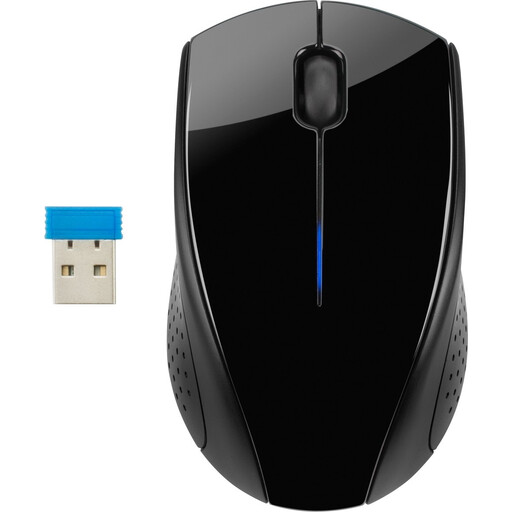
Why it suits this profile: This mouse is designed for straightforward everyday use and works with a 2.4GHz USB receiver. According to the specifications, its rounded shape is suitable for both left- and right-handed users.
There is no need to pair Bluetooth, and the specifications list 1,300 DPI, an optical sensor and a battery life of up to 15 months with daily use, according to HP.
2.4GHz connection, two buttons, scroll wheel and support for Windows, ChromeOS and macOS.

Why it suits this profile: This ergonomic mouse has a 57-degree vertical angle, Bluetooth and a 2.4GHz connection via a receiver. The rechargeable battery and adjustable 4,000 DPI make it suitable for extended computer use.
The specifications clearly state the hand orientation, vertical shape, connection options and battery. According to Logitech’s own research, the design could reduce hand movement and muscle activity; this is a brand claim.
Vertical grip, Bluetooth, USB receiver, fast charging and a stated usage time of up to four months per full charge, according to Logitech.

Why it suits this profile: This wireless gaming mouse combines an optical sensor of up to 4,800 DPI with six programmable buttons, a 2.4GHz receiver and RGB lighting.
According to the product information, the sensor resolution can be adjusted from 800 to 4,800 DPI. The mouse can be used via USB-C while charging, so you are not entirely reliant on the battery.
Lightweight design of approximately 73 grams, up to 80 hours of battery life according to Trust, six programmable buttons and adjustable RGB lighting.
We have put together a complete, up-to-date list of products that fully meet these strict selection criteria and the applicable European safety regulations.
For a laptop mouse, Bluetooth is often practical because it leaves a USB port free. The HP 240 uses Bluetooth 5.1 and has an optical sensor of 1,600 DPI, according to the specifications. If you want to take a compact mouse with you, you should also consider its weight and how easy it is to store.
For an office mouse, quiet buttons, a reliable connection and battery life are usually more important than RGB or an extremely high DPI. The Trust Sura has an optical sensor, six buttons and adjustable DPI according to the product specifications.
Gamers can opt for a wireless model with low latency, multiple connection modes, programmable buttons and a rechargeable battery. However, make sure the shape suits your hand: many gaming mice are designed exclusively for right-handed use.
That depends on how you use it. A wireless mouse gives you greater freedom of movement and keeps your desk tidy. A USB mouse works without batteries and does not need a wireless connection. For a permanent desktop setup, a wired model can therefore be simple and reliable.
This varies by model, battery type and usage. Office mice powered by AA or AAA batteries sometimes state a usage time of several months. A rechargeable gaming mouse will often work for dozens of hours per charge. Always check the stated capacity or usage time and confirm whether the mouse can still be used while charging.
No. The laptop must support Bluetooth, and the operating system must be compatible. If your laptop does not have Bluetooth or you want to use a direct receiver, choose a model with a USB dongle or a mouse that offers both connection methods.
