
Vandaag of morgen in huis

Kwaliteit gegarandeerd

Welkomstaanbiedingen ontgrendelen: GRATIS bezorging | Tot 80% korting | Gratis 30 dagen JoyPlus-proefperiode
Download de app
A wireless mouse keeps your desk tidy and gives you more freedom to move. But not every model is right for every situation. A Bluetooth mouse for travel has different requirements from a wireless mouse for an office PC or a gaming mouse designed for fast responses.
So don’t focus only on appearance or a high DPI figure. In practice, the connection, shape, power source and buttons all affect how comfortable a mouse is to use.
A Bluetooth mouse connects directly to a Bluetooth-enabled device. This is handy with many laptops and tablets, as you don’t need a spare USB port. A mouse with a 2.4GHz receiver works via a small USB dongle. This can be practical for a PC, but less so if your laptop only has USB-C ports and you don’t want to use an adapter.
Also check whether the mouse offers more than one connection mode. A model with both Bluetooth and 2.4GHz is more flexible, but make sure you check how many devices you can actually pair it with.
DPI determines how far the cursor moves in response to a particular hand movement. A mouse with a high DPI can respond quickly, but more DPI doesn’t automatically mean better tracking. For office work, adjustable settings between around 800 and 3200 DPI are often enough. Gamers should also consider polling rate, sensor response and weight.
Having several DPI settings lets you adjust the speed to suit your screen size, programme or game.
A mouse may look ergonomic but still be too big, too small or unsuitable for the way you hold it. Check its dimensions, weight and shape. A vertical ergonomic mouse also takes some getting used to. A compact model is easier to carry around, but usually offers less support for your whole hand.
With a quiet mouse, the switches and buttons are what matter most. Manufacturer claims about noise reduction, such as ‘up to 90% quieter’, are claims made by the brand. Treat them as product information, not a universal guarantee for your working environment.
Before buying, check:
A mouse designed for laptop use won’t necessarily work seamlessly with every tablet or Mac. Check the compatibility list, especially for older devices and dual-boot configurations.
A standard AA or AAA battery can last for months and is quick to replace. A rechargeable mouse means you don’t need loose batteries, but you’ll need to charge it. Check the stated battery life and whether a charging cable is included. Some models can still be used while charging.
Actual battery life depends on usage, lighting, sleep mode and connection type. So treat a claim such as ‘up to 24 months’ as the maximum stated battery life under certain conditions.
Look at:
A mouse for PC work doesn’t need the same features as a gaming mouse. For spreadsheets, a horizontal scroll wheel may be more useful than RGB lighting. For competitive gaming, low weight, a 1000 Hz polling rate and a stable 2.4GHz connection matter more.
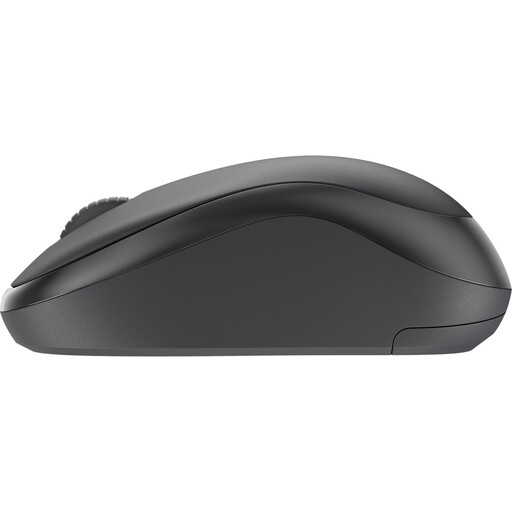
Why it suits this profile: A straightforward wireless mouse for everyday office and home use, with support for both left- and right-handed users according to the product information.
The controls are simple and uncluttered: three buttons, an optical sensor and a wireless USB connection.
According to the product description, this model features Silent Touch, an adjustable resolution of up to 4000 DPI and an included AA battery.

Why it suits this profile: Designed for people who spend long hours at a computer and prefer a vertical ergonomic shape.
Its shape is clearly different from a standard flat mouse. Check that the vertical grip suits your hand and working posture.
Bluetooth and a USB receiver, an adjustable sensor of up to 4000 DPI, and a rechargeable battery with a stated life of four months.

Why it suits this profile: A gaming mouse for PC and laptop gamers looking for a lightweight design, programmable buttons and fast wireless response.
The specifications list 2.4GHz, a 1000 Hz polling rate and a weight of around 73 grams, so you don’t have to focus on DPI alone.
The product information lists up to 4800 DPI, six programmable buttons, RGB lighting and up to 80 hours of battery life.

Why it suits this profile: For anyone who switches between a laptop, PC and tablet, and often works with wide spreadsheets or timelines.
You get more than just a 2.4GHz connection: according to the product description, this model also supports two additional Bluetooth devices.
A horizontal scroll wheel, quiet buttons, a rechargeable battery and an optical sensor of up to 3200 DPI.
We’ve put together a complete, up-to-date list of products that meet these strict selection criteria and the applicable European safety regulations.
Yes, if the model uses a 2.4GHz USB receiver. You’ll need a suitable USB port, though. If your laptop only has USB-C ports, check whether an adapter is included or needs to be bought separately.
It varies by model. Some manufacturers state that their mice last for months or even years, while rechargeable models often have a stated battery life of several weeks or months. Usage, sleep mode, lighting and connection type all affect how long the battery actually lasts.
A quiet mouse is particularly useful in a shared workspace. For gaming, the sensor, polling rate, weight, connection and programmable buttons are usually more important than noise level. So check the full list of specifications before buying.
