
Vandaag of morgen in huis

Kwaliteit gegarandeerd

Welkomstaanbiedingen ontgrendelen: GRATIS bezorging | Tot 80% korting | Gratis 30 dagen JoyPlus-proefperiode
Download de app
A wireless mouse gives you more desk space and is handy for a laptop, home office or gaming setup. But a high DPI rating or long battery life doesn’t tell you everything. Some models become uncomfortable after a few hours, don’t work with your laptop or have features you’ll never use.
As a Joybuy Product Recommendation Officer, I focus on specifications you can check: connectivity, dimensions, weight, battery type, buttons and compatibility. Read on to find out which pitfalls to avoid and which wireless mouse suits different needs.
DPI indicates how sensitively the cursor responds to movement. A gaming mouse with 18,000 or 30,000 DPI offers a wide range of settings, but you’ll often use a much lower setting in the office. So check the sensor type, adjustability and polling rate too. For everyday work, reliable tracking and a comfortable shape are usually more important than the maximum DPI figure.
A Bluetooth mouse only works if your computer supports Bluetooth. A mouse with a 2.4GHz connection usually uses the supplied USB receiver. Check in advance that your laptop has a suitable USB port. Some modern laptops only have USB-C ports, while the receiver uses USB-A.
A model with multiple connection options is handy if you switch between a laptop, desktop and tablet. Check how many devices can be paired at once and how you switch between them.
The stated battery life often depends on the connection type, polling rate, lighting and intensity of use. A rechargeable mouse means you don’t need spare batteries, but you’ll need to charge it in good time. A mouse powered by AA or AAA batteries can be more convenient if you want to keep working without delay.
Also check whether you can use the mouse while it’s charging and what type of cable is included. A short cable or unusual connector can be inconvenient at a busy workstation.
For office work and laptop use, Bluetooth and 2.4GHz are often sufficient. Bluetooth saves a USB port, while a USB receiver is usually easy to set up. For gaming, a dedicated wireless technology with low latency may be useful.
Check which operating systems are supported. According to its product specifications, the Kensington MY430 EQ works with Windows, macOS and ChromeOS. The Logitech MX Master 4 for Business can connect to up to three devices and supports Bluetooth and a Logi Bolt receiver.
An ergonomic mouse should suit your hand and grip. A compact model is easy to carry around, but may be less suitable for larger hands. A heavier model can feel more stable, while a lightweight gaming mouse moves more easily with less resistance.
Consider:
A symmetrical model, such as the Razer Orochi V2, may suit both left- and right-handed users. A Logitech MX Master model, on the other hand, is designed for right-handed users.
A quiet mouse is useful in a shared office or workspace. Check whether the manufacturer specifies quiet clicks; a quiet scroll function isn’t automatically included. Programmable buttons are handy for shortcuts, media controls or gaming, but may require additional software.
If you’re considering a mouse with programmable buttons, check that the software is available for your operating system. The Kensington MY430 EQ uses KensingtonWorks to customise its buttons. Gaming models may also offer macros, DPI profiles and onboard memory.
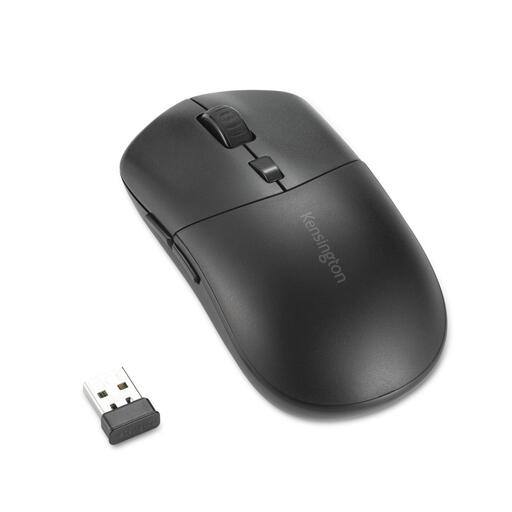
Why it suits this user: This rechargeable mouse is designed for everyday work and combines Bluetooth with a USB-A receiver. That makes it a good choice for people working from home with multiple devices.
The product specifications list three active connections, six buttons and quiet clicks. This means you’re less reliant on a single connection option and won’t have to put up with loud clicking.
Stated battery life of up to four months, USB-C charging, 2,400 DPI and support for Windows, macOS and ChromeOS.

Why it suits this user: This model is designed for right-handed office professionals who scroll a lot, switch between devices and use shortcuts.
As well as Bluetooth, a Logi Bolt receiver is included. The mouse has eight programmable buttons and, according to the specifications, works on glass surfaces.
8,000 DPI, horizontal scroll wheel, quiet click, connection to three devices and a rechargeable USB-C battery.

Why it suits this user: This wireless gaming mouse is aimed at players looking for a low weight, plenty of buttons and a high polling rate.
According to the product information, the mouse weighs 53 grams and supports native 8K polling. Check that your computer can handle this setting, as a higher polling rate can use more system resources.
Up to 26,000 DPI, ten programmable buttons, macro support and stated battery life of up to 750 hours at 1,000 Hz.
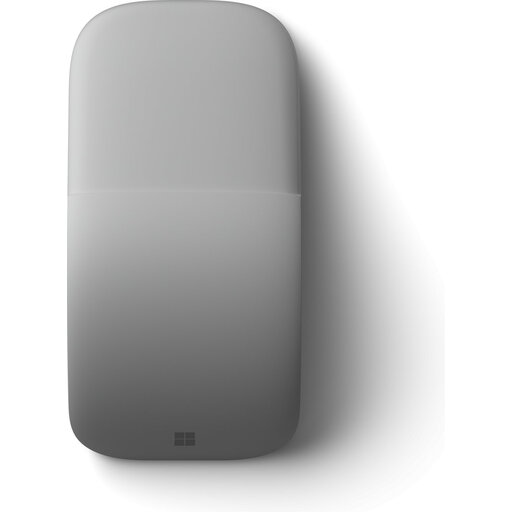
Why it suits this user: Its flat design makes it easy to carry in a laptop bag. The mouse uses Bluetooth, so it doesn’t need a USB receiver.
It connects via Bluetooth 4.0 or later. Check this in advance, as older devices may not be compatible, according to the product information.
Flat design, low weight, switches off when folded and suitable for left- and right-handed use.
We’ve put together a complete, up-to-date list of products that meet these strict selection criteria and current European safety regulations.
No. A Bluetooth mouse requires Bluetooth support on your laptop. A model with a USB receiver needs a suitable USB port. Also check the operating system and whether programmable buttons require additional software.
It varies by model and how you use it. Manufacturers provide an estimated battery life, often based on the connection mode, lighting and polling rate. You can charge a rechargeable mouse via USB-C; models with AA or AAA batteries can keep going for longer if you have spare batteries to hand.
It can be, especially if you value a low weight, adjustable DPI and programmable buttons. Bear in mind the click noise, shape and battery type. A gaming mouse with RGB lighting or a high polling rate won’t necessarily offer any advantage for word processing or spreadsheets.
