
Vandaag of morgen in huis

Kwaliteit gegarandeerd

Welkomstaanbiedingen ontgrendelen: GRATIS bezorging | Tot 80% korting | Gratis 30 dagen JoyPlus-proefperiode
Download de app
A wireless mouse gives you more freedom on your desk, but not every model is suitable for every user. A Bluetooth mouse can be handy for a laptop, while a 2.4GHz receiver is often more practical for a PC. Gamers, on the other hand, will look at the polling rate and sensor precision, while people working from home tend to prioritise comfort, quiet buttons and battery life.
The product packaging doesn't always tell the whole story. That's why you should watch out for these common pitfalls before buying a wireless computer mouse.
A mouse with adjustable DPI allows you to change the pointer speed. However, a high maximum, such as 24,000 or 42,000 DPI, doesn't automatically mean the mouse is more comfortable or precise to use. For office work, lower settings are often more manageable. For gaming, the sensor, polling rate, software and weight also play a crucial role.
Therefore, check:
A wireless mouse can connect via Bluetooth, a 2.4GHz USB receiver, or both. Bluetooth saves a USB port and is ideal for many laptops. A receiver is useful if your PC doesn't have Bluetooth or if you want a simple plug-and-play setup.
Also, pay attention to the type of USB connection. A USB-A receiver won't plug directly into every modern laptop. Some models support multiple devices, but this doesn't always mean you can switch between all your systems at the touch of a button. Check how many devices can be paired and what switching functions are available.
An ergonomic mouse should fit your hand, grip and posture. A vertical mouse, for example, has a different learning curve than a traditional model. A mouse designed for small hands can be uncomfortable for someone with large hands, while a large model can be difficult to handle when travelling.
Before you buy, consider:
For a laptop mouse, Bluetooth is often the logical choice, as you don't need to carry a receiver with you. For a PC mouse, a 2.4GHz connection via a USB dongle can be more practical. A tri-mode model combines Bluetooth, 2.4GHz and wired USB-C, but always check which features are available in each mode.
You should also check for compatibility with Windows, macOS, ChromeOS, iPadOS or Android. Software for programmable buttons and macros sometimes only works on Windows.
A rechargeable mouse saves you from having to regularly replace AA or AAA batteries. Check the stated battery life, charging time, and whether you can continue to use the mouse while it's charging. A magnetic charging stand is convenient for a fixed workstation, but less suitable if you often take your mouse with you.
For models with replaceable batteries, it's important to check if the battery is actually included. It's best to store a USB receiver in the dedicated compartment inside the mouse to avoid losing it.
An optical sensor is standard for everyday use and gaming. DPI determines the sensitivity, while the polling rate indicates how often the mouse reports its position. A value of 1,000 Hz is sufficient for many gamers, while higher values place greater demands on your hardware and battery.
For productivity, extra buttons, horizontal scrolling and customisable functions can make more of a difference than an extremely high DPI. A silent mouse is useful in a shared workspace, but check whether it's just the main buttons that are silent or if the scroll wheel is too.
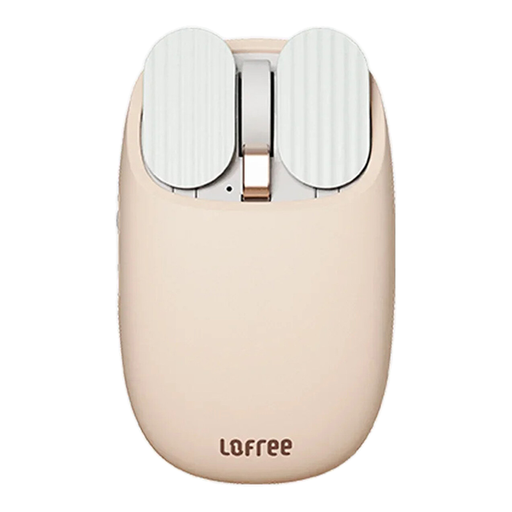
Why it fits this profile: A practical dual-mode mouse for home, the office and on the go, with both Bluetooth and 2.4GHz in one model.
The five DPI settings, ranging from 800 to 3600, make the sensitivity easy to manage. The product information also lists compatibility with Windows, macOS, iPadOS, iOS and Android.
800mAh built-in battery, USB-C charging and a PAW3220LU optical sensor.

Why it fits this profile: Aimed at professionals who work extensively with spreadsheets, documents and multiple devices.
The specifications list eight programmable buttons, Bluetooth, a Logi Bolt receiver and connectivity for up to three devices.
8,000 DPI, horizontal scrolling, quiet click and a rechargeable battery.
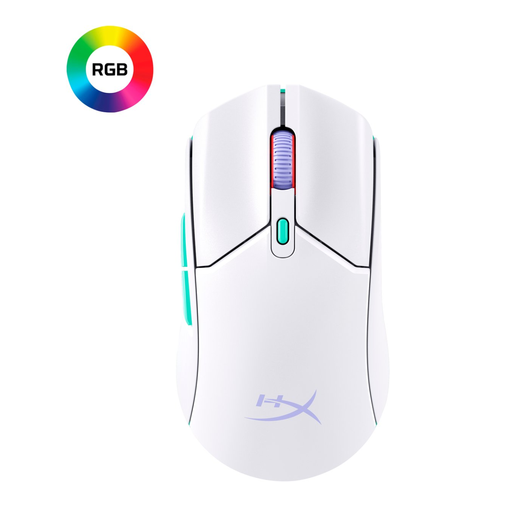
Why it fits this profile: A wireless gaming mouse for users who prioritise a low weight and two wireless connection options.
The product specifications mention Bluetooth 5.2, 2.4GHz, a polling rate of up to 1000 Hz and a weight of 70 grams. This makes it easy to check the relevant gaming parameters.
A sensor with up to 12,000 DPI, six buttons and, according to the product information, up to 100 hours of use on a single AAA battery.

Why it fits this profile: The vertical shape is designed for right-handed users who want a different hand position than that offered by a standard mouse.
The 57-degree angle and right-handed design are clearly stated in the product details. According to Logitech's own research, this shape can reduce muscle activity; this is a brand claim and not a medical guarantee.
Bluetooth and 2.4GHz, adjustable 4,000 DPI and a rechargeable battery with a stated battery life of up to four months.
We have compiled a complete, up-to-date list of products that fully meet these strict selection criteria and comply with current European safety regulations.
Only if the model supports Bluetooth and your computer has Bluetooth. A mouse that only uses a 2.4GHz connection will need the included USB receiver. If you're using a laptop, also check whether you need a USB-A or USB-C port.
That depends on the battery capacity, frequency of use, lighting and connection type. The products in this selection have a stated battery life ranging from approximately one month to a maximum of four months. These are the manufacturer's stated values; actual performance may vary.
Yes, as long as the mouse has a suitable sensor, a high enough polling rate, a reliable 2.4GHz connection and the right software. Bluetooth can be fine for casual gaming, but for competitive games, you should always check the wireless mode and latency data.
