
Vandaag of morgen in huis

Kwaliteit gegarandeerd

Welkomstaanbiedingen ontgrendelen: GRATIS bezorging | Tot 80% korting | Gratis 30 dagen JoyPlus-proefperiode
Download de app
A clean, cable-free desk—that's the promise of a wireless mouse. But reality can be different: a lagging connection during an important presentation, a dead battery at the worst possible moment, or wrist strain after just a few hours of work. The market is enormous, and marketing terms don't make the choice any easier.
As a Product Recommendation Officer at Joybuy, I filter out the noise and help you avoid buyer's remorse. Before you buy a wireless mouse, it's wise to be aware of a few common pitfalls.
Many people fall into the same traps, lured by attractive promises that disappoint in practice. Here are the three most important ones to watch out for.
Manufacturers often advertise battery life of 12, 24, or even 36 months. These figures are usually based on limited, standardised use—for example, a few hours a day in an office environment. If you're an intensive user, a frequent gamer, or never turn the mouse off, that battery can drain much faster. A rechargeable mouse with a USB-C connection can be more practical than a model that relies on replaceable batteries.
A mouse marketed as 'suitable for left- and right-handed users' is often a compromise. A symmetrical design is not necessarily an ergonomic mouse. The shape, size, and weight of a mouse determine how comfortable it is during prolonged use. A laptop mouse that is too small can eventually cause cramps, while a model that is too large feels clumsy. True left-handed users often benefit more from a specifically designed left-handed mouse or a model with programmable buttons.
A Bluetooth mouse seems ideal: no dongle to lose and no occupied USB port. The downside is that the connection can sometimes be less stable, and pairing with devices doesn't always go smoothly. A mouse with a 2.4GHz RF connection via a USB receiver is typically 'plug-and-play' and very stable, but that tiny receiver is notorious for getting lost.
To make the right choice, it's helpful to understand three core specifications.
Connectivity: Bluetooth, 2.4GHz RF, or Both? The choice depends on your usage. Do you work on a laptop with few USB ports? Then a Bluetooth mouse is a logical choice. For a desktop PC or if you need a rock-solid connection for activities like gaming, a 2.4GHz RF mouse with a dongle is often more reliable. The solution for those who work on multiple devices? A multi-device mouse that can switch between your laptop (via Bluetooth) and your desktop (via the USB receiver) at the touch of a button.
Ergonomics and Size Pay attention to the dimensions and shape. Do you have large hands? Look for a larger model. Are you left-handed? Consider a specific left-handed model or a fully symmetrical mouse. An ergonomic mouse often has a contoured design that supports the natural posture of your hand and wrist, which can help prevent strain.
Power: Rechargeable or Batteries? A rechargeable mouse is often more convenient and environmentally friendly in the long run. You can easily charge it with a USB cable, often while continuing to use it. The advantage of mice that use AA or AAA batteries is that their battery life can be extremely long, and you can get back to work immediately by replacing a dead battery.
Based on these criteria, we have highlighted several popular choices that suit different user profiles.
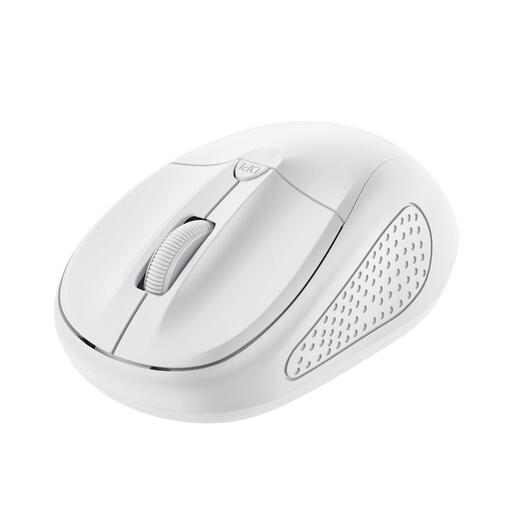
Why This Fits Their Persona: Ideal for students and home users looking for a simple, reliable, and affordable mouse for their laptop. No frills, just a mouse that works.
This mouse uses a simple 2.4GHz USB receiver, which eliminates connectivity paralysis. The on/off switch gives you control over the battery, rather than relying on vague claims.
Compact design, ideal for on-the-go use. Adjustable DPI (1000-1600) for personal preference.
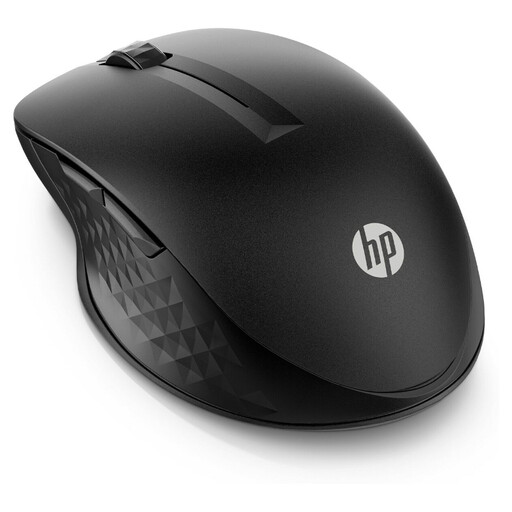
Why This Fits Their Persona: For the professional who seamlessly switches between a work laptop, a personal computer, and maybe even a tablet. Efficiency and a clean workspace are top priorities.
This mouse solves the connectivity problem by supporting both 2.4GHz RF and Bluetooth. The long battery life (up to 24 months, according to HP) is a major plus for those who can't afford unexpected interruptions.
Seamlessly switch between multiple devices. Four programmable buttons for a personalised workflow.
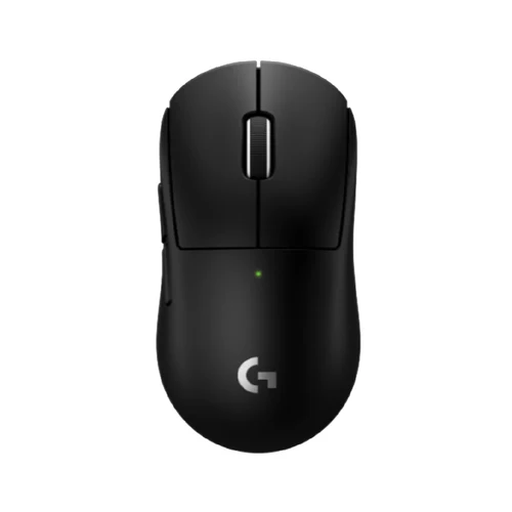
Why This Fits Their Persona: For gamers, designers, and other power users for whom precision, speed, and low weight are crucial. This is a popular Logitech wireless mouse for performance.
This is the opposite of a 'one-size-fits-all' mouse. According to Logitech, its LIGHTSPEED technology is designed to minimise latency. As a rechargeable mouse, it prevents the frustration of dead batteries during a crucial moment.
Extremely lightweight (53 grams) for rapid movements. The HERO 2 sensor provides highly accurate tracking.
Not every hand is the same. For those seeking a comfortable mouse suitable for both left- and right-handed use, we have a special selection.
This depends heavily on your usage. The advertised battery life is often an estimate based on standard office use. If you use the mouse intensively, select the highest DPI setting, or never turn it off, the battery will drain faster. A rechargeable mouse offers predictability: you charge it when it's convenient for you, for example, overnight.
There is no 'better', only a better fit for your situation.
Yes, a silent mouse makes significantly less noise. Models like the DELL Pro Compact Silent Mouse - MS355 use special switches that, according to the manufacturer, reduce the click sound by more than 90%. This is ideal for open-plan offices, libraries, or if you work late at night and don't want to disturb housemates.
