
Vandaag of morgen in huis

Kwaliteit gegarandeerd

Welkomstaanbiedingen ontgrendelen: GRATIS bezorging | Tot 80% korting | Gratis 30 dagen JoyPlus-proefperiode
Download de app
A wireless mouse keeps your desk tidy and is handy for a laptop, home office or flexible workspace. But not every mouse is suitable for long hours of daily use. A low price, a high DPI figure or the word “ergonomic” doesn’t tell the whole story.
The most common buying mistakes come down to three pitfalls:
First, think about how you’ll use the mouse. A right-handed mouse with a thumb rest can feel stable, while a symmetrical model may be a better choice if several people will use the same mouse. Left-handed users should pay particular attention to the hand orientation.
An ergonomic mouse often has a taller body, a repositioned thumb rest or a vertical shape. A vertical mouse takes some getting used to, but may suit users who want to keep their wrist less twisted. Always check the dimensions. A mouse designed for small hands may not offer enough support for larger hands, while a large model may be awkward to use with a laptop.
Weight matters too. A heavier mouse can feel more controlled, but is less suitable if you carry it around often.
A Bluetooth mouse connects directly to many modern laptops and tablets, leaving a USB port free. A mouse with a 2.4GHz receiver can be handy if you prefer a dedicated connection, but check whether the receiver is USB-A or USB-C.
A mouse that works with multiple devices is useful for business users. Models with a switch button can move between two or three paired devices. Check whether they connect via Bluetooth, a supplied receiver or both.
If your laptop has only USB-C ports, a mouse with a USB-C receiver or Bluetooth is usually the simplest option. Otherwise, you may need an adapter for a USB-A receiver.
A quiet mouse is useful in a shared office, library or during online meetings. Check the difference between quiet clicks and quiet scrolling: manufacturers don’t always mean the same thing by these terms.
A rechargeable mouse saves you from having to replace disposable batteries regularly. Check the charging connection and stated battery life. Manufacturer figures depend on usage, settings and connection type. A model that takes AA batteries may be a better choice if you don’t want to wait for it to charge.
DPI determines the sensitivity of the sensor. For many office applications, an adjustable setting of around 1,000 to 4,000 DPI is enough. A higher figure, such as 8,000 DPI, may be useful for large screens or precise editing, but it doesn’t guarantee a better experience. Also check that the sensor works on your desk surface.
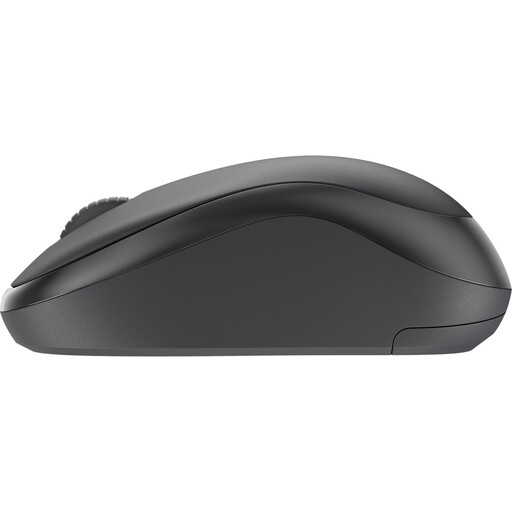
Why it suits this profile: A practical choice for everyday laptop and office work, with simple controls, an optical sensor and support for both left- and right-handed use.
The specifications list both Bluetooth and a wireless connection, as well as SilentTouch technology. Before buying, check that the receiver and connection type are compatible with your device.
3 buttons, adjustable DPI up to 4,000 according to the product information, and a design for both left- and right-handed use.
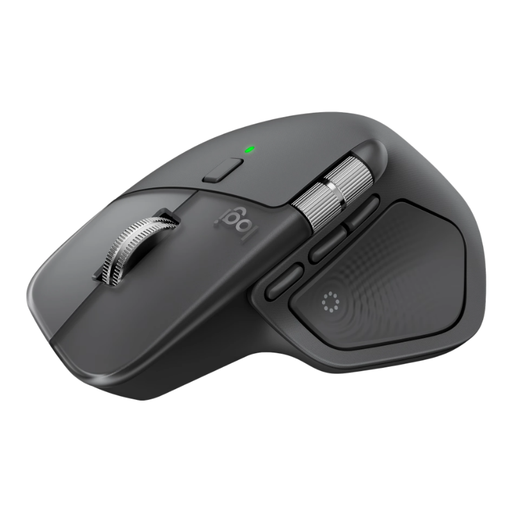
Why it suits this profile: Designed for business users who spend a lot of time working with spreadsheets, documents and multiple computers.
The mouse combines Bluetooth with a USB-C receiver and supports up to three devices, according to the specifications. That means you don’t have to rely on just one type of connection.
8 programmable buttons, up to 8,000 DPI, horizontal scrolling and a built-in rechargeable battery. Logitech says the mouse features quiet buttons and MagSpeed scrolling.
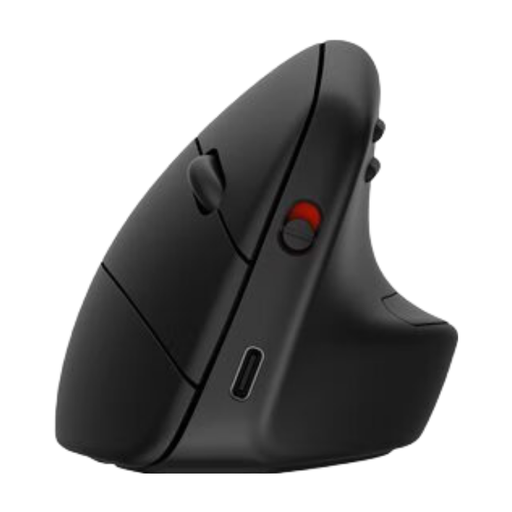
Why it suits this profile: The vertical shape is designed for right-handed users who want to try a different grip and hand position during long working days.
Its shape and dimensions are clearly different from those of a standard mouse. This means you can judge in advance whether a vertical mouse suits your grip, rather than buying based on the ‘ergonomic’ label alone.
Vertical design, detachable wrist rest, Bluetooth 5.3, a USB receiver and a stated resolution of 4,000 DPI.
We’ve put together a complete, up-to-date list of products that meet these strict selection criteria and current European safety regulations.
Not necessarily. Check whether your laptop supports Bluetooth or has a USB port for the supplied receiver. If your laptop has only USB-C ports, a Bluetooth mouse or USB-C receiver is usually the easiest option. Also check which operating systems are supported.
Its lifespan depends on the build quality, how often you use it, the battery and how you carry it. A rechargeable mouse has a built-in battery that you charge via USB-C. With a mouse that takes AA or AAA batteries, you replace them when they run out. Manufacturer battery-life figures are estimates and can vary depending on how you use the mouse.
A quiet mouse reduces clicking noise, but you should also consider its shape, scroll wheel and connection. Quiet buttons are useful in a shared workspace. For long periods of use, a comfortable fit is just as important. So don’t choose on the basis of the word “quiet” alone: compare hand orientation, dimensions, DPI and power source too.
