
Vandaag of morgen in huis

Kwaliteit gegarandeerd

Welkomstaanbiedingen ontgrendelen: GRATIS bezorging | Tot 80% korting | Gratis 30 dagen JoyPlus-proefperiode
Download de app
A wireless mouse can help keep your desk clutter-free, but not every model is suited to everyday use. A compact mouse for travel may feel too small in the office. An ergonomic mouse can take some getting used to if you’ve always used a traditional model. And a Bluetooth mouse won’t necessarily work with every device.
As Joybuy’s Product Recommendation Officer, I focus on features you can verify: connectivity, shape, power source, DPI, noise level and compatibility. That way, you can avoid paying a premium just for marketing terms.
Many models use a 2.4GHz USB receiver. These usually work as soon as you plug the receiver into a spare USB-A port, but that can be inconvenient if your laptop only has USB-C. A Bluetooth mouse doesn’t need a dongle, but your computer must support Bluetooth, and the pairing process can vary between operating systems.
Before you buy, check:
A rounded mouse may be described as ergonomic, but how well it fits depends largely on your hand size and grip. A vertical mouse positions your hand differently from a standard mouse. This may suit users looking for a more neutral hand position, but it usually takes a little time to get used to.
Check the dimensions, weight and hand orientation. A right-handed mouse isn’t suitable if you’re specifically looking for a left-handed or ambidextrous model.
A manufacturer may quote a long battery life, but the actual runtime depends on how often you use the mouse, its sleep mode and the type of battery. A model that takes replaceable AA or AAA batteries means you won’t need to recharge it, but you’ll have ongoing battery costs. A rechargeable mouse means fewer disposable batteries, but you’ll need to plug it in when required.
For a permanent workspace, a mouse with a USB receiver is often a practical choice: plug it in and get started. Check whether you can store the receiver inside the mouse, too. This makes it less likely that you’ll lose the small component.
A multi-device mouse is useful if you switch between a laptop, desktop and tablet. Don’t just look for “up to three devices”; check which connection types it supports. According to the product description, the HP 635 can connect to up to three devices via its nano receiver and Bluetooth. The Trust Ozaa+ supports one 2.4GHz receiver and two Bluetooth channels, according to its product specifications.
A standard mouse is usually easy to use without any adjustment. A vertical mouse has a noticeably different grip. For example, the Trust Bayo II Wireless has a 57-degree angle and is designed for right-handed use, according to its product specifications. The HP 925 is also vertical and right-handed.
If you want a mouse for either hand, look for terms such as ambidextrous or “suitable for left- and right-handed use”. The HP 240 Bluetooth Mouse and HP Wireless Mouse 220 fit this category.
DPI indicates how sensitively the cursor responds to movement. A moderate setting is often enough for word processing, emails and spreadsheets. Adjustable DPI is especially useful if you switch between precise selections and moving quickly across a large screen.
A quiet mouse reduces clicking noise in a shared workspace. Check whether quiet operation is specifically mentioned for the left and right buttons. The HP 285 is listed as offering noise reduction of up to 90%, according to its product information. Bear in mind that noise-level claims are based on HP’s product description and aren’t a universal guarantee for every working environment.
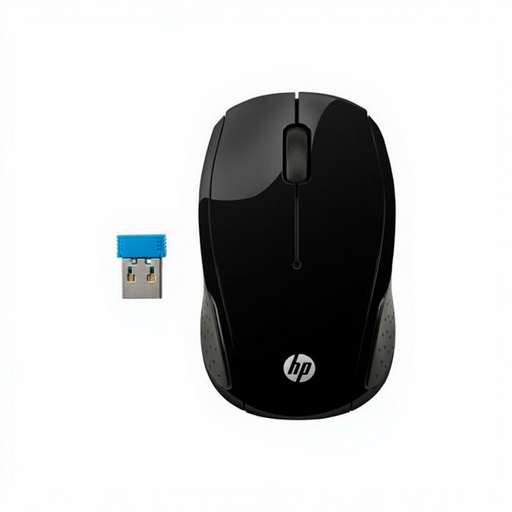
Why it suits this profile: A straightforward mouse for home use, studying or setting up your first wireless workspace. The USB receiver and included AAA batteries make it easy to get started.
The 2.4GHz connection and included receiver make it clear which connection type you’re getting. The 1000 DPI is designed for everyday navigation, rather than excessively high speeds.
Symmetrical design, optical sensor, two AAA batteries included, and compatibility with Windows, Mac OS and ChromeOS, according to the product specifications.

Why it suits this profile: A good choice for office professionals who work across multiple devices and with large spreadsheets. Its larger shape and rubber grip are designed to provide more support for your hand.
The product description lists both a USB receiver and Bluetooth, as well as a rechargeable battery. So you don’t have to rely solely on disposable batteries.
Connects to up to three devices, horizontal scroll wheel, quiet buttons, adjustable DPI up to 3200, and charging via the included cable, according to the product specifications.
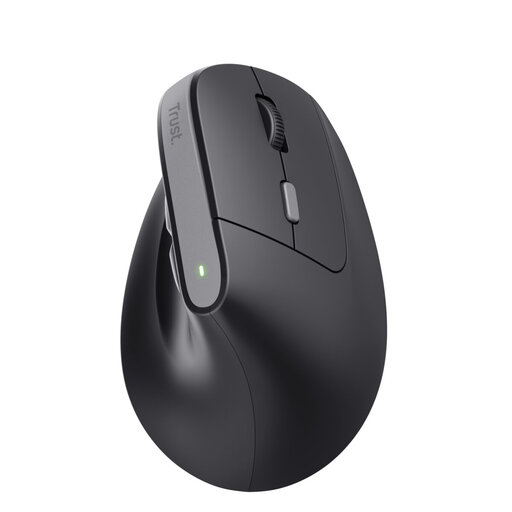
Why it suits this profile: For people working from home and office professionals who want to try a vertical grip during long working days. This right-handed model connects via a USB receiver.
The 57-degree angle, hand orientation and connection type are clearly specified. Trust also lists quiet buttons and a rechargeable battery in the product description.
DPI settings from 800 to 2400, two thumb buttons, quiet clicks and a battery that Trust says lasts up to three months per charge.
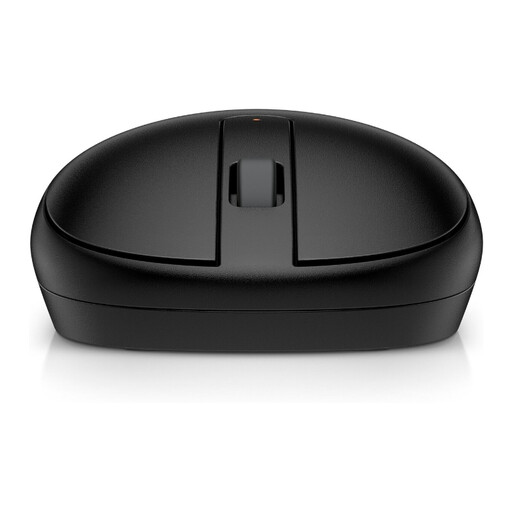
Why it suits this profile: A lightweight mouse for students and laptop users who don’t want to carry a USB receiver. Its symmetrical shape suits both left- and right-handed users.
The Bluetooth 5.1 connection works without a dongle. Check beforehand that your laptop supports Bluetooth, and remember that the mouse requires an AA battery.
54.2 grams, optical sensor with 1600 DPI, three buttons and support for Windows, macOS and ChromeOS, according to the product specifications.
We’ve put together a complete, up-to-date list of products that meet these strict selection criteria and the applicable European safety regulations.
No. A model with a USB receiver usually needs a spare USB-A port. A Bluetooth mouse requires Bluetooth support and must be paired before use. Also check that the model is compatible with your operating system.
It varies by model and how you use it. Product information quotes up to 15 months for certain HP Bluetooth models, 18 months for the HP 285 and up to three months per charge for the Trust Bayo II Wireless. These are manufacturer-stated figures; heavy use may affect battery life.
A quiet mouse can be useful in a shared space, library or home office. Check whether “quiet click” is specifically listed for the buttons. The scroll wheel and other switches may still make a sound.
