
Vandaag of morgen in huis

Kwaliteit gegarandeerd

Welkomstaanbiedingen ontgrendelen: GRATIS bezorging | Tot 80% korting | Gratis 30 dagen JoyPlus-proefperiode
Download de app
A wireless mouse keeps your desk tidy and is handy with a laptop, home office setup or gaming PC. But the range can be more complicated than it first appears. A low price doesn’t tell you much about comfort, while a high DPI rating doesn’t automatically mean a mouse is suitable for everyday use.
Joybuy’s Product Recommendation Officer filters the key features using verifiable product specifications. That way, you can avoid paying for features you won’t use.
A Bluetooth mouse connects directly to a device that supports Bluetooth, so you don’t need a separate dongle. A wireless computer mouse with an RF connection usually uses a small USB receiver. This can be a reliable plug-and-play solution, but it does take up a USB-A port.
So, check the following first:
A receiver can also get lost. With compact models such as the Trust Zaya, the micro receiver can be stored inside the mouse.
DPI determines how far the cursor moves in response to a particular hand movement. A high-DPI mouse is especially useful for gamers and people using multiple screens. For word processing, spreadsheets and browsing, a range of around 1,000 to 1,600 DPI is enough for many users.
So, a high maximum DPI isn’t a deciding factor on its own. Also consider whether you can adjust the speed, how accurate the optical sensor is and how the mouse feels in your hand.
Long battery life sounds appealing, but check the type of power supply. A rechargeable mouse means you don’t need disposable batteries, but it does need to be plugged in regularly. A model with AA or AAA batteries can last from months to years, depending on use and power-saving settings.
Also check whether the manufacturer gives an estimated maximum battery life. HP states that the HP 635 can last up to twelve months with replaceable batteries. Actual battery life depends on usage, connection and settings.
A 2.4GHz RF connection usually works via a USB receiver. This is practical for a desktop PC or laptop with USB-A. Bluetooth is more convenient if you have few ports or regularly switch between devices.
A model with both options offers more flexibility. According to its product specifications, the HP 635 can be paired with up to three devices via the nano receiver and two devices via Bluetooth. This suits a workspace with, for example, a laptop, desktop PC and tablet.
An optical mouse uses an optical sensor to track movement across a surface. Performance can be affected by glass, highly reflective surfaces or very smooth desks. A mouse mat is a simple way to keep tracking consistent.
Look out for these points:
An ambidextrous mouse is designed for left- and right-handed use. This is handy in a shared workspace, but its shape may not offer the same support as a model designed specifically for left- or right-handed users.
Consider the length, width and weight, as well as the position of the thumb buttons. An ergonomic mouse may suit your grip, but “ergonomic” doesn’t guarantee that the shape will suit every hand. Compare its dimensions with those of your current mouse.
Programmable buttons are useful for shortcuts, media controls or gaming commands. For basic office work, two or three buttons and a scroll wheel are often enough.
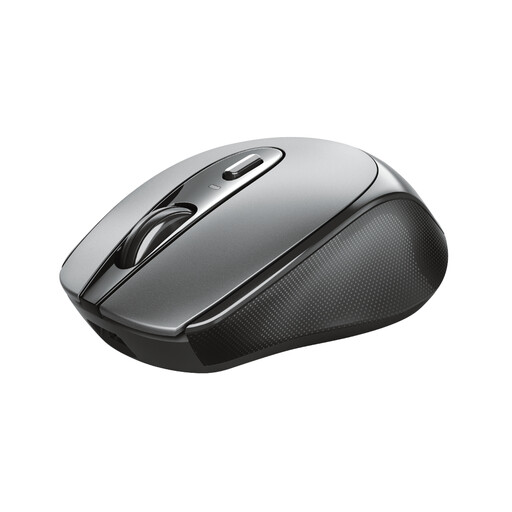
Why it suits this profile: This compact mouse is suitable for basic use at the office, at home or on the go. Its shape works for left- and right-handed users, and the built-in battery means you don’t need separate batteries.
You can set the DPI to 800, 1200 or 1600, and store the USB micro receiver inside the mouse. That way, you won’t pay for features that offer little benefit for everyday office work.
Rechargeable battery, USB-C port, four buttons, optical sensor and wireless range of up to 10 metres according to the product specifications.
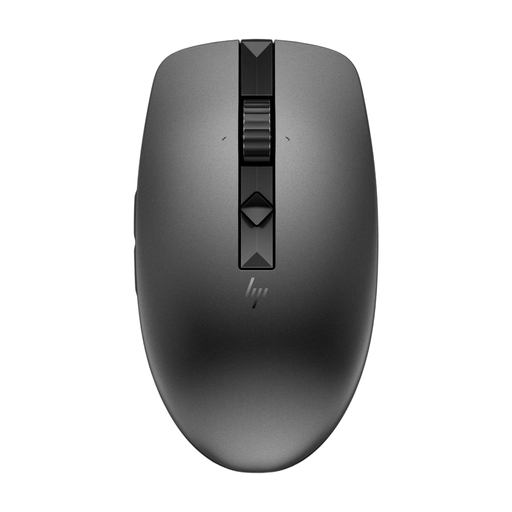
Why it suits this profile: With Bluetooth, a nano receiver, programmable buttons and adjustable scroll speed, this mouse is a good fit for professionals who use multiple devices.
You’re not limited to a single connection type. The mouse can be paired with multiple devices and uses replaceable batteries rather than a built-in rechargeable battery.
Four programmable silent buttons, support for up to five paired devices according to the product description, and a stated battery life of up to twelve months.

Why it suits this profile: This wireless gaming mouse is designed for right-handed players who value a low weight, adjustable buttons and a high-resolution sensor.
The specifications list both wireless and wired use. This means you can keep working or gaming while it charges, without relying solely on the battery.
Weighs around 63 grams, optical sensor up to 30,000 DPI, five buttons and a stated battery life of up to 90 hours according to the manufacturer.
We’ve put together a complete, up-to-date list of products that meet these strict selection criteria and the current European safety regulations.
Not all mice work in the same way. An RF mouse usually needs a free USB port for its receiver. A Bluetooth mouse works with laptops that support Bluetooth. Also check the operating system and recommended compatibility in the product information.
It varies by model, connection and usage. A rechargeable mouse needs to be charged via USB from time to time. According to product specifications, models with AA or AAA batteries can last from months to several years. Battery life claims from brands are estimates; your usage can affect how long the battery actually lasts.
Usually not. For documents, email and web pages, an adjustable speed of around 1,000 to 1,600 DPI is often practical. A higher DPI is mainly useful for gaming, large screens or users who want a wide cursor range with small hand movements.
