
Vandaag of morgen in huis

Kwaliteit gegarandeerd

Welkomstaanbiedingen ontgrendelen: GRATIS bezorging | Tot 80% korting | Gratis 30 dagen JoyPlus-proefperiode
Download de app
A wireless mouse keeps your desk tidy and gives you more freedom to move, but not every model suits every user. A compact Bluetooth mouse can be a good choice for a laptop, while gamers are more likely to look at polling rate, sensor and programmable buttons. If you focus only on price or a high DPI rating, you could still end up with a mouse that’s awkward to use or doesn’t suit you.
DPI determines how far the cursor moves in response to a given hand movement. A high-DPI gaming mouse offers more settings to choose from, but you don’t automatically need a high maximum DPI for office work or browsing. For everyday use, a reliable optical sensor and a comfortable shape are often more important.
A wireless Bluetooth mouse works without a USB dongle, but your laptop or PC must support Bluetooth. A model with a USB receiver uses a free USB-A port. So check which connections are available before you buy. Some gaming mice support both Bluetooth and 2.4GHz wireless, while others work only with a receiver.
Check whether the mouse uses replaceable AA or AAA batteries, or has a built-in rechargeable battery. According to product information from various brands, battery life depends on the connection mode, lighting and settings. A quiet wireless mouse with replaceable batteries needs charging less often, but you’ll have ongoing battery costs.
For a wireless mouse for a laptop, Bluetooth is useful if you want to keep your USB ports free. The HP 240 Black Bluetooth Mouse uses Bluetooth 5.1 and, according to its specifications, doesn’t need a dongle. The model is listed as compatible with Windows, macOS and ChromeOS.
A wireless mouse for a PC with a USB receiver is handy if your computer doesn’t have Bluetooth. Check whether the receiver uses USB-A. You may need an adapter for modern laptops with USB-C ports only. Multi-device models offer extra flexibility. According to its product description, the HP 635 can connect to up to three devices via the nano receiver and two devices via Bluetooth.
Optical sensors are common in both office and gaming mice. For example, the HP 200 has a 1000 DPI optical sensor, while the HP 240 is listed at 1600 DPI. These values are generally suitable for word processing, admin and browsing.
For a wireless gaming mouse, polling rate, weight and response time also matter. The Razer Basilisk V3 X HyperSpeed is listed with a sensor of up to 18,000 DPI and several wireless modes. Models such as the Rapoo VT3 quote a polling rate of up to 8000 Hz. Check that the speed you want is available in your chosen connection mode, and whether you’ll need software.
A symmetrical mouse can suit both left- and right-handed users, but that doesn’t mean it will suit your preferred grip. An ergonomic wireless mouse may have a wider shape, thumb rest or angled design. Check the dimensions and weight if you have small hands or are looking for a compact mouse.
A quiet wireless mouse can be useful in a shared office or when working from home. The HP 285 is listed as having noise reduction on the left and right buttons. According to Trust’s product information, the Trust Bayo II also has two quiet buttons, a 57-degree vertical angle and a USB receiver. These features describe the design; comfort still depends on your hand size, grip and working posture.
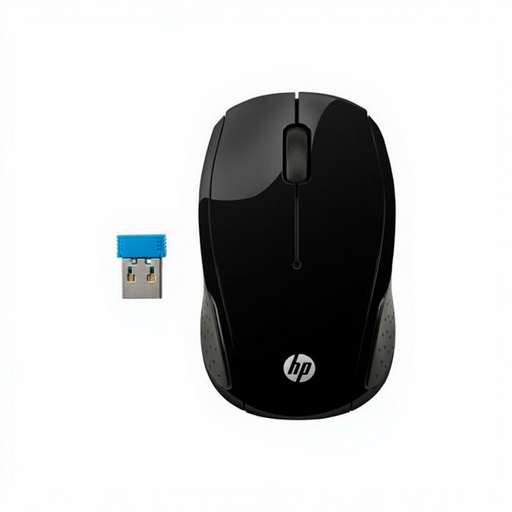
Why it suits this type of user: This wireless computer mouse is designed for everyday use, with a 2.4GHz connection, two AAA batteries and a 1000 DPI optical sensor.
The specifications are straightforward: no unnecessary software and a USB receiver included. Just check that your PC or laptop has a USB-A port.
A symmetrical shape, a quoted range of 10 metres and compatibility with Windows, Mac and ChromeOS, according to the product information.
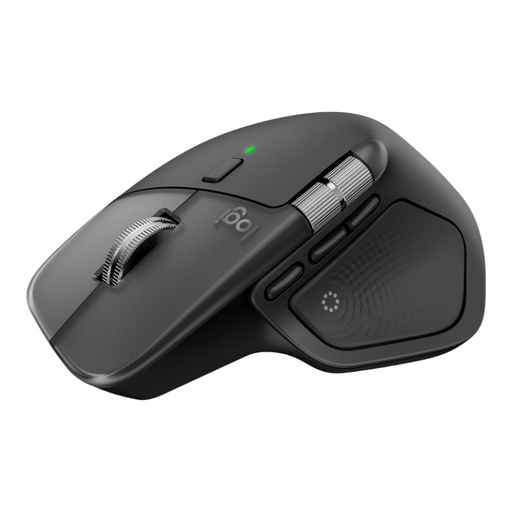
Why it suits this type of user: This model is designed for productivity, with eight programmable buttons, multiple scroll functions and the ability to pair with up to three devices.
The connection options are clearly set out: Bluetooth or Logi Bolt. Check your computer’s port and whether you want to use the associated software features.
A built-in rechargeable battery, USB-C charging and customisable features for Windows and macOS, according to the product description.
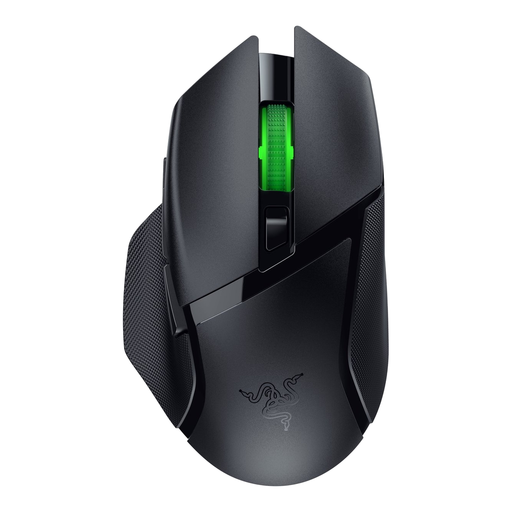
Why it suits this type of user: This gaming mouse has programmable buttons, an ergonomically shaped body and a choice of Bluetooth or Razer HyperSpeed Wireless.
The high DPI rating isn’t the only thing to consider: the product information also lists a 5G optical sensor and two wireless modes.
Up to 18,000 DPI, nine programmable buttons according to the product description, and a quoted Bluetooth battery life of up to 535 hours.
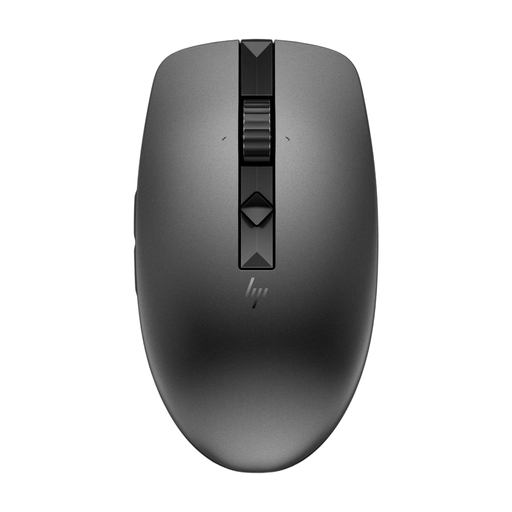
Why it suits this type of user: This mouse is designed for people who switch between a laptop, PC and other devices, and need extra buttons.
You don’t have to choose between Bluetooth and a receiver. HP says both connection options are available.
Four programmable quiet buttons, adjustable scroll speed and a battery life of up to twelve months, as quoted by HP.
We’ve put together a complete, up-to-date list of products that meet these strict selection criteria and the applicable European safety regulations.
Not every mouse works in the same way. A Bluetooth mouse requires Bluetooth support on your laptop. A model with a USB receiver needs a compatible port. Check the operating system and any software requirements before ordering, too.
It varies by model, battery type and usage. Product information may quote a battery life of anything from months to years, but lighting and a high polling rate can affect power consumption. A mouse with a built-in rechargeable battery needs charging; with an AA or AAA model, you can replace the batteries.
Yes, as long as the mouse has a suitable sensor, a reliable connection and the polling rate you want. Many competitive gamers choose a 2.4GHz receiver for low latency. Bluetooth is handy for general use, but always check the specifications of your chosen model and the settings required for your games.
